EasyManua.ls Logo

Samsung MX-T50 - Connecting a USB Storage Device; USB Device Connection and Playback

Samsung MX-T50
34 pages
Print Icon
To Next Page IconTo Next Page
To Previous Page IconTo Previous Page
Loading...
ENG - 18
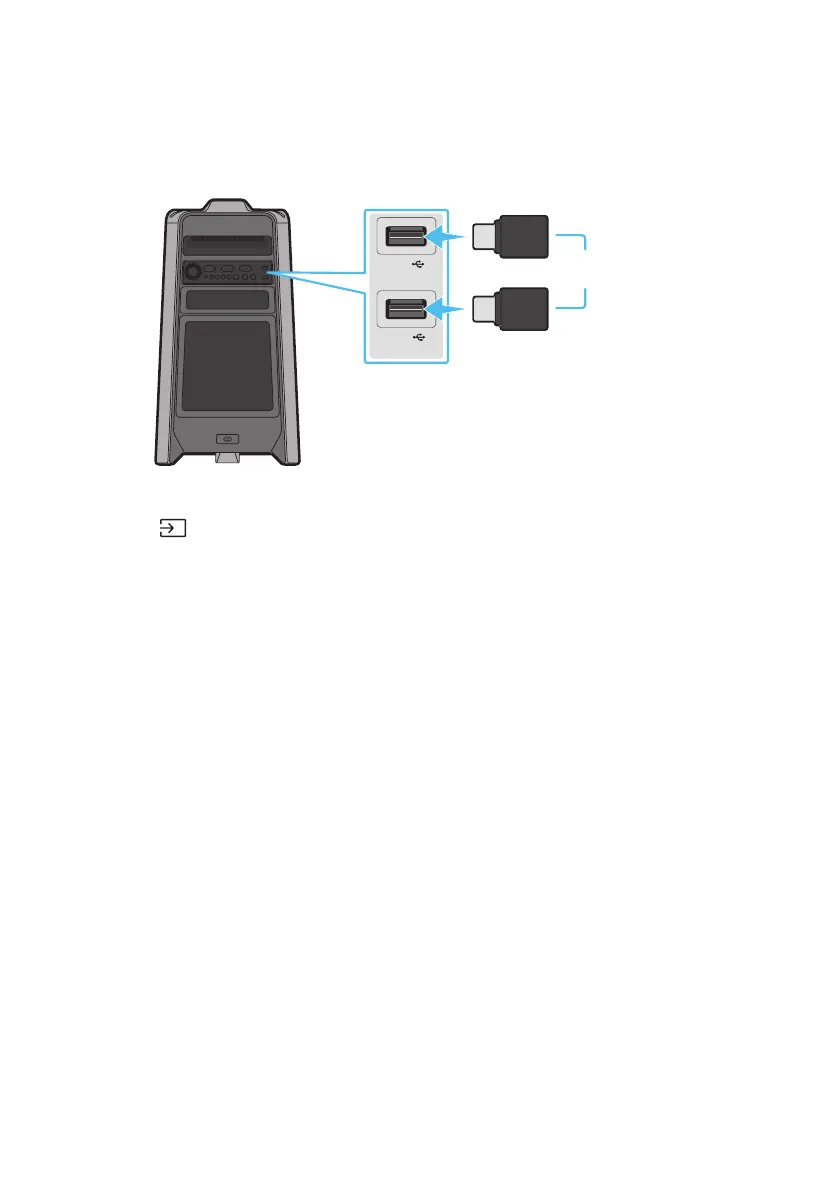
05 CONNECTING A USB STORAGE DEVICE

USB1
(5V 2.1A)
USB2
(5V 0.5A)
OR
USB storage device (not supplied)
Rear of the Sound Tower
1. 
2. Press the (Source) button on the top panel or on the remote control, and then select “USB1” or
USB2”.
You can also select a source using USB button on the remote control.
3. USB1” or “USB2” appears in the display screen.
4. 
The Sound Tower automatically turns off (Auto Power Down) if USB device is not connected,

NOTES

system.
This product does not support HDD storage or storage on mobile devices.




Related product manuals