To Next Page


C
Courtney HamiltonJul 26, 2025
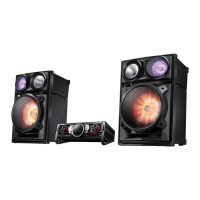
What to do if Samsung MX-FS8000 AMP IC temperature is over 150?
- HHarold RomanJul 26, 2025
If the temperature of the AMP IC exceeds 150 degrees, allow the AMP IC to cool down.

What to do if Samsung MX-FS8000 AMP IC temperature is over 150?
If the temperature of the AMP IC exceeds 150 degrees, allow the AMP IC to cool down.
Why is the power block protection circuit operating on my Samsung MX-FS8000 Stereo System?
The power block protection circuit may activate due to several reasons: * There is over current at the AMP IC, possibly due to a speaker wire short. In this case, check and correct the speaker wire connection. * The temperature of the AMP IC is over 150 degrees. * There is no power supply for amp. In this case, restore power supply to the amp.
What to do if my Samsung MX-FS8000 displays 'No Disc'?
During 'No Disc' displayed, push the stop Button for 5 seconds.
How to update MAIN MICOM on Samsung Stereo System?
Insert a USB memory stick containing the update file. The update file name should be: HMC-FS8000WWM-XXXX.ssp.
How to update SUB MICOM on Samsung MX-FS8000 Stereo System?
Insert a USB memory stick containing the update file. The update file name should be: HMC-FS8000WWF-XXXX.ssp.
What to do if Samsung MX-FS8000 Stereo System has operation of power block protection circuit?
Check and correct speaker wire connection. Allow the AMP IC to cool down. Restore power supply to the amp.
General safety instructions for proper and safe operation of the product.
Key precautions for installation, ventilation, heat, moisture, and general use of the product.
Advice on how to handle and store discs to prevent damage and ensure optimal performance.
Information on supported disc types, formats, and file compatibility for playback.
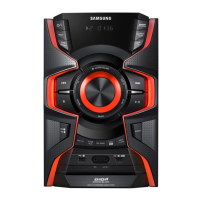
Detailed explanation of the controls and indicators on the front panel of the unit.
Overview of the connection terminals and ports located on the rear of the unit.
Explanation of the functions and buttons of the remote control unit.
Instructions on how to properly connect the speakers for optimal sound output.
Explanation of how to view and adjust display modes, including dimmer and LED settings.
Instructions for loading and playing standard CDs on the unit.
Details on playing CD-R, CD-RW, and MP3/WMA discs, including format compatibility.
Guide to connecting and playing music files from USB storage devices.
Introduction to Bluetooth technology and its use with the Hi-Fi system.
Step-by-step guide for pairing the Hi-Fi system with a Bluetooth-enabled device.
Instructions for tuning into FM radio stations and managing presets.
Guide to setting the clock and using the timer to automatically turn the unit on/off.
Instructions for configuring the timer to schedule automatic power on/off.
Overview of recording capabilities from various sources to a USB device.
Instructions for performing basic recording from CD, USB, Tuner, or External Source.
Troubleshooting steps if the disc cannot be ejected from the player.
Steps to resolve issues where no sound is output from the unit.
General checks for product malfunctions or unusual noises.
Explanation and solutions for the unit automatically shutting off with a 'PROTECT' message.
 General
| Bass reflex | Yes |
|---|---|
| Speaker type | 3-way |
| Subwoofer type | Passive subwoofer |
| Frequency range | 22 - 20000 Hz |
| RMS rated power | 2300 W |
| Woofer diameter | 381 mm |
| Tweeter diameter | 152.4 mm |
| Number of speakers | 2 |
| Peak Music Power Output (PMPO) | 27600 W |
| Type | Home audio mini system |
| Cassette deck | No |
| Product color | Black |
| Disc loading type | Tray |
| Number of optical discs | 1 discs |
| Disc types supported | CD, CD-R, CD-RW |
| Playback disc formats | CD audio |
| Audio formats supported | MP3, WMA |
| Supported radio bands | AM, FM |
| Display type | FLT |
| Audio (L/R) in | 1 |
| USB 2.0 ports quantity | USB 2.0 ports have a data transmission speed of 480 Mbps, and are backwards compatible with USB 1.1 ports. You can connect all kinds of peripheral devices to them. |
| Microphone connectivity | 3.5 mm |
| Apple docking compatibility | Not supported |
| Volume control | Digital |
| Power source | AC |
| Power consumption (standby) | 0.45 W |
| Power consumption (typical) | 137 W |
 Weight and Dimensions
| Package weight | 62000 g |
|---|