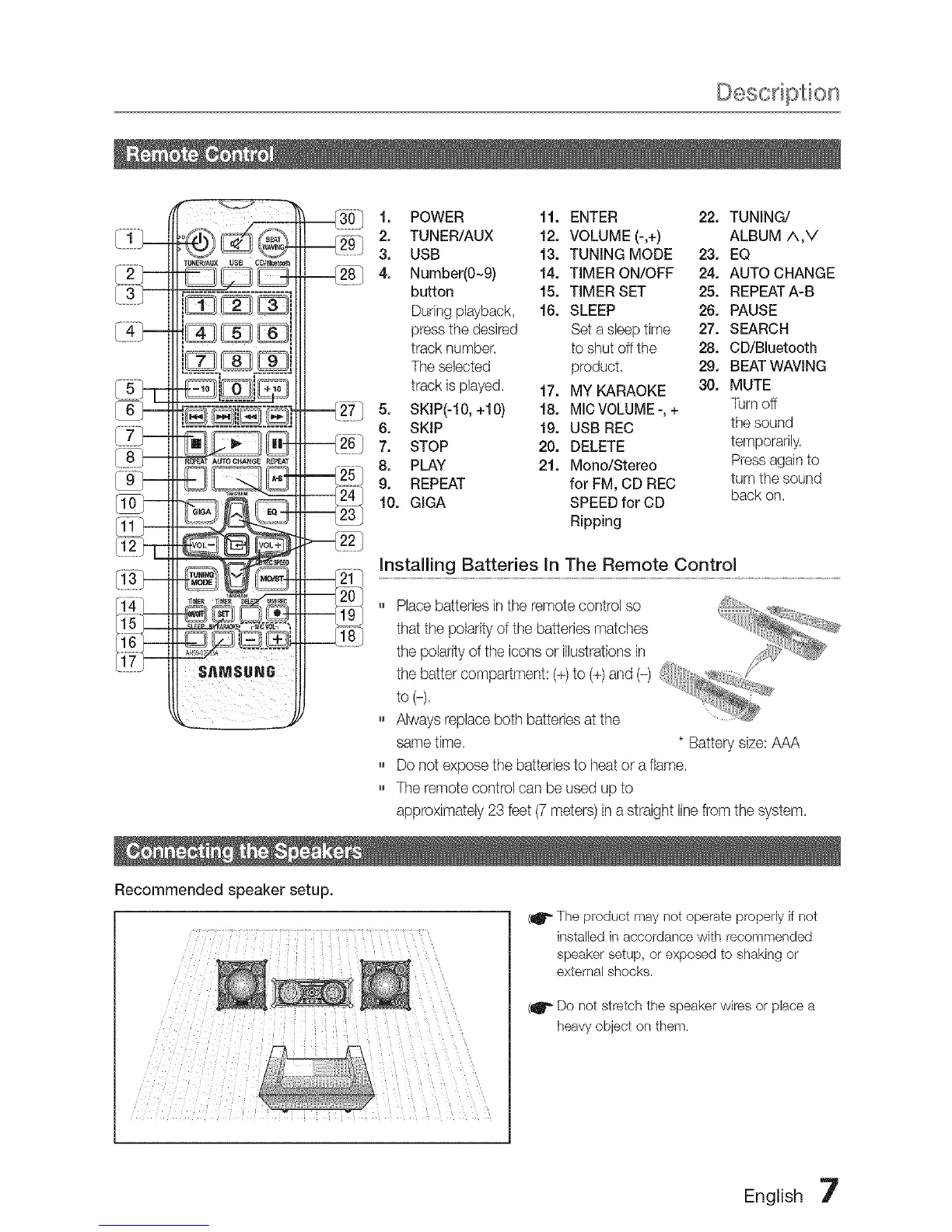
_0_ 1. POWER 11. ENTER 22. TUNING/
2. TUNER/AUX 12. VOLUME (-,+) ALBUM A,V
----_g 3. USB 13. TUNING MODE 23. EQ
4. Number(0~9) 14. TIMER ON/OFF 24. AUTO CHANGE
button 15. TIMER SET 25. REPEATA-B
During playback, 16. SLEEP 26. PAUSE
press the desired Sel a sleep time 27. SEARCH
track number, to shut off the 28. CD/Bluetooth
The selected product, 29. BEAT WAVING
track JspJayed, 17. MY KARAOKE 30. MUTE
SKIP(-10, +10) 18. MIC VOLUME -, +
s. T0mo
6. SKIP 19. USB REC thesound
-----_26117. STOP 20. DELETE temporarily.
8. PLAY 21. Mono/Stereo Press again to
9. REPEAT for FM, CD REC turn the sound
10. GIGA SPEED for CD back on.
Ripping
,,, Place batteries in the remote control so ,_®_.....
____iB _........... that the polarity of the batteries matches JU ;:_,,,,+
the polarity of the icons or ustraions in
$AMSUNG ......... ]it
the baiier compartment: (+) to (+} and (-} .......1,+, '
[ to(-),
,,, Always replace both batteries at the
same time, * Battery size: AAA
,,, Do not expose the batteries to heat or a flame,
,,, The remote contrd can be used up to
approximately 23 feet (7 meters) in a straight line from the system,
Recommended speaker setup.
(if +The product may not operate properly if not
installed in accordance with recommended
speaker setup, or exposed to shaking or
external shocks.
{11'_ Do not stretch the speaker wires or pJacea
heavy object on them.
English



 To Next Page