Description
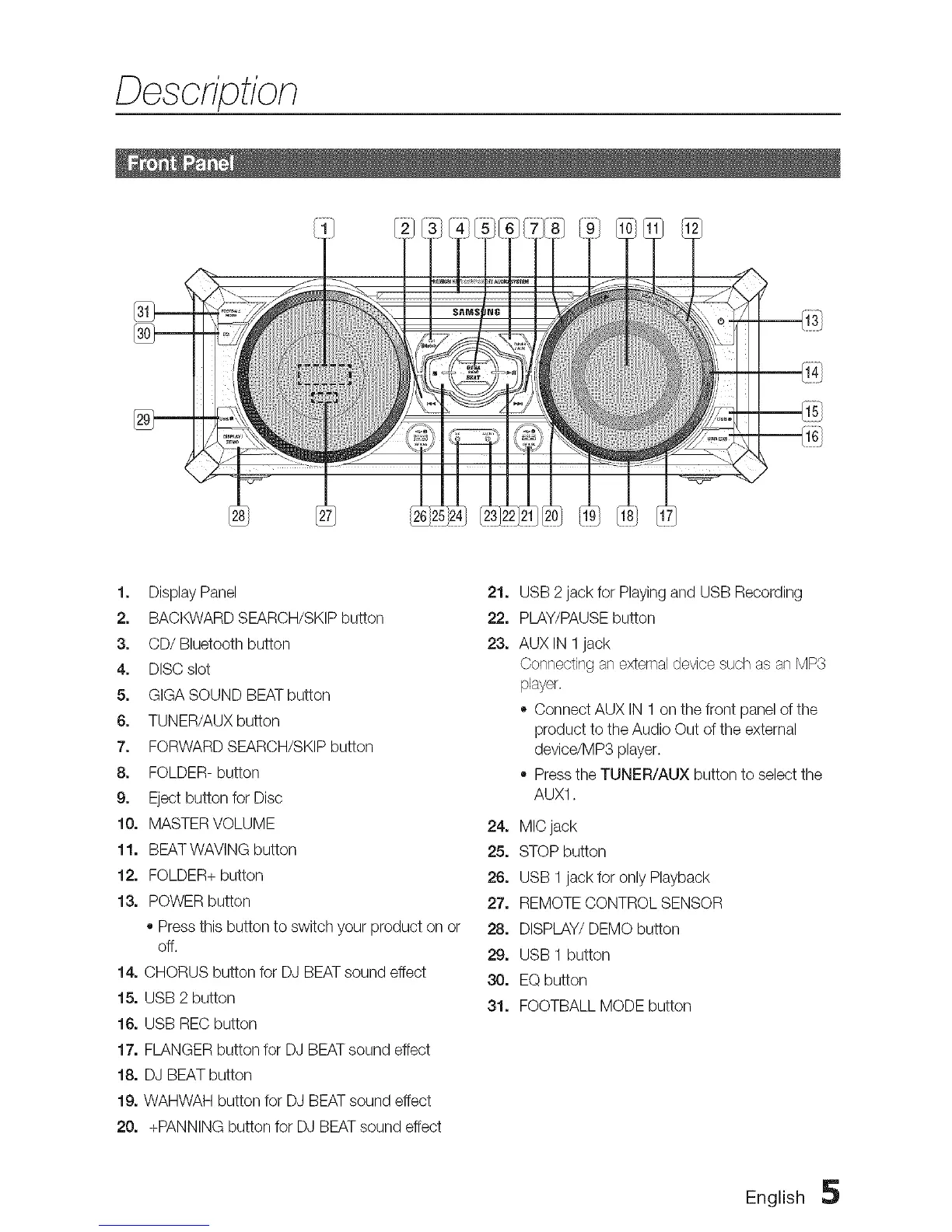
1, Display Panel
2, BACKWARD SEARCH/SKIP button
3, CD/Bluetooth button
4, DISC slot
5, GIGA SOUND BEATbutton
6, TUNER/AUX button
7, FORWARD SEARCH/SKIP button
8, FOLDER- button
9, Eject button for Disc
10, MASTER VOLUME
11, BEATWAVING button
12, FOLDER+ button
13, POWER button
• Press this button to switch your product on or
off.
14, CHORUS button for DJ BEATsound effect
15, USB 2 button
16, USB RECbutton
17, FLANGER button for DJ BEATsound effect
18, DJ BEAT button
19, WAHWAH button for DJ BEAT sound effect
20, +PANNING button for DJ BEAT sound effect
21, USB 2jack for Playingand USB Recording
22. PLAY/PAUSE button
23, AUX IN 1jack
Connecting an external device such as an MPS
player.
o Connect AUX IN 1 on the front panel of the
product to the Audio Out of the external
device/MP3 player.
o Pressthe TUNER/AUX button to select the
AUX1.
24, MIC jack
25, STOP button
26, USB 1jack for only Playback
27. REMOTE CONTROL SENSOR
28, DISPLAY/DEMO button
29, USB 1 button
30, EQ button
31, FOOTBALL MODE button
English 5



 To Next Page