44
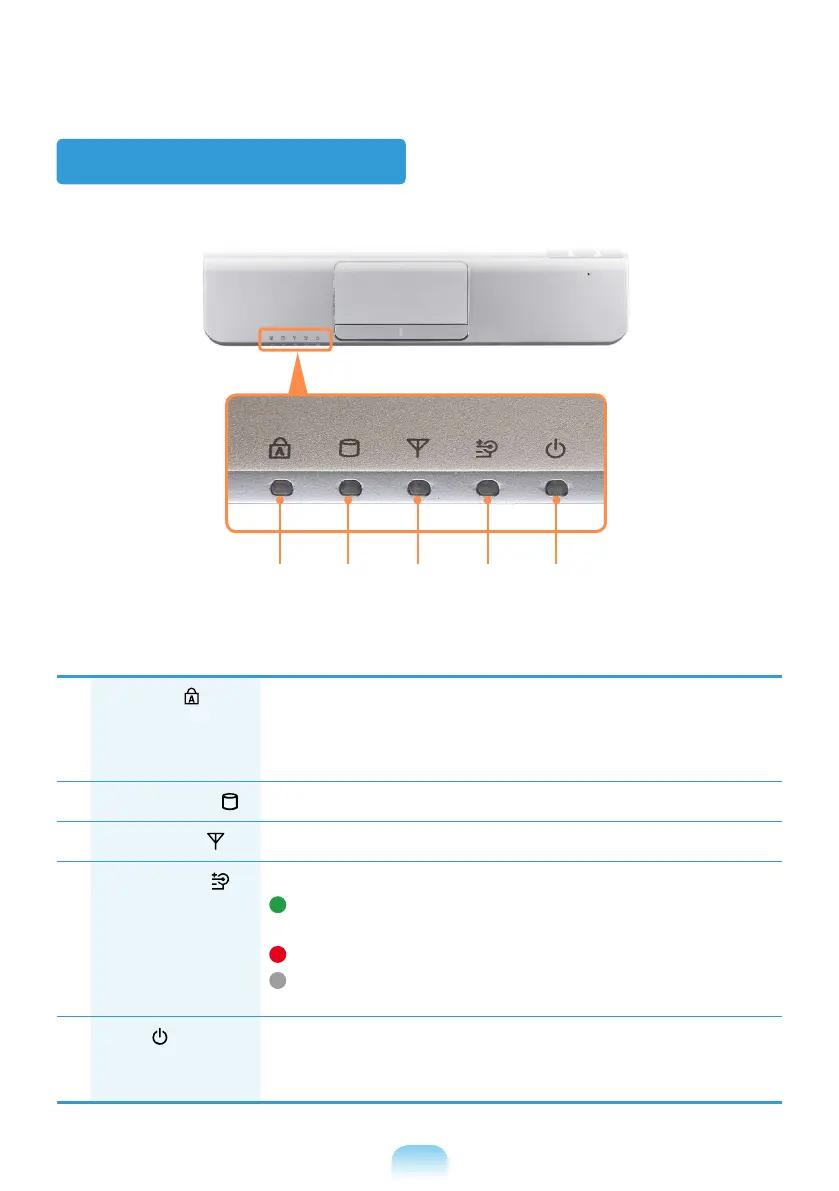
Status Indicators
1
Caps Lock
This turns on when the Caps Lock key is pressed allowing capital
letters to be typed without holding the Shift button down.
On
: Upper-case alphabetic input
Off
: Lower-case alphabetic input
2
Hard Disk Drive
Indicates that the hard disk drive is running.
3
Wireless LAN
This turns on when the wireless LAN is operating.
4
Charge Status
This shows the power source and the battery charge status.
Green:
When the battery is fully charged or the battery is not
installed.
Red:
When the battery is being charged.
Off:
When the computer is running on battery power without being
connected to AC adapter.
5
Power
This shows the computer operating status.
On:
When the computer is operating.
Blinks:
When the computer is in Sleep mode.
1 2 3 4 5


 To Next Page