Samsung Electronics 4-7
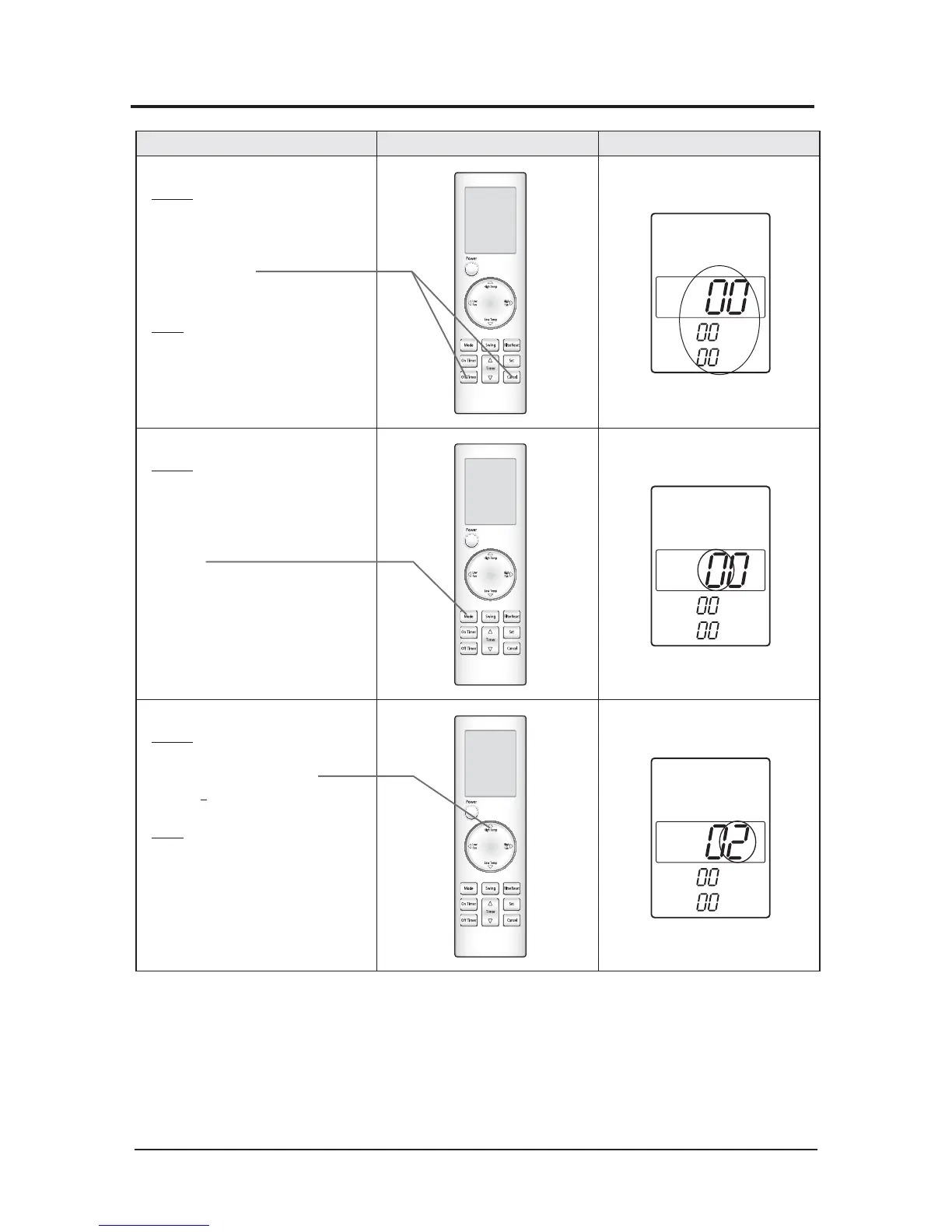
Operation method Applicable button Indicating state
K Step 1
Method)
① Remove the battery of remote
controller.
② Push the Off Timer and Cancel button
simultaneously.
③Insert the battery.
Result)
When the display of remote
controller is indicated as shown
in the right, then go to the step 2.
K Step 2
Method)
If the first digit of remote
controller shows "0", go to the step 3.
t*GJUTIPXTQSFTTUIF.PEFCVUUPOPOFUJNF
to change it into 0 and then go to step 3.
K Step 3
Method)
Input the second digit of option code by
pressing the High Temp button.
example) 021E311422852A311439421F
Result)
If 2 is displayed, go to the step 4 (whenever
pressing the button, 1~9, A,B,C,D,E,F are lit in
order.)
4-3-2 Type B( Setting Option Setup Method)



 To Next Page