EN-8
English
EN-9
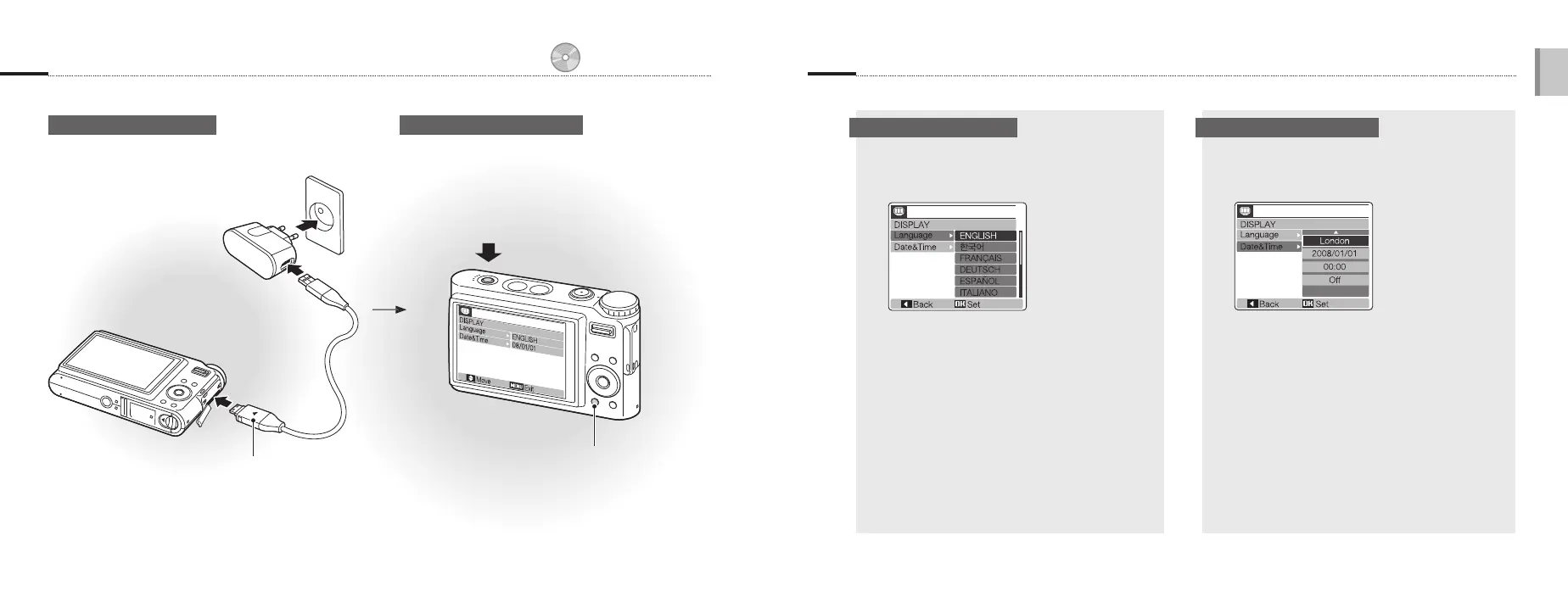
3. Charge the battery and turn on your camera
Press [POWER]
When you turn on your camera
for the first time, select a language
and set the date and time.
4. Select a language and set the date and time
p. 84 ‘About the battery’
Charge the battery Turn on your camera
Indicator light
Red: Charging
Green: Fully charged
▪
▪
1
Press [r] to select Language.
2
Press [t].
3
Press [w] or [r] to select a language.
4
Press [MENU/OK].
1
Press [r] to select Date&Time.
2
Press [t] and then [w].
3
Press [e] or [t] to select a city.
4
Press [MENU/OK].
5
Press [t] to select the date field.
6
Press [w] or [r] to change the number.
7
Press [t] to select the next item or field.
8
Press [w] or [r] to change the number or
select another date format.
9
Press [MENU/OK].
Press [y] to view stored files.
Press and hold [y] to mute
camera sounds.
▪
▪
Select a language Set the date and time



 To Next Page