2
English
1 Way Cassette WindFree Panel
If the WindFree function is not visible on the higher-level
controller after connecting the WindFree panel:
• Check if the software of the higher-level controller is
the latest version.
• If the software is not the latest version, update to the
latest version.
• If the software of the higher-level controller is the
latest version but the WindFree function is not visible
on it, perform tracking again on the higher-level
controller or reset its power.
※ Higher-level controller: DMS, Touch Centralized
Controller, Wi-Fit kit, or other device
Models : PC1MWFMAN / PC1NWFMAN / PC1BWFMAN
Accessories
Item M4ⅹ25 screw
Installation
manual (1)
Screw
Tightening
torque
(N∙m)
Shape
PC1MWFMAN : (5)
PC1NWFMAN : (6)
PC1BWFMAN : (7)
M4
(L25)
1.2~1.8
CAUTION
• After installing the product, be sure to explain to the
user how to use the air conditioner.
Installing the panel
CAUTION
• Handle the panel carefully.
• Do not lean the panel against a wall or place it on a
protruding object.
Failing to do so may damage the surface of the panel.
• Be careful when installing the air inlet panel by hand.
You may get hurt.
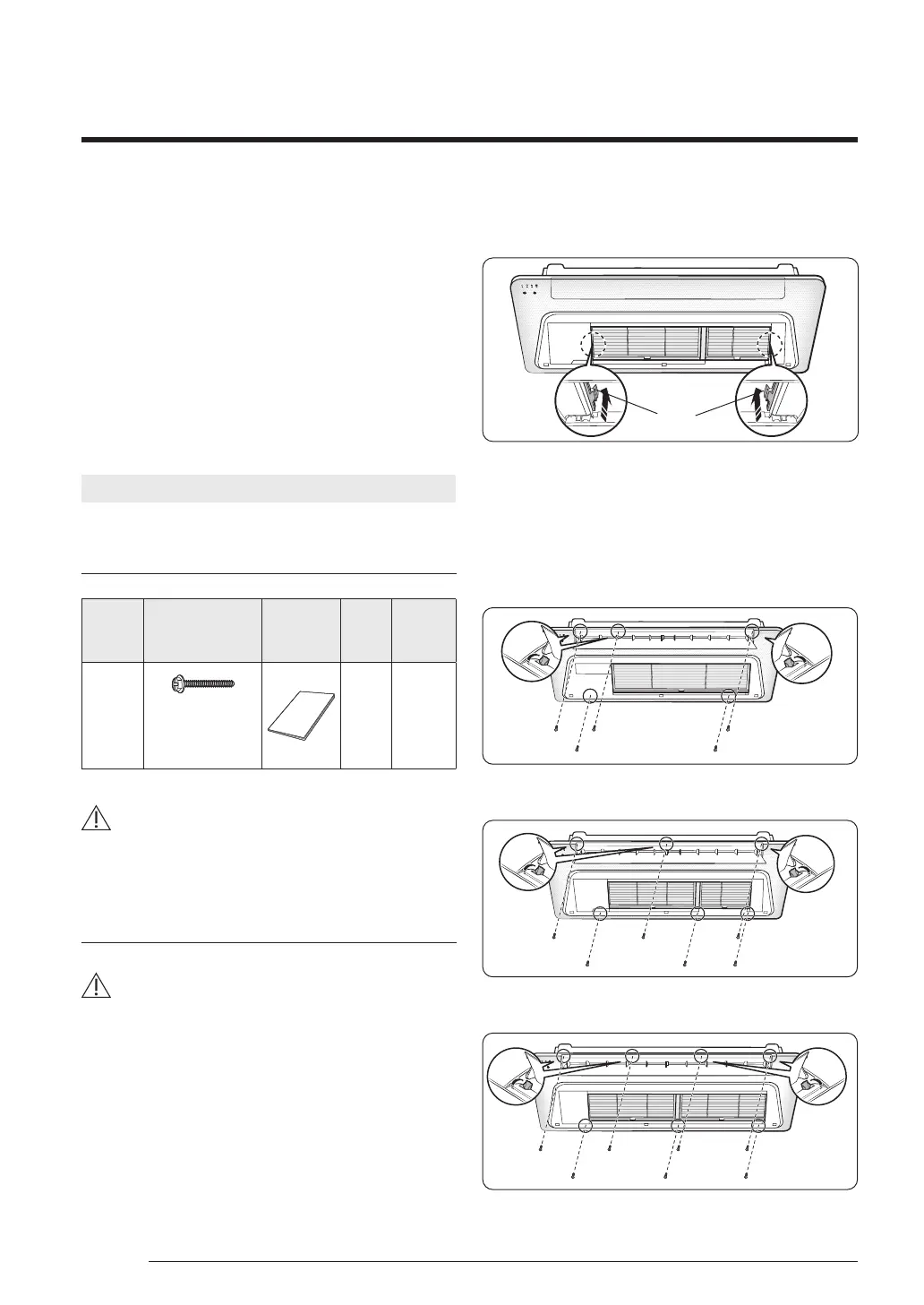
1 Fix the panel by engaging the latches at its both sides
onto the grooves on the both sides of the indoor unit.
Latch
2 Open the screw cover on the air outlet, insert and
fasten the panel fixing screws. If the screws are
not fastened completely, it may produce a gap
between the indoor unit and the panel, resulting in
condensation.
PC1MWFMAN
PC1NWFMAN
PC1BWFMAN
English
DB68-07556A-03_SYS WindFree 1way Panel_EU_EN_.indd 2DB68-07556A-03_SYS WindFree 1way Panel_EU_EN_.indd 2 2022-11-25 오전 10:52:342022-11-25 오전 10:52:34



 To Next Page