9
EN
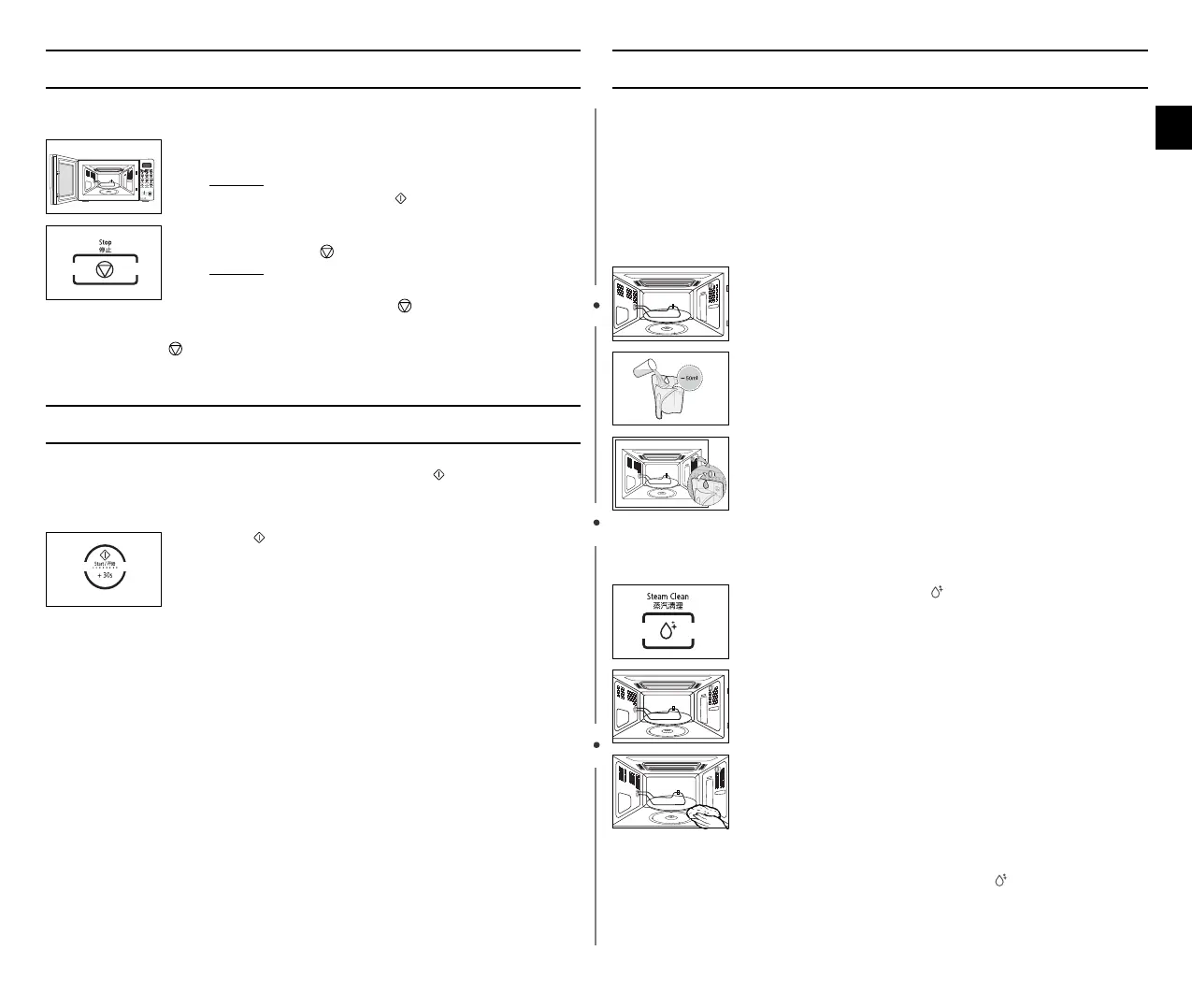
Stopping the Cooking
You can stop cooking at any time to check the food.
You can cancel any setting before starting cooking by simply pressing
Stop ().
Adjusting the Cooking Time
You can increase the cooking time by pressing the button once for
each 30 seconds to be added.
You can not adjust the time during cooking when Auto modes are
selected.
Using the Steam Cleaning
The steam provided by steam clean system will soak the cavity surface.
After using steam clean function, you can easily clean the cavity of
oven.
use this function only after the oven has completely cooled.
(Room temperature)
Use normal water only,and no distilled water.
Warning!
• Water Bowl only can be use during Steam clean
()
” mode.
• When cooking non-liquid items, remove water bowl because It will
damage and cause fire to the microwave oven.
1. To stop temporarily;
Open the door.
Result :
Cooking stops. To resume cooking, close the
door and press again.
2. To stop Completely;
Press the Stop ( ) button.
Result :
The cooking stops.
If you wish to cancel the cooking settings,
press the Stop ( ) button again.
Press the button once for each 30 seconds to be added.
1. Open the Door.
2. Fill with water following guide line(water level) outside the
water bowl.
OThe line is about 50ml.)
3. Insert water bowl into upper water bowl holder on the right
wall of cooking chamber.
4. Close the door.
5. Press the Steam clean
()
button.
It can be seen MISTY during steam cleaning.
but it is not a defect BUT STEAM SHIELDS THE light
INSIDE.
6. Open the Door.
7. Please clean cavity of oven with dried dishtowel.
Remove the turntable and only under rack with kitchen
paper.
wn_Z_ztTWZZ[WlluUGGwG`GG~SGtGX[SGYWW_GG\aYZGwt



 To Next Page