58
LCD monitor Indicator
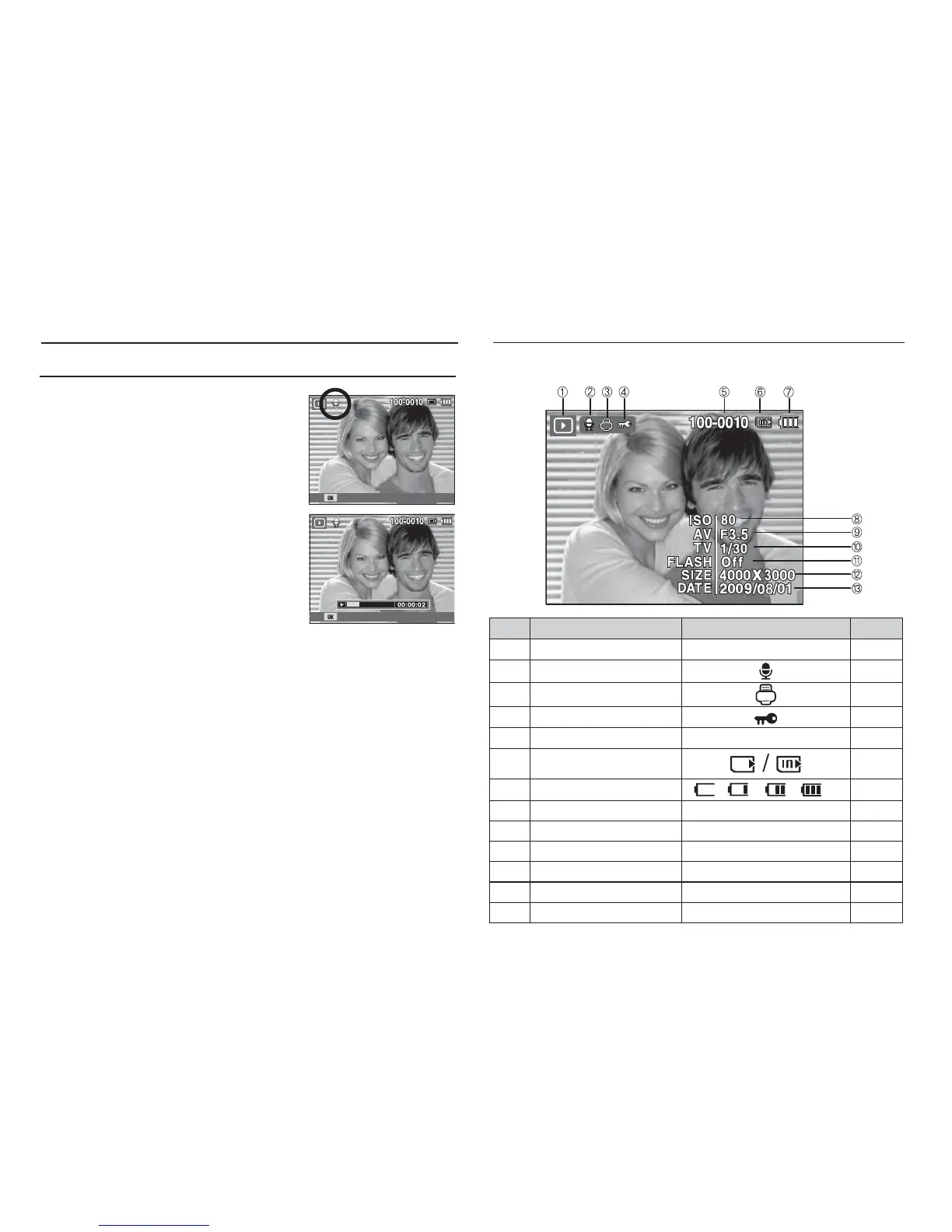
The LCD monitor displays shooting information about the displayed image.
No. Description Icon Page
1 Playback mode
Î
p.56
2 Voice Memo
p.73
3 DPOF
p.74
4 Protect p.73
5 Folder name & File name 100-0010 p.52
6 Memory card indicator
-
7 Battery
p.14
8 ISO 80~3200 p.38
9 Aperture value F3.5 ~ F5.5 -
10 Shutter speed 8 ~ 1/2,000 -
11 Flash On/Off p.31
12 Image size 4000X3000 ~ 1024X768 p.41
13 Recording date 2009/08/01 p.52
Playing back a voice memo
1. Select a still image that has the voice
memo.
2. Press the OK button to play back the
voice memo.
- To pause the voice memo, while
playing it back, press the OK button
again.
- To resume playback of the voice memo,
press the OK button.
Pause
Play
Starting play mode



 To Next Page