EasyManua.ls Logo

Samsung PL210 - User Manual

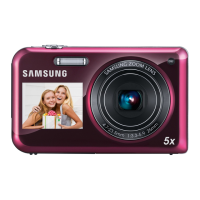
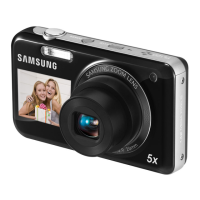
Samsung PL210
115 pages
Print Icon
To Next Page IconTo Next Page
Loading...
This user manual includes detailed usage
instructions for your camera. Please read
this manual thoroughly.
Basic troubleshooting
Quick reference
Contents
Basic functions
Extended functions
Shooting options
Playback/Editing
Settings
Appendixes
Index
User Manual
PL210/PL211
Click a topic

Table of Contents

Other manuals for Samsung PL210

Questions and Answers

  • S
    Samuel BrowningJul 31, 2025
    What to do if photos are blurred when shooting at night with my Samsung PL210?
    • V
      vmcclainJul 31, 2025
      Blurred photos at night occur because the camera slows the shutter speed to gather more light. To resolve this, select Night in the mode, turn on the flash, set ISO speed options, or use a tripod to prevent camera shake.
  • F
    Fred HansonAug 7, 2025
    How to prevent red eye effect on my Samsung Digital Camera?
    • E
      ericdiazAug 7, 2025
      Red eye occurs due to reflection from the camera flash. Set the flash option to Red-eye or Red-eye Fix. If the photo has already been taken, select Red-eye Fix in the edit menu.
  • K
    Kaitlyn HaleAug 15, 2025
    Why do subjects come out too dark because of backlighting on my Samsung PL210 Digital Camera?
    • M
      mistyfryeAug 15, 2025
      When the light source is behind the subject, or there is a high contrast between light and dark, subjects can appear shaded. To fix this, avoid shooting with the sun behind your subject. You can also select Backlight in the mode, set the flash option to Fill in, set the Auto Contrast Balance (ACB) option, adjust the exposure, or set the metering option to Spot if a bright subject is in the center of the frame.
  • B
    barajasaprilAug 22, 2025
    Why does my Samsung PL210 take photos with dust spots?
    • N
      Nicole HinesAug 22, 2025
      Dust spots in photos can occur when dust particles floating in the air are captured when using the flash. Turn off the flash or avoid taking photos in a dusty place. You can also set ISO speed options.

Summary

Health and Safety Information

Safety Warnings: Preventing Injury

Precautions to prevent injury to yourself or others from camera usage.

Safety Cautions: Preventing Damage

Cautions regarding potential damage to the camera or other equipment.

General Safety Precautions

Important safety advice for camera operation and handling.

Basic Camera Functions

Taking Photos

Basic steps for capturing photos using the Smart Auto mode.

Extended Camera Functions

Shooting Modes Explained

Overview and usage of various shooting modes for different scenarios.

Recording Videos

Instructions for recording high-definition videos and sound settings.

Shooting Options and Settings

Resolution and Image Quality

Adjusting photo and video resolution and JPEG quality settings.

Shooting in Low Light Conditions

Tips for taking photos at night or in dim lighting, including flash usage.

Camera Focus Adjustment

Methods for adjusting camera focus, including macro and auto focus.

Face Detection Features

Using face detection, smile shot, and face registration for better portraits.

Adjusting Brightness and Color

Modifying exposure, contrast, and color balance for optimal image appearance.

Appendixes and Reference

Error Messages and Remedies

Troubleshooting common error messages and their solutions.

Before Contacting Service Center

Troubleshooting common camera issues before seeking professional help.

Samsung PL210 Specifications

General IconGeneral
Megapixel14.2 MP
Camera typeCompact camera
Sensor typeCCD
Image stabilizerYes
Image sensor size1/2.3 \
Maximum image resolution4320 x 3240 pixels
Digital zoom5 x
Combined zoom50 x
Focal length range4.85 - 48.5 mm
InterfaceUSB, A/V-out
Digital SLRNo
Minimum RAM512 MB
Minimum processorIntel Pentium4 3.2GHz, AMD Athlon 64FX 2.6GHz
Power supply typeDC
Aperture range (F-F)3.3 - 5.9
Camera shutter speed1/8 - 1/2000 s
Minimum system requirementsnVIDIA Geforce 7600GT+ ATI X1600+ 64MB VRAM
Compatible operating systemsWindows XP (SP2) Windows Vista Mac OS X
Focal length (35mm film equivalent)27 - 270 mm
Minimum system requirements for MacintoshPower Mac G5 1.8GHz Intel Core Duo 1.83GHz 256 RAM 64 VRAM
FocusTTL
Focus adjustmentAuto
Normal focusing range0.8 - ∞ m
Auto focusing (AF) modesCentre weighted Auto Focus, Continuous Auto Focus, Multi Point Auto Focus, Single Auto Focus
Macro focusing range (tele)1.5 - 2.0 m
Macro focusing range (wide)0.05 - 0.8 m
Normal focusing range (tele)2 - ∞ m
Auto Mode focusing range (tele)1.5 - ∞ m
Auto Mode focusing range (wide)0.05 - ∞ m
Light meteringCentre-weighted, Spot
ISO sensitivity80, 100, 200, 400, 800, 1600, 3200, Auto
Flash modesAuto, Fill-in, Flash off, Red-eye reduction, Slow synchronization
Flash range (tele)0.5 - 1.8 m
Flash range (wide)0.3 - 3.3 m
Flash recharging time4 s
Internal memory30 MB
Compatible memory cardsmicroSDHC
Motion JPEG frame rate30 fps
Maximum video resolution1280 x 720 pixels
Analog signal format systemPAL
Display diagonal3 \
Display resolution (numeric)230000 pixels
USB version2.0
Scene modesBacklight, Beach, Close-up (macro), Documents, Fireworks, Night, Night landscape, Night portrait, Portrait, Self-portrait, Snow, Sports, Sunset, Landscape (scenery)
Image editingresizing, rotating, trimming
Photo effectsNegative film, Vivid
White balanceAuto, Cloudy, Daylight, Fluorescent, Tungsten
Camera playbackmovie, single image
Self-timer delay2 s
Playback zoom (max)1 x
Product colorBlue
Battery typeBP85A
Power requirements4.2V
Operating temperature (T-T)0 - 40 °C
Operating relative humidity (H-H)5 - 85 %
Weight and Dimensions IconWeight and Dimensions
Depth19.7 mm
Width100.4 mm
Height58.5 mm
Weight148 g

Related product manuals