4-23
6)
CPU Fan Control
1.
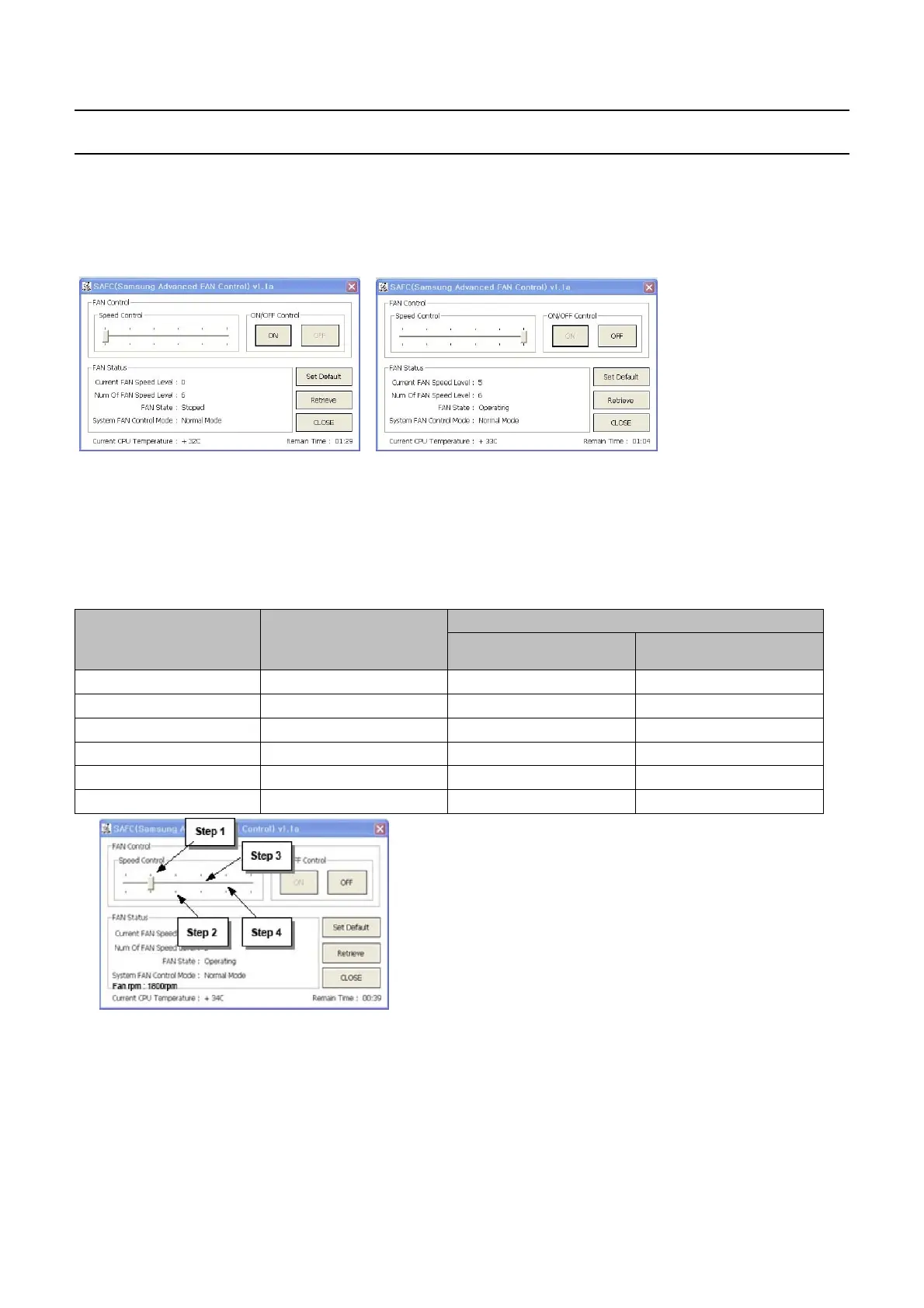
Checking the work of FAN
One can turn the fan on
&
off and check the fan's operational conditions wirhout system
disassembly
Pic
(1)
Fanoffstatus Pic(2)Fanonstatus
-
SAFC's default setting is
"
Fan off" or
"
Minimum Fan Speed"
-
Press
"
On" in
"
ON/OFF Control" Fan is turned on to maximum fan speed.
-
Press
"
OFF" in
"
ON/OFF Control" Fan r eturns to defalt setting.
2.
Checking the normal Working State of F AN Control
FAN[RPM]
FAN Input Voltage
[
V]
Board Level System Level
Off
000
Low
2200 2.8 3.0
Middle
12500 3.2 3.4
Middle
22800 3.7 3.9
Middle
33100 4.2 4.4
High
3400 4.9 4.9
Pic(3) Adjust FAN State
[
Fan Voltage Measurement]
-
Read Fan RPM indicated in SAFC
[
Fan Voltage Pass/Fail determination]
-
If Fan RPM satisfies
"
rpm spec+/-10%", then Fan test is
"
PASS"
-
This Document can not be used without Samsung's authorization
-
4.
Troubleshooting



 To Next Page