©porch
r
U
G Ro rcjor tor
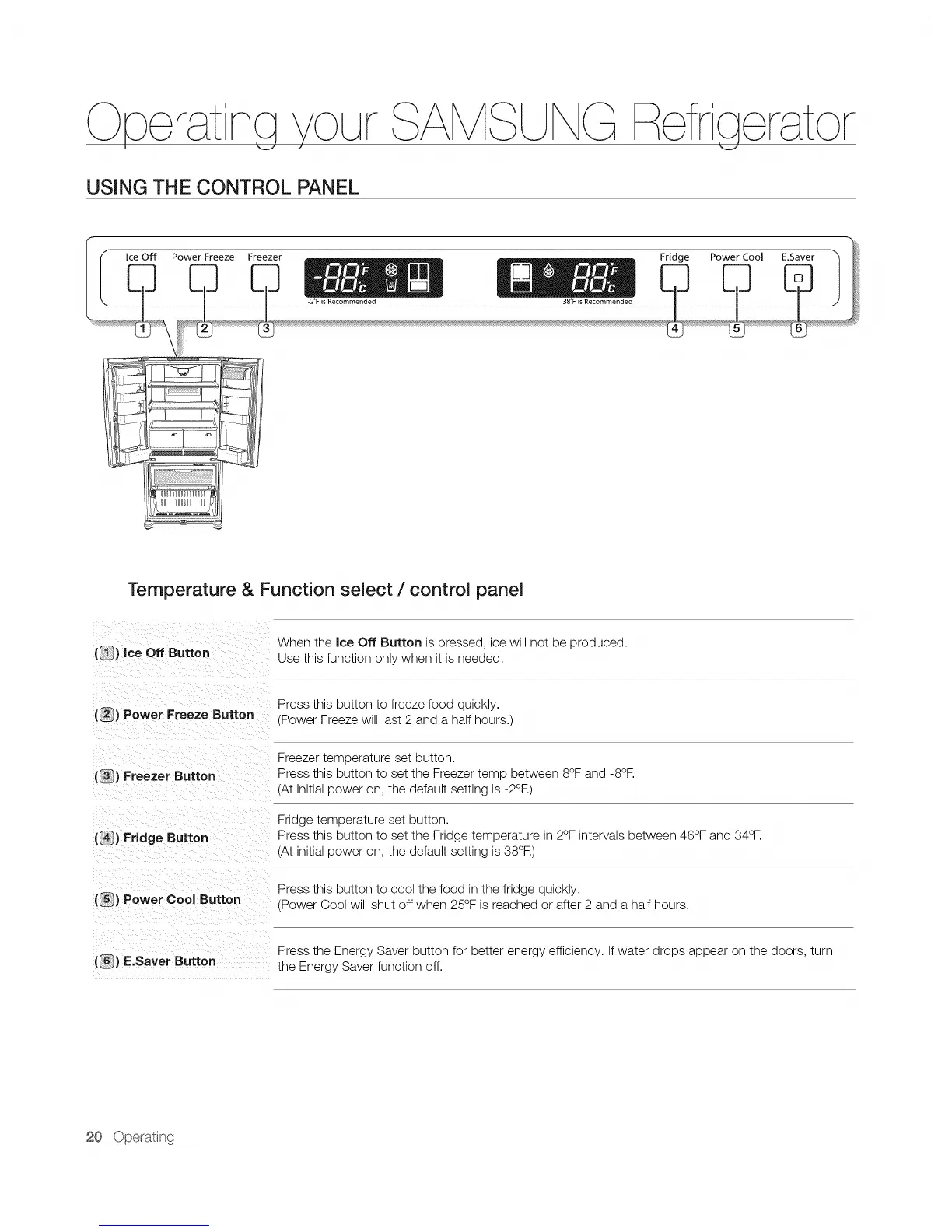
USING THE CONTROL PANEL
Temperature & Function select / control panel
(_) Ice Off Button
When the Ice Off Button is pressed, ice will not be produced.
Use this function only when it is needed.
(_} Power Freeze Button
Press this button to freeze food quickly.
(Power Freeze will last 2 and a half hours.)
(_) Freezer Button
(_) Fridge Button
Freezer temperature set button.
Press this button to set the Freezer temp between 8°F and -8°R
(At initial power on, the default setting is -2°R)
Fridge temperature set button.
Press this button to set the Fridge temperature in 2°F intervals between 46°F and 34°R
(At initial power on, the default setting is 38°R)
(_) Power Cool Button
Press this button to cool the food in the fridge quickly.
(Power Cool will shut off when 25°F is reached or after 2 and a half hours.
Press the Energy Saver button for better energy efficiency. If water drops appear on the doors, turn
(_) E.Saver Button the Energy Saver function off.


 To Next Page