EasyManua.ls Logo

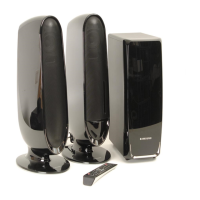
Samsung RTS-HE10 - User Manual

Samsung RTS-HE10
104 pages
Print Icon
To Next Page IconTo Next Page
Loading...
Room
Cinema System
user Manual
imagine the possibilities
Thank you for purchasing this Samsung product.
To receive more complete service,
please register your product at
www.samsung.com/global/register
RTS-HE10
02143A-RTSHE10-XSH-ENG.indd *302143A-RTSHE10-XSH-ENG.indd *3 7/28/08 2:22:36 PM7/28/08 2:22:36 PM

Questions and Answers

  • C
    Courtney DelgadoAug 17, 2025
    How to reset my Samsung RTS-HE10 when it's not working properly?
    • D
      Duane PerezAug 17, 2025
      If your Samsung Home Theater System's main unit isn't working correctly (for example, the power goes out or you hear a strange noise), you can try resetting it. While the player is in No Disc mode, hold the SKIP (®®l) button on the front panel for longer than 5 seconds. Keep in mind that using the RESET function will erase all stored settings, so only use this if necessary.
  • M
    Mary CunninghamAug 20, 2025
    Why is my Samsung RTS-HE10 remote control not working?
    • C
      Carolyn RyanAug 20, 2025
      If your Samsung Home Theater System remote control isn't working, first ensure you're within the operational range for angle and distance. Also, check to see if the batteries are dead and replace them if needed.
  • G
    Guy OliverAug 22, 2025
    Why is there no sound coming from my Samsung Home Theater System?
    • E
      Emily OliverAug 22, 2025
      If your Samsung Home Theater System isn't producing any sound, there are a few things to check. Ensure the speakers are properly connected and the speaker setup is correctly customized. Also, remember that no sound is heard during fast playback, slow playback, and step motion playback. Finally, check the disc for severe damage.
  • H
    hallwilliamAug 25, 2025
    What to do if my Samsung RTS-HE10 Home Theater System shows no picture or the picture quality is poor?
    • H
      hallnancyAug 26, 2025
      If your Samsung Home Theater System is showing no picture even though the disc is rotating, or if the picture quality is poor and shaking, check the following: * Ensure that your TV is powered on. * Verify that the video cables are connected correctly. * Inspect the disc for dirt or damage. * Be aware that a poorly manufactured disc may not be playable.
  • B
    Beth GloverAug 27, 2025
    How to reset the rating level password on my Samsung RTS-HE10 Home Theater System?
    • K
      Kyle Montes Jr.Aug 27, 2025
      If you've forgotten the password for the rating level on your Samsung Home Theater System, you can reset it by pressing the (®®l) button on the front panel for more than 5 seconds when there is no disc inside. Be aware that this will revert all settings, including the password, to the factory defaults. Use this reset function only when absolutely necessary, as it will erase all stored settings.
  • T
    Thomas EsparzaAug 30, 2025
    Why are audio language and subtitles not working on my Samsung RTS-HE10 Home Theater System?
    • L
      Leslie BaileyAug 30, 2025
      Audio language and subtitles will not work on your Samsung Home Theater System if the disc doesn't contain them.
  • A
    Arthur MartinSep 2, 2025
    Why won't my Samsung Home Theater System start playback?
    • D
      Dr. Gary BarajasSep 2, 2025
      If your Samsung Home Theater System won't play a disc, first check the region number of the DVD to ensure it's compatible. Also, CD-ROMs and DVD-ROMs cannot be played on this Room Cinema System. Finally, make sure that the rating level is correct.
  • M
    Maria FryeSep 4, 2025
    How can I improve radio reception on my Samsung RTS-HE10 Home Theater System?
    • M
      Matthew PadillaSep 4, 2025
      To improve radio reception on your Samsung Home Theater System, first ensure the antenna is connected properly. If the signal remains weak, consider installing an external FM antenna in an area known for good reception.
  • V
    Vincent WarrenSep 6, 2025
    What to do if my Samsung RTS-HE10 Home Theater System won't eject the disc?
    • N
      nicolegreenSep 6, 2025
      If your Samsung Home Theater System is not ejecting the disc, make sure the power cord is securely plugged into the outlet. If it is, try turning the power off and then back on.
  • C
    Christopher DelgadoSep 9, 2025
    Why does my Samsung RTS-HE10 delay starting playback?
    • N
      Nancy MartinezSep 9, 2025
      If your Samsung Home Theater System doesn't start playback immediately when you press the Play/Pause button, check the disc. If the disc is deformed or has scratches, try wiping it clean.

Summary

Features

Multi-Disc Playback & FM Tuner

Combines multi-disc playback and FM tuner functions for versatile audio/video playback.

USB Host Support

Allows connection and playback of files from external USB storage devices.

TV Screen Saver and Power Saving Functions

Automates screen saving and power-off after periods of inactivity.

HDMI Connectivity

Transmits digital DVD video and audio signals simultaneously for clearer picture.

Whats Included

Lists supplied accessories for the Room Cinema system.

Safety Information

Safety Warnings

Essential safety precautions to reduce risk of electric shock, fire, and injury.

Class 1 Laser Product Warning

Advises caution regarding laser radiation exposure from the CD player.

Precautions

Handling and Installation Precautions

Guidelines for proper placement, ventilation, and power handling to ensure safe operation.

Environmental and Usage Precautions

Advice on avoiding moisture, heat, direct sunlight, and proper battery disposal.

System Setup

Setting the Language

How to change the On-Screen Display (OSD) language.

Setting the Audio Output

Configure digital audio output (PCM/Bitstream) and dynamic compression.

Setting the Display Aspect Ratio

Adjust TV aspect ratio (Letter Box, Pan&Scan, Wide) for optimal viewing.

Display Settings: Still Mode, Screen Messages, TV System, Video Output, HDMI

Configure picture stability, message visibility, TV system, video output, and HDMI settings.

Picture Quality Adjustments

Fine-tune brightness, contrast, and color saturation for optimal picture.

Parental Controls: Password and Rating Level

Set or reset passwords and restrict playback based on content rating levels.

Password Change and DivX Registration

Procedure to change the password and register for DivX video on demand.

DRC and Equalizer Functions

Adjust dynamic range compression and equalizer settings for sound optimization.

Radio

Listening to Radio Operations

How to scan frequencies, change presets, and save radio stations.

Troubleshooting

Disc Playback and Sound Issues

Solutions for problems like disc not ejecting, playback failure, or no sound.

Remote Control and Picture Quality Issues

Troubleshooting for remote control malfunction or poor picture quality.

System Operation and Password Recovery

Solutions for unit not working, aspect ratio issues, or forgotten passwords.

Radio Reception Troubleshooting

Solutions for problems related to receiving radio broadcasts.

USB Host Supported Products

Compatible Digital Cameras

List of compatible digital camera models for USB host functionality.

Compatible USB Flash Discs

List of compatible USB flash drive models for USB host functionality.

Compatible MP3 Players

List of compatible MP3 player models for USB host functionality.

Appendix

Disc Handling and Storage Precautions

Guidelines for handling, cleaning, and storing discs to prevent damage.

Product Specifications

Technical details including power, dimensions, operating ranges, and component outputs.

Getting Started

Before Reading the Users Manual

Important terms and information to review before using the manual.

Icons Used in the Manual

Explanation of icons used throughout the manual for better understanding.

Playable Discs

Supported Disc Types

Details on DVD-VIDEO, VIDEO CD, AUDIO-CD, and DivX disc compatibility.

Unsupported Disc Types

Lists disc formats that cannot be played on this player.

Copy Protection

Explains copy protection measures and connection recommendations for DVDs.

Description

Front Panel Overview

Identifies and describes the controls and indicators on the front panel.

Rear Panel Overview

Identifies and describes the ports and connectors on the rear panel.

Remote Control

Remote Control Operation Range

Specifies the effective distance and angle for remote control usage.

Inserting Remote Batteries

Step-by-step guide on how to properly insert batteries into the remote control.

Remote Control Button Functions

Detailed explanation of each button on the remote control and its function.

Connections

Connecting the Speakers

Instructions for connecting speakers, including placement and positioning guidance.

Connecting to Your TV via Video Output

Explains three methods: HDMI, Component Video, and Composite Video.

HDMI Functionality and Settings

Details on HDMI auto-detection, HDCP, and resolution settings.

Connecting External Audio Devices (AUX)

Guide for connecting MP3 players or other components via the AUX input.

Connecting the FM Antenna and Cooling Fan

Instructions for FM antenna connection and information on the cooling fan.

HDMI Function

HDMI Resolution Selection

Allows selection of screen resolution for HDMI output for optimal picture quality.

Before Using Your Room Cinema

Initial Setup and Power On

Steps to plug in the unit and switch it on for the first time.

Playback

Disc Playback Operations

How to play, stop, pause, and resume playback of discs.

MP3;WMA-CD Playback

Guide to playing music files from MP3/WMA encoded CDs.

JPEG and Picture CD Playback

How to view JPEG image files and pictures from Picture CDs.

Image Rotation and Zoom

Function to rotate displayed images and zoom in on pictures.

Slideshow Function

Automated playback of images with adjustable time intervals.

DivX Playback Controls

How to navigate and control DivX disc playback: skip, fast play, audio, and subtitle selection.

DivX File Format Support and Caption Function

Details on supported DivX formats and how to use caption files.

Disc Information and Remaining Time

How to view title, chapter, playback time, and remaining time of discs.

Playback Speed Control (Fast;Slow;Skipping)

Adjust playback speed for fast, slow, or scene/song skipping.

Repeat Playback Modes

Options for repeating chapters, titles, tracks, or folders during playback.

A-B Repeat and Step Functions

Function to repeatedly play a designated section or move frame-by-frame.

Audio and Subtitle Language Selection

How to select the desired audio track and subtitle languages for playback.

Using Disc Menus and Virtual Sound

How to access menus and use the virtual sound feature for enhanced audio.

USB Host Feature: Media Playback and Safe Removal

Connect and play media from USB devices; procedure for safe removal.

USB Playback Features and Compatible Devices

Details on fast playback via USB and lists of compatible devices and formats.

USB Host Feature

Using the USB Host Feature

Connect and play media files from USB devices like MP3 players and cameras.

Safe USB Removal

Procedure for safely removing USB devices to prevent data damage.

Samsung RTS-HE10 Specifications

General IconGeneral
TypeHome Theater System
BrandSamsung
ModelRTS-HE10
Channels5.1
Speaker TypeSatellite
SubwooferYes
Wireless ConnectivityNo
HDMI InputYes
Optical InputYes
USB PortYes
BluetoothNo
Remote ControlYes
DVD PlayerYes

Related product manuals