This document describes the Samsung Room Cinema System, model E10T, a multi-disc playback and FM tuner device with USB Host support.
Function Description
The Samsung Room Cinema System (RTS-E10) is a versatile entertainment unit designed for home use. It combines a multi-disc player with an FM tuner, offering a comprehensive audio and video experience. The system supports various disc formats, including DVD-VIDEO, CD, VCD, MP3-CD, WMA-CD, DivX, and CD-R/RW. This allows users to enjoy a wide range of media content.
A key feature is its USB Host support, enabling the connection and playback of files from external USB storage devices such as MP3 players and USB flash drives. This expands the system's media compatibility beyond physical discs.
The system includes a TV Screen Saver Function, which displays the Samsung logo on the TV screen if the main unit remains in Stop mode for 3 minutes. After 20 minutes in Screen Saver mode, the RTS-E10 automatically switches into a power-saving mode, eventually shutting itself off after 20 minutes in Stop mode to conserve energy. Users can also customize the TV screen display by selecting a favorite image during JPEG or DVD playback to set as a background wallpaper.
Important Technical Specifications
General:
- Power Consumption: 30 W
- Weight: 4.8 kg
- Dimensions (W x H x D): 646(W) x 357(H) x 552(D) mm
- Operating Temperature Range: +5°C ~ +35°C
- Operating Humidity Range: 10% to 75%
Disc Playback:
- DVD (Digital Versatile Disc):
- Reading Speed: 3.49 ~ 4.06 m/sec.
- Approx. Play Time (Single Sided, Single Layer Disc): 135 min.
- CD (12 cm COMPACT DISC):
- Reading Speed: 4.8 ~ 5.6 m/sec.
- Maximum Play Time: 74 min.
- CD (8 cm COMPACT DISC):
- Reading Speed: 4.8 ~ 5.6 m/sec.
- Maximum Play Time: 20 min.
Video Output:
- Composite Video: 1.0 Vp-p (75 Ω load)
- Component Video:
- Y: 1.0 Vp-p (75 Ω load)
- Pr: 0.70 Vp-p (75 Ω load)
- Pb: 0.70 Vp-p (75 Ω load)
- Operates in Interlace scan mode 576i(480i) for component output.
Amplifier:
- Front speaker output: 20W x 2 (3Ω)
- Subwoofer speaker output: 40W (6Ω)
- Frequency range: 20Hz~30KHz
- S/N Ratio: 70dB
- Channel separation: 65dB
- Input sensitivity (AUX): 400mV
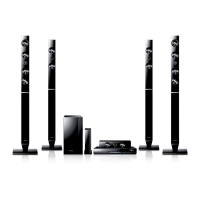
Speakers (2.1ch speaker system):
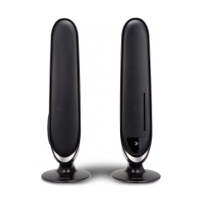
- Front Speaker:
- Impedance: 3 Ω
- Frequency range: 175 Hz ± 20%
- Output sound pressure level: 79dB
- Rated input: 40W
- Maximum input: 40W
- Dimensions (W x H x D): 181 x 569 x 261 mm
- Weights: 390 g
- Subwoofer:
- Impedance: 6 Ω
- Frequency range: 70 Hz ± 20%
- Output sound pressure level: 84dB
- Rated input: 40W
- Maximum input: 40W
Supported USB Host Feature Products:
- Digital Camera: Supports USB Mass Storage v1.0 (removable disc in Windows 2000 or later).
- USB Flash Disc: Supports USB2.0 or USB1.1.
- MP3 Player: HDD and flash type MP3 players.
- USB Card Reader: One-slot and multi-slot card readers.
- Supported File Systems: Only FAT 16/32. NTFS is not supported.
- Still Picture (JPEG): Max resolutions 5120 x 3480 (19.0 MPixel) for standard JPEG, 2048 x 1536 (3.0 MPixel) for progressive JPEG.
- Music (MP3/WMA):
- MP3: 80~384kbps, 44.1kHz
- WMA: 56~128kbps, V8, 44.1kHz
- Movie (DivX): .AVI, .ASF, 4Mbps, DivX3.11~DivX5.1, XviD, 720x480, 44.1KHz~48KHz.
Usage Features
Disc Playback:
- To load a disc, insert it vertically into the Disc Insert Hole, ensuring it sits gently in the tray with the label facing up.
- Close the compartment by pressing the PLAY button. Playback starts automatically.
- To stop playback, press the STOP button. If pressed once, playback is paused and stored in memory. Pressing PLAY or ENTER resumes from the stop position. If pressed twice, STOP is displayed, and playback starts from the beginning.
- To temporarily pause playback, press the PAUSE button. Pressing PLAY resumes playback.
MP3/WMA-CD Playback:
- Load the MP3/WMA disc. The MP3/WMA menu screen will appear and playback will start.
- In Stop mode, use the Cursor buttons to select an album, then press ENTER. Use Cursor buttons to select a track.
- To change the album, use Return and Cursor buttons to select another album, then press ENTER.
- Press STOP to stop playback.
- Music files can be played, and image files can be viewed.
JPEG File Playback:
- Insert a Picture (JPEG) CD Disc. The folder directory will be displayed.
- Press Cursor buttons to select a picture, then press ENTER.
- Press Cursor buttons to display the previous or next picture.
- Rotation: Press Cursor buttons to select the rotate icon. Each time ENTER is pressed, the picture rotates 90 degrees clockwise.
- Zoom: Press Cursor buttons to select the zoom icon. Each time ENTER is pressed, the picture is enlarged up to 4X (Normal → 2X → 4X → 2X → Normal).
- Slideshow: Press Cursor buttons to select the slideshow icon. Press ENTER. Three icons for time interval (6, 12, 18 seconds) are displayed. Select one and press ENTER.
DivX Playback:
- Skip Forward/Back: During playback, press the Skip buttons to go to the next or previous file.
- Fast Playback: During playback, press the Fast Forward or Rewind buttons. Each press changes the speed (2x → 4x → 8x).
- Audio Display: Press the AUDIO button to toggle between multiple audio tracks.
- Subtitle Display: Press the SUBTITLE button to toggle between available subtitle tracks or turn them off.
Playback Functions:
- Displaying Disc Information: During DVD playback, press the INFO button to view current Title, Chapter, and counter position. Use Cursor buttons to select items and ENTER to make changes.
- Checking Remaining Time: Press the REMAIN button to check the total remaining time.
- Fast Playback: Press Fast Forward/Rewind buttons. Speed changes (X2 → X4 → X64 → X128 for DVD; X2 → X4 → X8 for DivX).
- Slow Playback: In Pause mode, press Fast Forward/Rewind buttons. Speed changes (1/2 → 1/4 → 1/8). No sound is heard during slow playback.
- Skipping Scenes/Songs: Press Skip buttons to play the previous or next chapter, track, or directory.
- Repeat Playback: Press the REPEAT button. Options include OFF, CHAPTER, TITLE, A-B (for DVD); OFF, TRACK, FOLDER, RANDOM (for CD/MP3); OFF, TITLE, FOLDER (for DivX).
- A-B Repeat Playback: For DVDs, press REPEAT, select A-, press ENTER, then press ENTER at the end of the desired segment.
- Step Function: Press the STEP button. The picture moves forward one frame at a time. No sound is heard.
- Audio Language Selection: Press INFO, use Cursor buttons to select audio language, then press ENTER.
- Subtitle Language Selection: Press INFO, use Cursor buttons to move to SUBTITLE, then press Cursor buttons or ENTER to select.
- Using the Disc Menu: Press MENU, use Cursor buttons or numeric buttons to move to Disc Menu, then press ENTER.
- Using the Title Menu: Press MENU, use Cursor buttons to move to Title Menu, then press ENTER.
- P-SOUND (POWER SOUND): Press the P.SOUND button to enhance amplifier bass and high key.
USB Host Feature:
- Connect a USB device to the USB port on the front.
- If there is a partition on the USB, press the Up/Down button to select one, then press ENTER.
- Press the Up/Down or Left/Right buttons to select a file, then press ENTER to open it.
- Safe USB Removal: Press STOP to remove the USB device safely.
- Skip Forward/Back: During playback, press the Skip buttons.
System Setup:
- Setting the Language: In Stop mode, press MENU, navigate to Setup, then Language Setup. Select desired language.
- Setting the Audio: In Stop mode, press MENU, navigate to Setup, then Audio Setup. Options include Dynamic Compression (On/Off) and PCM Down Sampling (On/Off).
- Setting TV Screen Type: In Stop mode, press MENU, navigate to Setup, then Display Setup. Select TV Aspect (4:3 Letter Box, 4:3 Pan&Scan, 16:9 Wide).
- Still Mode: Options for preventing picture shake in still mode (Auto, Field, Frame).
- Screen Messages: Turn on/off on-screen messages.
- TV System: Select NTSC or PAL based on TV compatibility.
- Video Output: Select I-SCAN (Component Interlace 525i) or P-SCAN (Component Progressive 525p).
- Black Level: Adjusts screen brightness (On/Off).
- Setting Password Parental Controls: Set a password for parental rating level. Default is "0000". If forgotten, hold SKIP (►►I) button on the front panel for >5 seconds in No Disc mode to reset.
- Setting (Rating Level): Restrict playback of adult/violent DVDs.
- Change Password: Change the parental control password.
- DivX (R) Registration: Register the player for DivX video on demand using the provided code.
- Setting the DRC (Dynamic Range Compression): Adjust Dolby Digital sound for low volume listening.
- Setting the EQUALIZER Function: Select sound modes (CLASSIC, ROCK, JAZZ, POP).
Radio:
- Press the TUNER button to access FM radio.
- Use Cursor buttons to scan frequencies manually.
- Use PRESET buttons to select preset numbers.
- To save a frequency as a preset, press STOP or ENTER.
Maintenance Features
Handling and Storing Discs:
- Avoid touching the playback side of the disc.
- Hold discs by the edges to prevent fingerprints.
- Do not stick paper or tape on discs.
- Store discs in a clean protection jacket, vertically, in a cool, ventilated area, away from direct sunlight.
- Do not allow discs to become contaminated with dirt.
- Do not load cracked or scratched discs.
- Clean discs with a mild detergent diluted in water, wiping gently from the inside to the outside.
Condensation:
- If condensation forms inside the player (e.g., due to warm air contacting cold parts), the player may not operate correctly. Remove the disc and let the player stand for 1 or 2 hours with the power on to allow it to reach room temperature.
Cooling Fan:
- The cooling fan supplies cool air to prevent overheating.
- Ensure the unit is well-ventilated and do not obstruct the cooling fan or ventilation holes. Maintain a minimum of 10 cm clear space on all sides of the fan.
Batteries:
- Replace both AAA batteries in the remote control at the same time, ensuring correct polarity.
- Do not expose batteries to heat or flame.
- Dispose of batteries properly, as they contain harmful chemicals.
General Care:
- Disconnect the AC main plug from the wall outlet during thunderstorms to prevent damage from voltage peaks.
- Do not expose the unit to direct sunlight or other heat sources to prevent overheating and malfunction.
- Protect the player from moisture and excess heat (e.g., from fireplaces) or strong magnetic/electric fields (e.g., from speakers).
- If the player malfunctions, disconnect the power cable from the AC supply.
- If the player has been stored in cold temperatures, wait approximately 2 hours until it reaches room temperature before using it.
- The main unit (R Speaker) has a groove on the front side for opening with a thin, hard tool for service purposes. Do not open unless for service.

 Need help?
 General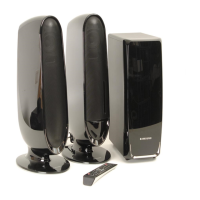





 To Next Page