17
GB
● CONNECTIONS
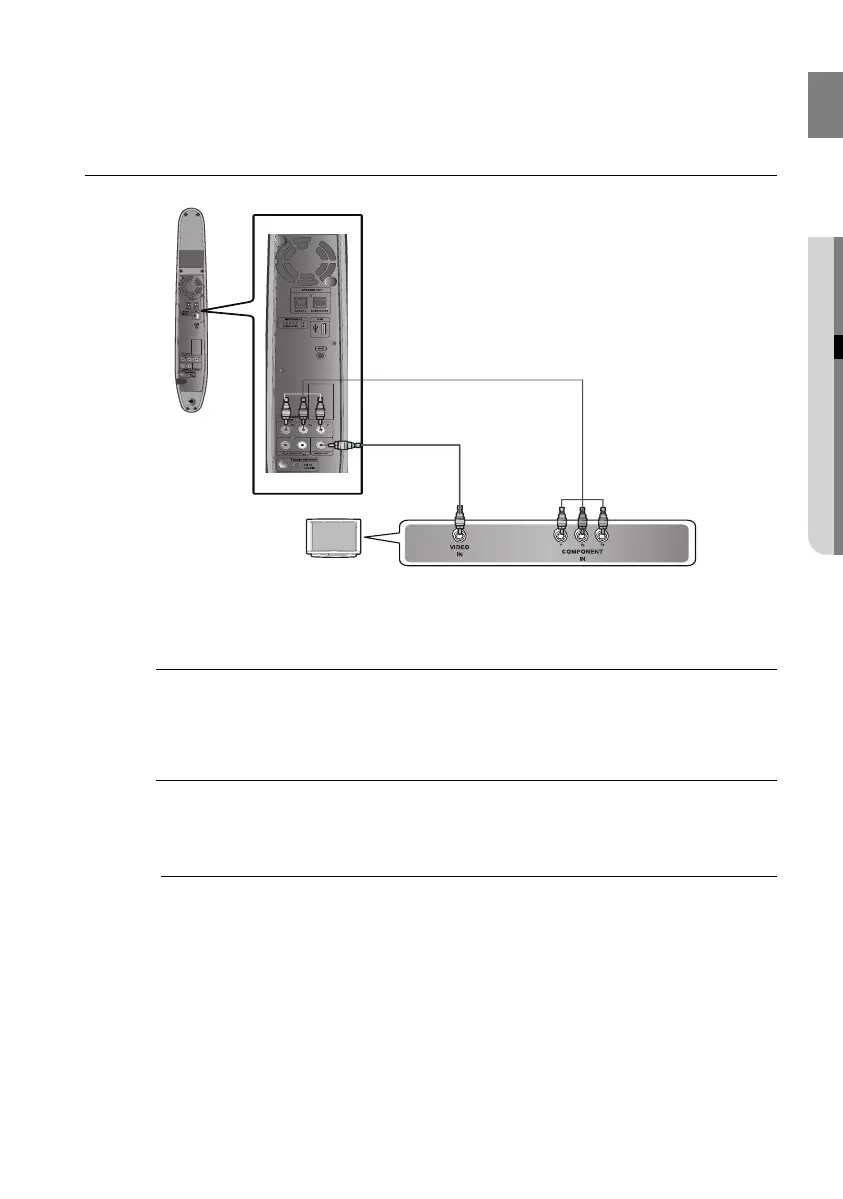
CONNECTING THE VIDEO OUT TO YOUR TV
Choose one of the two methods for connecting to a TV.
METHOD2
(Supplied)
METHOD1
METHOD 1 : Component Video
If your television is equipped with Component Video inputs, connect a Component Video cable (not
supplied) from the Component Video Output (P
R
, P
B
and Y) jacks on the back of the Room Cinema
System to the Component Video Input jacks on your TV.
METHOD 2 : Composite Video
Connect the supplied Video cable from the VIDEO OUT jack on the back of the Room Cinema
System to the VIDEO IN jack on your TV.
This product operates in Interlace scan mode 576i(480i) for component output.
M
02107H-RTSE10-XME.indd 1702107H-RTSE10-XME.indd 17 6/20/08 11:04:59 AM6/20/08 11:04:59 AM






 To Next Page