11
GB
● DESCRIPTION
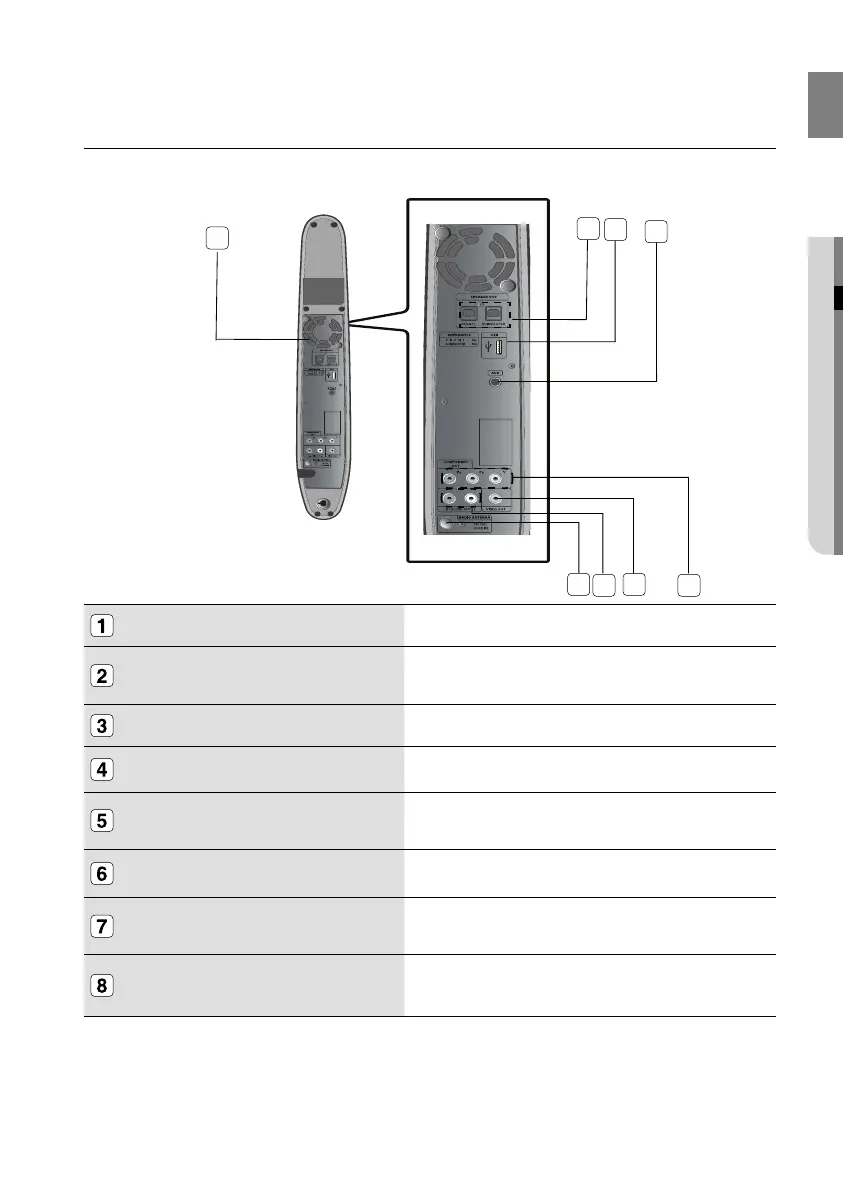
REAR PANEL
SPEAKER OUTPUT CONNECTORS Connect Left, subwoofer speakers.
USB Host
Connect digital still camera, MP3 Player, memory stick, card reader, or
other removable storage devisces.
AUX IN JACK
Connect to the analog output of an external device (such as a MP3 Player)
FM 75Ω Connect the FM antenna.
AUDIO L, R OUT JACKS
You can connect your system to the television using the audio cable if the
appropriate input is available on the television.
VIDEO OUTPUT JACK Connect the TV's Video input jack (Video IN) to the Video Out Jack.
COMPONENT VIDEO OUTPUT JACKS Connect a TV with Component video inputs to these jacks.
COOLING FAN
The fan always revolves when the power is on. Ensure a minimum of 10
Cm of clear space on all sides of the fan when installing the product.
4
8
6
7
1
2
3
5
02107H-RTSE10-XME.indd 1102107H-RTSE10-XME.indd 11 6/20/08 11:04:58 AM6/20/08 11:04:58 AM






 To Next Page