22
MP3/WMA-CD PLAYBACK
Data CDs (CD-R, CD-RW) encoded in MP3/WMA format can be played.
A
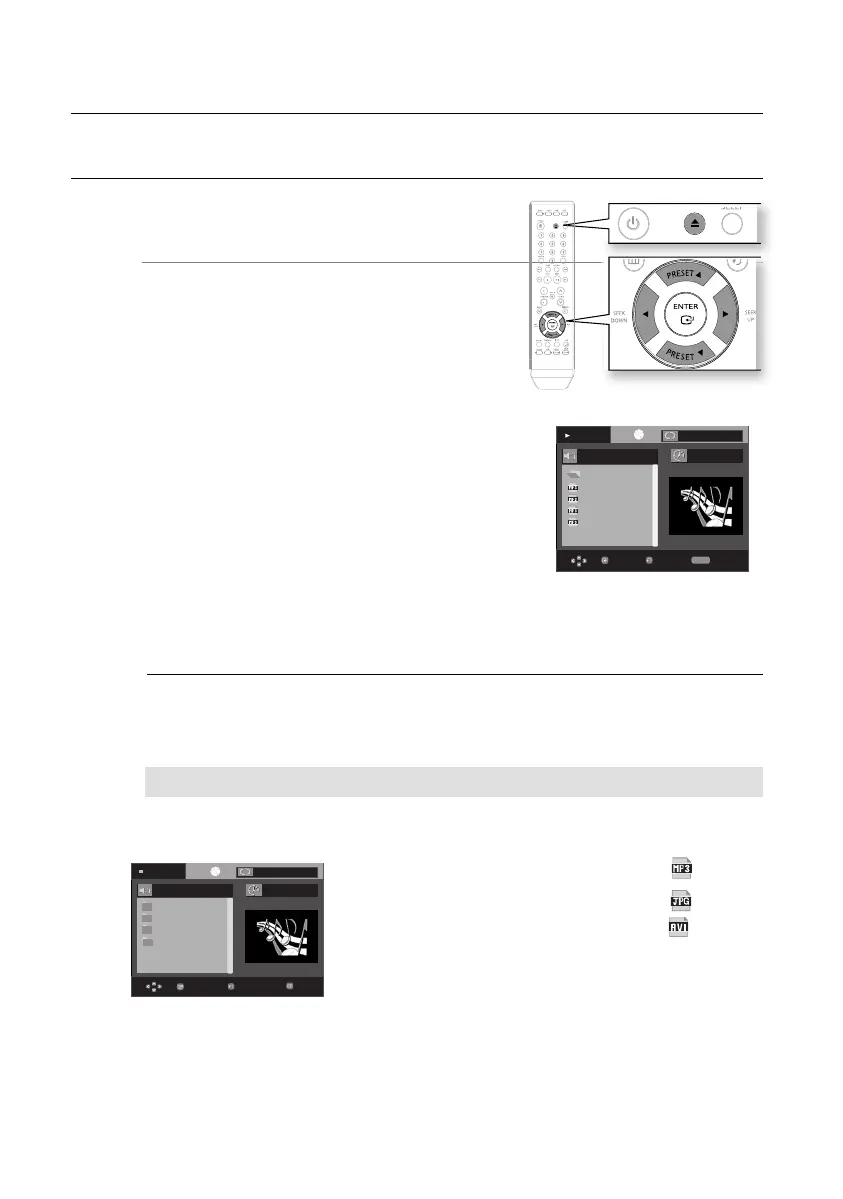
Load the MP3/WMA disc.
The MP3/WMA menu screen will appear and
playback will start.
The appearance of the menu depends on the
MP3/WMA disc.
WMA-DRM fi les cannot be played.
In Stop mode, use the Cursor
†
,
π
,
√
,
®
button
to select the album, and then press the ENTER button.
Use the Cursor †
,
π
button to select the track.
To change the album, use the Return and Cursor
†
,
π
button to select another album, and then press the ENTER.
Press the STOP
(
■
) button to stop playback.
Depending on the recording mode, some MP3/WMA-CDs may not play.
Table of contents of a MP3-CD varies depending on the MP3/WMA track format
recorded on the disc.
Press the Cursor
†
,
π
,
√
,
®
button when it is in Stop mode and select a desired icon from
the top part of the menu.
Music File Icon : To play music fi les only, select the
Icon.
Image File Icon : To view image fi les only, select the Icon.
Movie File Icon : To view movie fi les only, select the Icon.
1.
•
•
•
2.
•
3.
4.
M
•
Off
Play
...
Because You
Cactus
Sad Dayu
Wonderful
Because You
00:00:23
REPEAT
Enter
Return
Repeat
T
T
Off
Stop
WMA
JPEG
MP3
MPEG4
00:00:00
Enter Return
T
T
Menu
To play a fi le icon in the screen,
playback
02107H-RTSE10-XME.indd 2202107H-RTSE10-XME.indd 22 6/20/08 11:05:00 AM6/20/08 11:05:00 AM






 To Next Page