21
GB
● PLAYBACK
DISC PLAYBACK
B
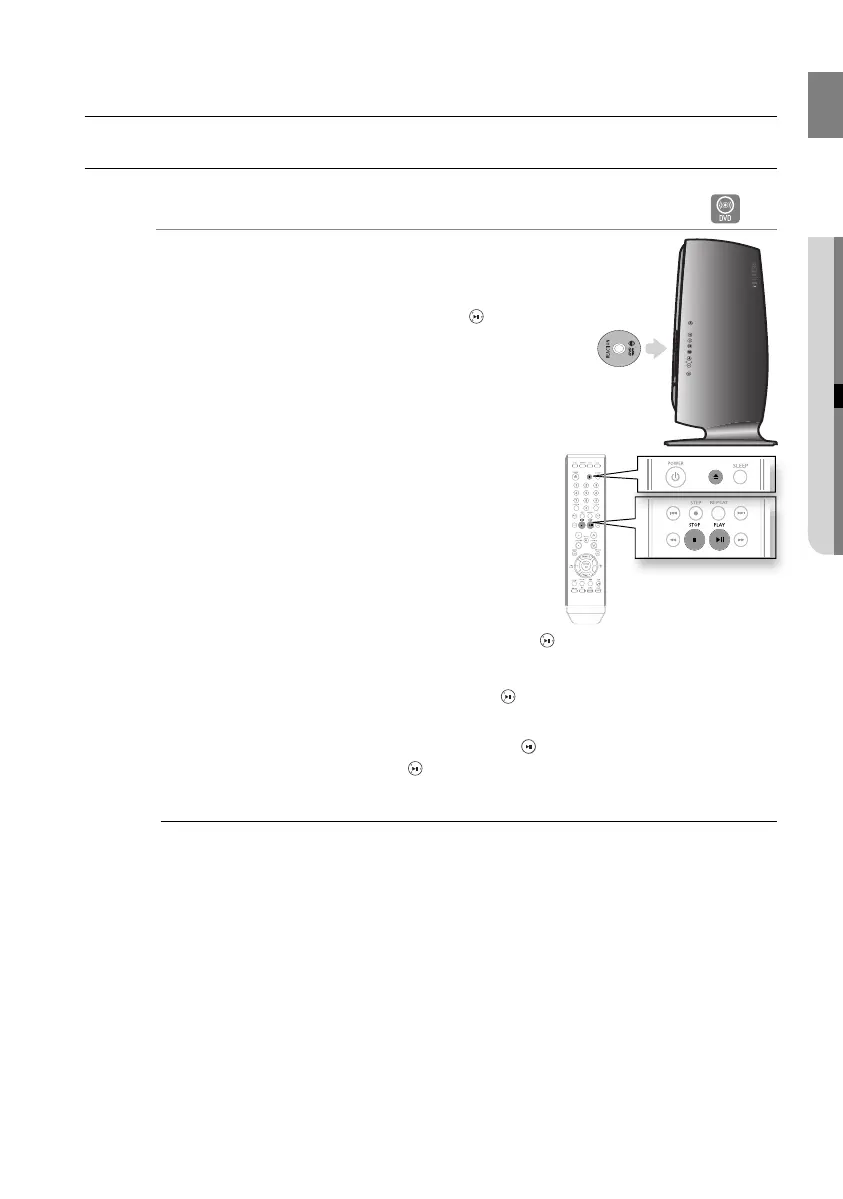
Load a disc vertically into the Disc Insert Hole.
Place a disc gently into the tray with the disc’s label facing
up.
Close the compartment by pressing the PLAY (
) button.
Playback starts automatically.
To stop playback, press the STOP (
) button during
playback.
If pressed once, PRESS PLAY is displayed and the stop
position will be stored in memory. If the PLAY (
) button or ENTER button is pressed, playback resumes from the stop position. (This
function works only with DVDs.)
If pressed twice, STOP is displayed, and if the PLAY (
) button is pressed, playback starts from
the beginning.
To temporarily pause playback, press the PAUSE ( ) button during playback.
To resume playback, press the PLAY ( ) button again.
Depending on the content of the disc, the initial screen may appear different.
Pirated discs will not run in this player because it violates the CSS (Content Scrambling System :
a copy protection system) recommendations.
1.
•
2.
•
•
•
•
M
playback
02107H-RTSE10-XME.indd 2102107H-RTSE10-XME.indd 21 6/20/08 11:05:00 AM6/20/08 11:05:00 AM






 To Next Page