EasyManua.ls Logo

Samsung SC-D103 - Front and Left View

Samsung SC-D103
108 pages
Print Icon
To Next Page IconTo Next Page
To Previous Page IconTo Previous Page
Loading...
ENGLISH
FRANÇAIS
Familiarisez-vous avec le caméscopeGetting to Know Your Camcorder
1313
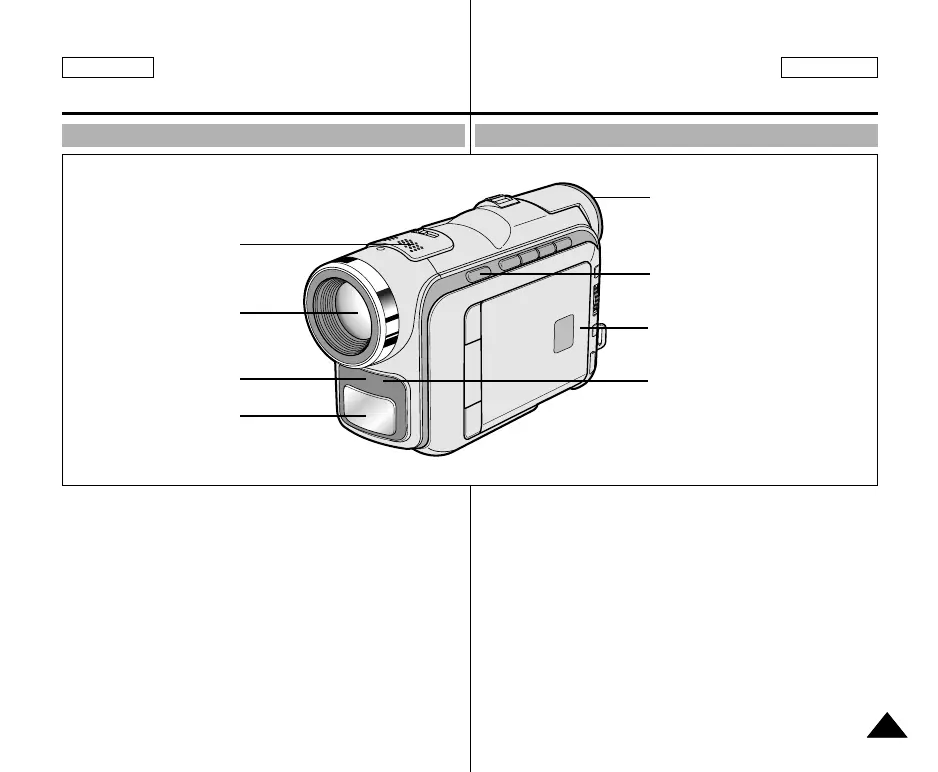
Front & Left View Vue avant et latérale (côté gauche)
1. Internal MIC
2. Lens
3. Remote sensor
(SCD105 only)
4. Video Light
(SCD103/D105 only)
5. Viewfinder
(see page 33)
6. EASY Q button
(see page 59)
7. TFT LCD monitor
8. IR(Infrared) Light
1. Entrée microphone
interne
2. Objectif
3. Capteur de la
télécommande
(SCD105 uniquement)
4. Torche intégrée
(SCD103/D105
uniquement)
5. Viseur (voir page 33)
6. Touche EASY Q
(voir page 59)
7. Écran à cristaux
liquides (LCD)
8. Témoin infrarouge
2. Lens
4. Video Light
(SCD103/D105 only)
3. Remote sensor
(SCD105 only)
1. Internal MIC
5. Viewfinder
7. TFT LCD monitor
8. IR(Infrared) Light
6. EASY Q button
00743B SCD103 USA+FRA(01~27) 2/16/04 5:13 PM Page 13

Table of Contents

Related product manuals