Need help?
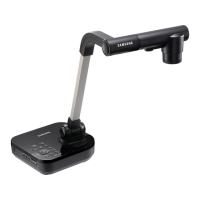
Do you have a question about the Samsung SDP-850DX and is the answer not in the manual?
Lists the minimum hardware and OS configurations needed to install the software.
Explains how to physically connect the presenter to the computer using a USB cable.
Provides steps to check USB port status and USB 2.0 support via Device Manager.
Explains how to view live images and how adjustments are displayed in the View Panel.
Explains Q-SAVE folder, auto-hide delay, and full resolution save settings.
Describes the main buttons and functions for image manipulation on the Control Panel.
Details the ZOOM/FOCUS and IRIS/COLOR controls for image adjustments.
Explains CONTROL FUNCTION buttons and Lamp ON/OFF controls.
Describes DIGITAL FUNCTION and PRESET features for saving/loading user settings.
Explains how to capture an image and save it in BMP or JPEG format.
Guides on how to print captured images using the Print Setup dialog.
Describes functions accessible from the Mini Control Panel, including switching to the full panel.
Explains how to instantly capture images using the Q-SAVE button or F2 key.
Details how to use the DIP panel to apply various image effects like Grayscale, Negative, etc.
Provides detailed explanations for DIP effects like Default, Grayscale, Histogram, and Negative.
Describes Image Rotation, Emboss, and Mosaic effects, and provides a summary table.
Lists system requirements and steps for installing and running the TWAIN driver in application software.
Explains how to scan images from the presenter using the TWAIN driver and application software.
Lists key combinations and their functions, such as SCREEN FULL mode and Q-SAVE.
Introduces the AVI Capture program for capturing digital images as AVI files.
Discusses file system limitations and compression modes for AVI capture.
Details capture time limits, video/audio compression, and image controls within the AVI Capture program.
Explains capture status, image flipping, control adjustments, and the stop/exit process for AVI capture.
Addresses issues related to program communication errors and USB connection problems.
Solves problems with finding USB drivers, incorrect USB hub connections, and slow frame rates.
Covers issues with performance degradation and inability to play captured files.
 General
| Resolution | XGA (1024 x 768) |
|---|---|
| Light Source | Lamp |
| Frame Rate | 30 fps |
| Document Size | A3 |
| Input Interfaces | VGA, S-Video, Composite Video |
| Output Interfaces | VGA |
| Image Sensor | 1/3" |
| Focus | Manual |

 To Next Page