
 Need help?
Do you have a question about the Samsung SGH-I747M and is the answer not in the manual?
Step-by-step guide to initiating phone calls.
How to receive and respond to incoming calls.
Guide to saving new contact information into the address book.
Step-by-step process for composing and sending messages.
Configuration options for connecting to wireless networks.
Managing Bluetooth connections and device visibility.
Information on connecting to wireless networks and managing settings.
Details on activating, pairing, and managing Bluetooth devices.
Utilizing the phone's camera for photos and videos.
 General
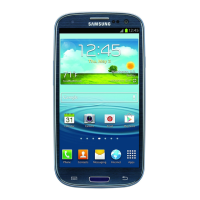
| Model | SGH-I747M |
|---|---|
| Network Technology | GSM / HSPA / LTE |
| 2G bands | GSM 850 / 900 / 1800 / 1900 |
| 4G bands | LTE band 4(1700/2100), 17(700) |
| Speed | HSPA 21.1/5.76 Mbps, LTE Cat3 100/50 Mbps |
| GPRS | Yes |
| EDGE | Yes |
| Announced | 2012, May |
| Dimensions | 136.6 x 70.6 x 8.6 mm (5.38 x 2.78 x 0.34 in) |
| Weight | 133 g (4.69 oz) |
| SIM | Micro-SIM |
| Display Type | Super AMOLED |
| Display Protection | Corning Gorilla Glass 2 |
| OS | Android 4.0.4 (Ice Cream Sandwich), upgradable to 4.3 (Jelly Bean) |
| Chipset | Qualcomm MSM8960 Snapdragon S4 Plus |
| CPU | Dual-core 1.5 GHz Krait |
| GPU | Adreno 225 |
| Internal Storage | 16 GB |
| RAM | 2 GB |
| Main Camera Video | 1080p@30fps |
| Selfie camera | 1.9 MP |
| Loudspeaker | Yes |
| 3.5mm jack | Yes |
| WLAN | Wi-Fi 802.11 a/b/g/n, dual-band, Wi-Fi Direct, DLNA, hotspot |
| GPS | Yes, with A-GPS, GLONASS |
| NFC | Yes |
| USB | microUSB 2.0 (MHL TV-out), USB Host |
| Sensors | Accelerometer, gyro, proximity, compass, barometer |
| Talk time | Up to 10 h (3G) |
| Colors | Pebble Blue, Marble White |
| 3G bands | HSDPA 850 / 1900 / 2100 |
| Status | Available |
| Display Size | 4.8 inches |
| Resolution | 720 x 1280 pixels |
| Card slot | microSD, up to 64 GB |
| Main Camera | 8 MP |
| Main Camera Features | LED flash |
| Bluetooth | 4.0, A2DP |
| Radio | FM radio |
| Battery | 2100 mAh |









 To Next Page
