SAMSUNG Proprietary-Contents may change without notice
Exploded View and Parts List
7-9
This Document can not be used without Samsung's authorization
9
11
1) 그림과 같이 스폰지를 부착한다.
12
9
10
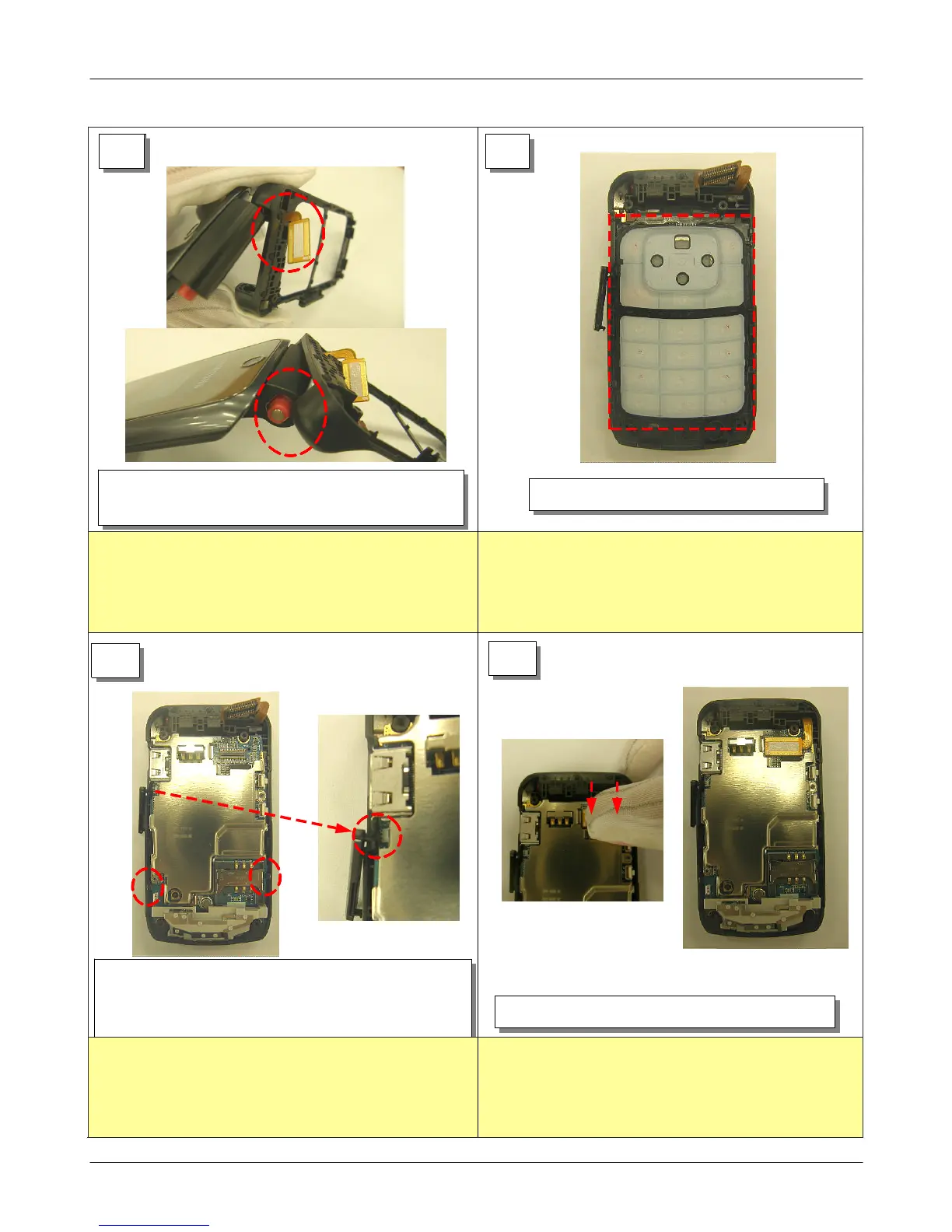
1) Assembly LCD CONNECTOR.
1) Insert LCD CON TO CON in the FRONT hall.
2) Push the Hinge portion and insert in FRONT hall.
1) Set KEYPAD on the FRONT.
1) Earjack cover projection is assembled on PBA with
right side picture.
2) Set a PBA.
1) Be careful not to crack LCD CON TO CON.
2) Be careful Hinge and Front damage.
1) KEYPAD takes care so that do not insert to FRONT
rib.
1) Check the earjack cover.
1) Press until Connector is sonant "Click"
2) When joint LCD CONNECTOR, be careful approximately
parts damage.






 To Next Page