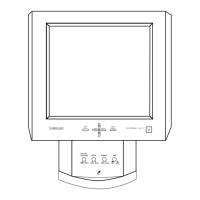
Front
1. MENU 6. PIP
2. Navigate buttons (Up-Down buttons) 7. Power button
3. Adjust buttons (Left-Right buttons)/
Volume buttons
8. Power indicator
4. ENTER 9. Remote Control Sensor
5. SOURCE
1. MENU
Opens the on-screen menu and exits from the menu or closes the screen adjustment
menu.
2. Navigate buttons (Up-Down buttons)
Moves from one menu item to another vertically or adjusts selected menu values.
3. Adjust buttons (Left-Right buttons) / Volume buttons
Moves from one menu item to another horizontally or adjusts selected menu values.
Adjusts the audio volume.
4. ENTER
Activates a highlighted menu item.
5. SOURCE
Switches from PC mode to Video mode.
Changing the source is only allowed for external devices that are connected to the monitor
at the time.
To switch Screen modes:
[PC] [BNC] [DVI] [AV] [S-VIDEO] [Component]
>>Click here to see an animation clip
6. PIP
Push the PIP button to turn the PIP screen On/Off.
More than one PIP cannot overlap on screen as BNC and the component use the same
terminal.
>>Click here to see an animation clip
• PC / DVI
: AV / S-Video / Component Mode
• BNC
: AV / S-Video Mode
• AV / S-Video
: PC / BNC / DVI Mode
• Component
: PC / DVI Mode
7. Power button
Turns the monitor On/Off.
8. Power indicator
Shows PowerSaver mode by blinking green.
9. Remote Control Sensor
Aim the remote control towards this spot on the Monitor.
See PowerSaver described in the manual for further information regarding power saving functions.
For ener





 To Next Page


