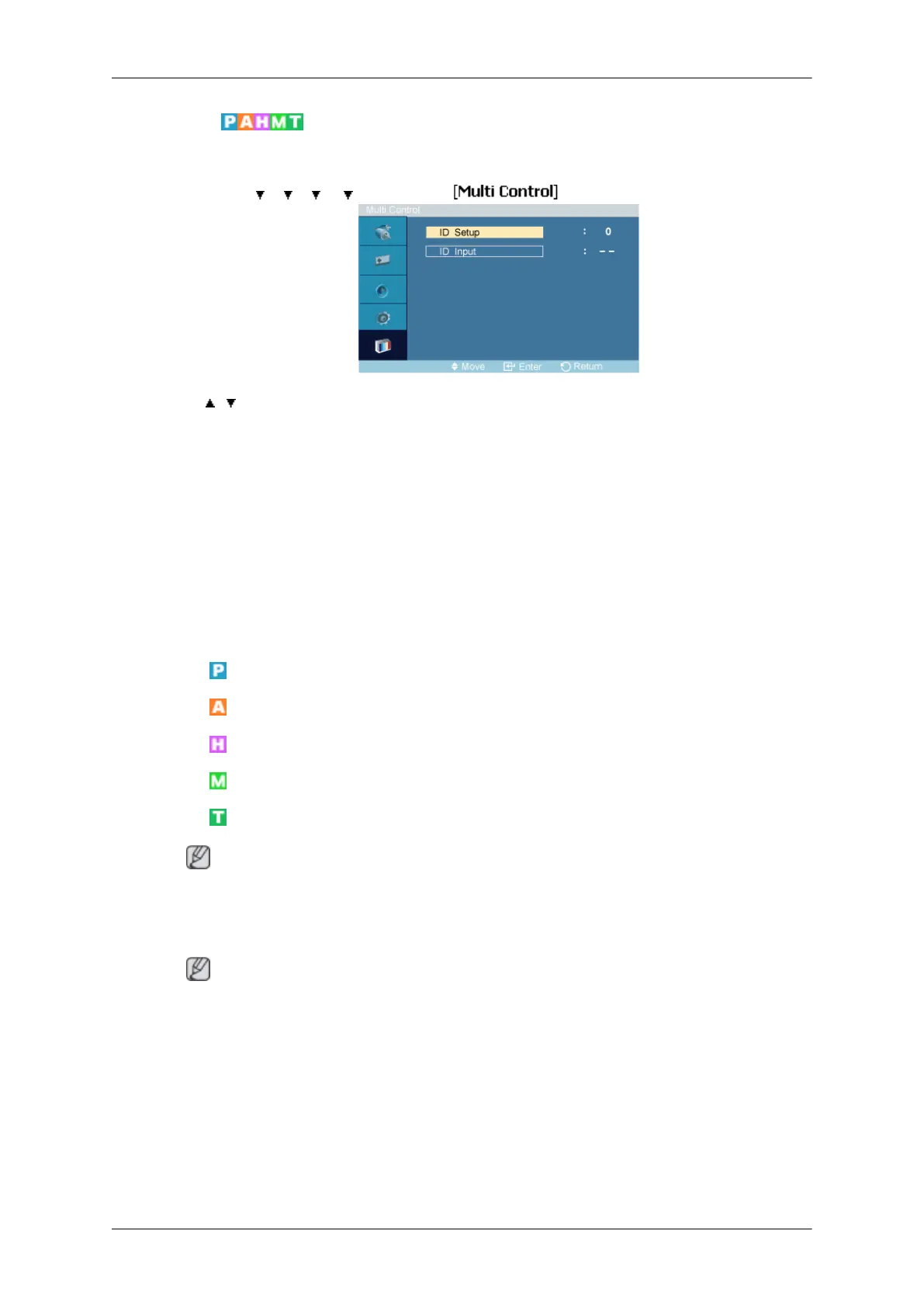
Multi Control
Assigns an individual ID to the SET.
MENU → → → → → ENTER → → ENTER
→ , → [0~9]
• ID Setup
Assigns distinctive IDs to the SET.
• ID Input
Use to select the transmitter functions of the individual SET. Only a SET where the ID
corresponds to the transmitter setting becomes activated.
MagicInfo
Available Modes
•
PC / DVI
•
AV
•
HDMI
•
MagicInfo
•
TV
Note
• The TV menu is available when a TV tuner box is installed.
• UT model can use MagicInfo menu when mounted Network box.
Note
• For MagicInfo, a remote control is available for MagicInfo. However, it is recommended
using a separate USB keyboard.
• For MagicInfo in Device mode, moving external devices while booting may cause errors.
Set up external devices only if the LCD Display turns on.
• Do not unplug the LAN cable used for the network (ex: video display). Otherwise, the
program (MagicInfo) may stop. If you do unplug the cable, restart the system.
• Do not unplug the LAN cable used by an USB device (ex: video display). Otherwise, the
program (MagicInfo) may stop.
Adjusting the LCD Display




 To Next Page