OS
z Windows™ 98 SE
z
Windows™ Me
z Windows™ NT 4.0
z
Windows™ 2000
z
Windows™ XP Home Edition
z
Windows™ XP Professional
Hardware
z
128MB Memory above(recommended)
z
25MB Free Hard disk space above
Service Packs
z
It is recommended that your System has the latest Service Pack installed.
z For Windows™ NT 4.0, it is recommended to install Internet Explorer 5.0 and above with Active
Desktop component.
* For more information, visit the MagicRotation website.
* Windows™ is registered trademark of Microsoft Corporation,Inc.
Overview | Installation |
Interface
| Uninstall | Troubleshooting
z
When Rotation is functioning, part of MagicTune™ Program may not operate normally.
z
AutoRotation : AutoRotation will automatically AutoRotations the monitor to 0, 90,
180degrees when you AutoRotations the monitor.
* The angle of rotatation may vary depending on your monitor spec.
To execute AutoRotation, it should be done as below.
z
Please install both of Rotation program and MagicTune™ 3.6 in your PC.
z
Launch MagicTune™ 3.6
z
Option
→
Preference
→
click the small box as "V" in
enable task tray menu
.
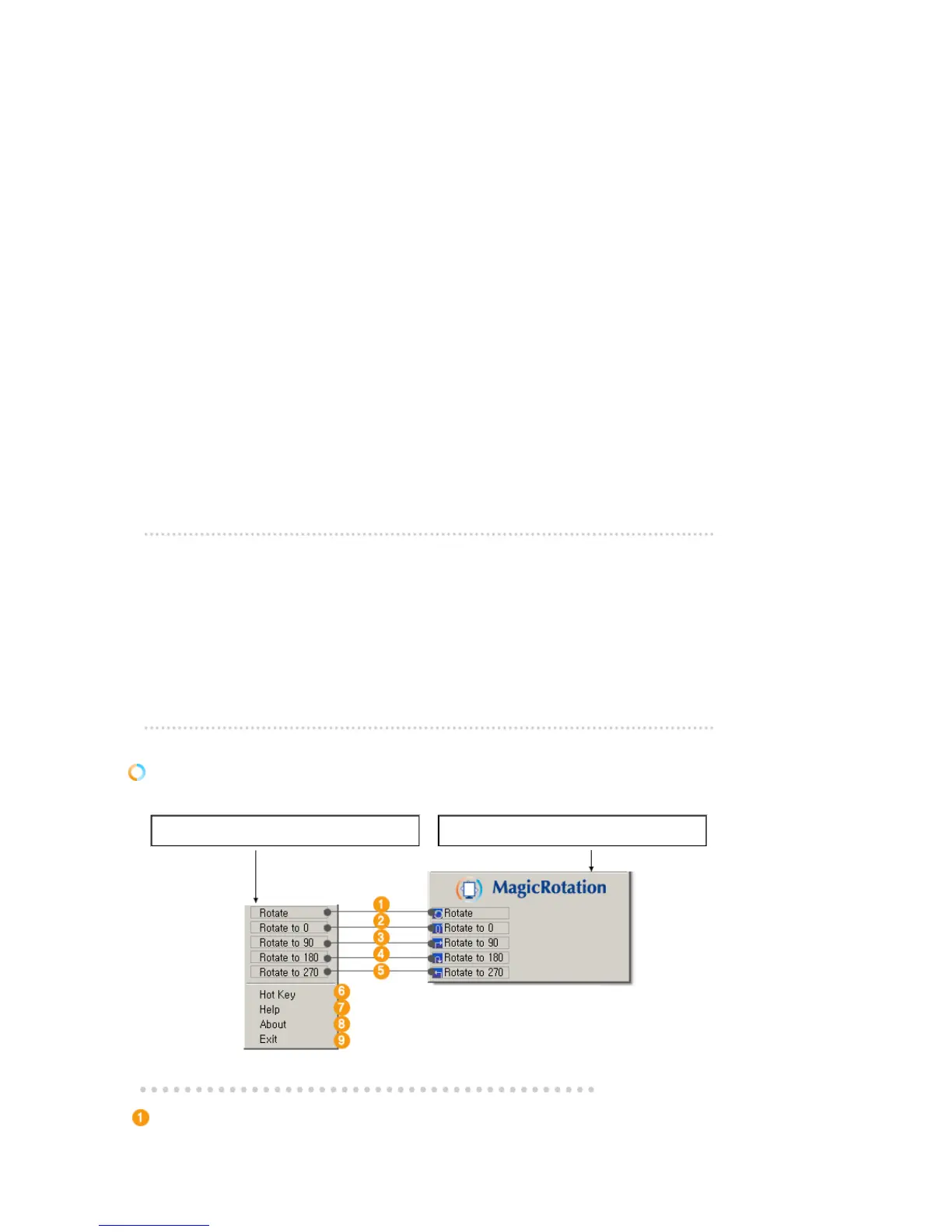
Interface
The Menu on task bar Menu pop up at the mouse right button click.
Rotate
: Display will get rotated by the unit of 90 degree












 To Next Page