User’s Guide 27
On-Screen Display
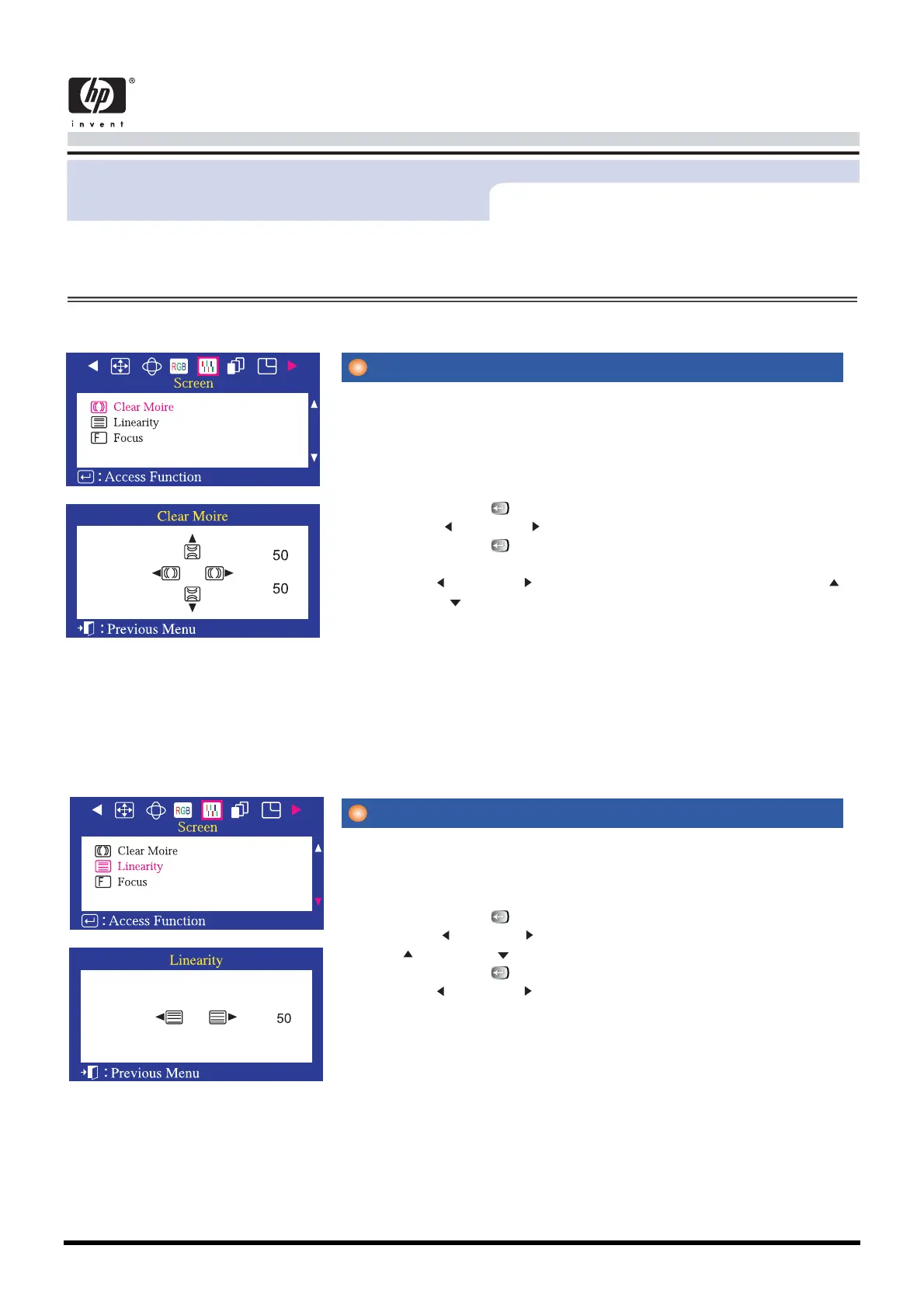
A 'moire' pattern can appear on your screen, looking like a series of
concentric circles or arcs. To eliminate this pattern, use the clear moi-
re
adjustments.
1 Push the Menu( ) button.
2 Push the button or button until the Screen OSD is displayed.
3 Push the Menu( ) button to open the Clear Moire adjustment
screen.
Use the button or button to adjust horizontal moire; use the
button or button to adjust vertical moire.
Adjust the linearity setting when the display image is compressed at
the left,right or top,bottom.
1 Push the Menu( ) button.
2 Push the button or button until the Screen OSD is displayed. Push
the button or button to select Linearity.
3 Push the Menu( ) buttonto open the Linearity adjustment screen.
4 Use the button or button to adjust the vertical Linearity.
v
Clear Moire
v
Linearity
Menu How to adjust









 To Next Page