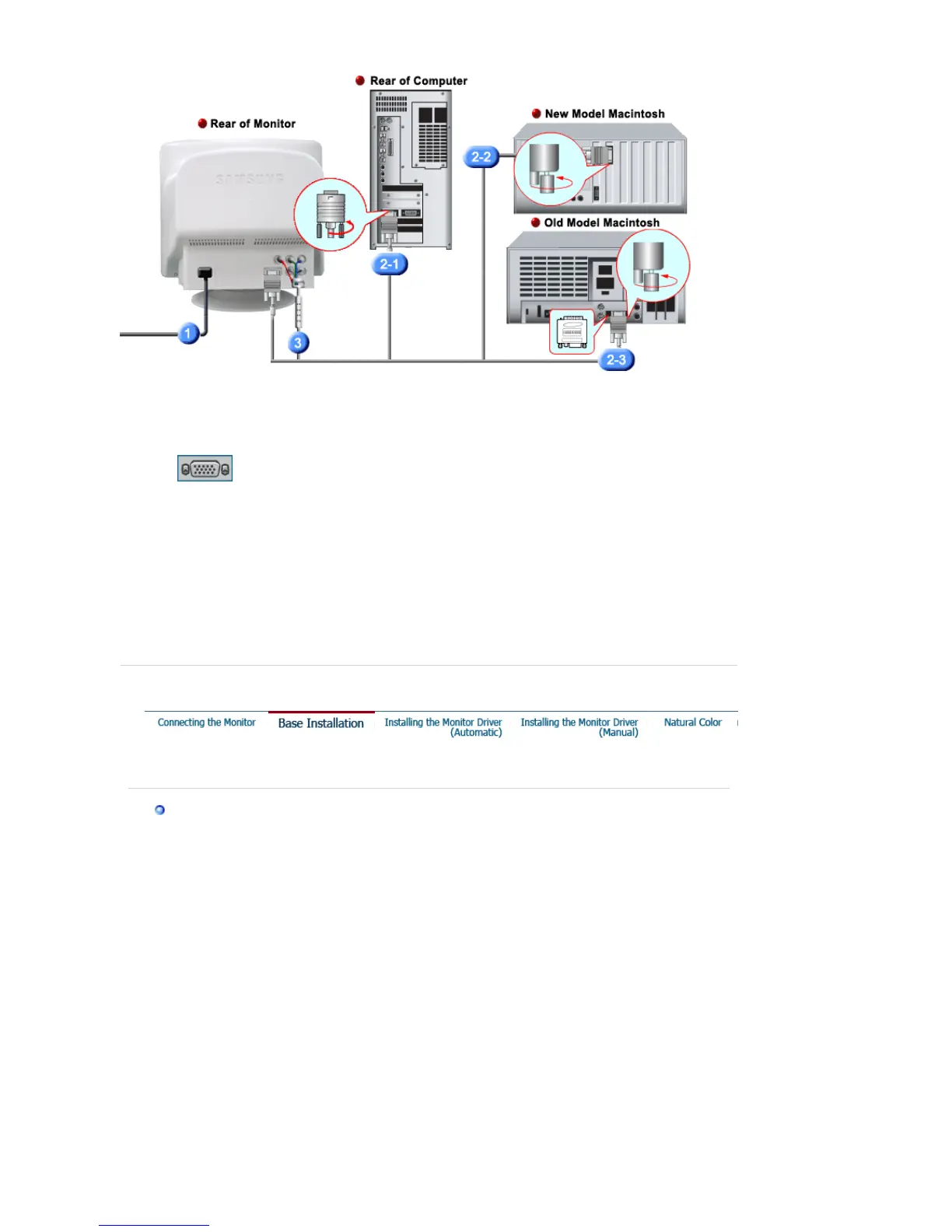
1.
Connect the power cord for your monitor to the power port on the back of the monitor.
Plug the power cord for the monitor into a nearby outlet.
2-1.
Connecting to a computer
Connect the signal cable to the 15-pin, D-sub connector on the back of your monitor.
2-2.
Connecting to a new Macintosh
Connect the monitor to the Macintosh computer using the D-Sub connection cable.
2-3.
Connecting to an old Macintosh
Connect your monitor to the Macintosh using the adapter for Macintosh (sold separately).
3.
When you use a BNC connector.
Connect the signal cable to the BNC signal port on the back of your monitor/computer.
4.
Turn on your computer and monitor. If your monitor displays an image, installation is
complete.
Tilt/Swivel Base | Attaching and Removing the Base
Tilt/Swivel Base
With the built-in pedestal, you can tilt and/or swivel the monitor for the most comfortable
viewin











 To Next Page