To Next Page
H
heather24Aug 17, 2025
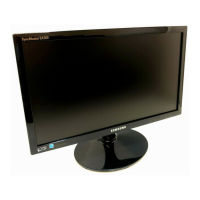
Why is my Samsung SyncMaster S19B420B Monitor screen too bright or too dark?
- TTerri EscobarAug 17, 2025
If your Samsung Monitor screen is too bright or too dark, adjust the Brightness and Contrast settings.

Why is my Samsung SyncMaster S19B420B Monitor screen too bright or too dark?
If your Samsung Monitor screen is too bright or too dark, adjust the Brightness and Contrast settings.
Why is there no sound coming from my Samsung SyncMaster S19B420B?
If there is no sound from your Samsung Monitor, check the connection of the audio cable and adjust the volume. Also, check the volume level.
How to fix low volume on Samsung SyncMaster S19B420B Monitor?
If the volume on your Samsung Monitor is too low, adjust the volume. If the volume remains low after maximizing it, adjust the volume on your PC sound card or software program.
What to do if the Samsung SyncMaster S19B420B screen is not clear or blurry?
If your Samsung Monitor screen appears blurry, try the following: 1. Adjust the Coarse and Fine settings. 2. Remove any accessories like video extension cables and try again. 3. Set the resolution and frequency to the recommended level.
How to fix unstable and shaky screen on Samsung SyncMaster S19B420B Monitor?
To resolve an unstable and shaky screen on your Samsung Monitor, verify that the PC resolution and frequency are within the monitor's compatible range. If needed, adjust the settings.
Why is there no image on my Samsung SyncMaster S19B420B Monitor, but the power LED blinks?
If there is no image on the screen and the power LED blinks on your Samsung Monitor, it's likely operating in power-saving mode. Press any key on the keyboard or move the mouse to return to normal operating mode.
How to fix inconsistent screen color on Samsung SyncMaster S19B420B?
To fix inconsistent screen color on your Samsung Monitor, change the COLOR settings.
How to fix distorted images on Samsung Monitor?
To fix distorted images on your Samsung Monitor, check the cable connection to the product.
How to fix white color on Samsung SyncMaster S19B420B if it does not really look white?
If white does not really look white on your Samsung Monitor, change the COLOR settings.
What to do if the power LED is off and the Samsung SyncMaster S19B420B Monitor screen will not switch on?
If the power LED is off and the screen will not switch on, check that the power cable is connected properly.
 General
| Resolution | 1366 x 768 |
|---|---|
| Panel Type | TN |
| Brightness | 250 cd/m² |
| Contrast Ratio | 1000:1 |
| Response Time | 5 ms |
| Aspect Ratio | 16:9 |
| Screen Size | 19 inches |
| Dynamic Contrast Ratio | Mega |
| Connectivity | VGA |
| Viewing Angle | 90° horizontal, 65° vertical |