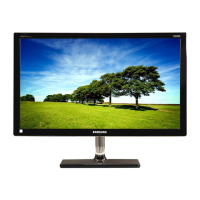
Why is there no sound on my Samsung T24C550ND Monitor but the video is working?
- AAmanda MccannAug 17, 2025
If you're getting video but no audio on your Samsung Monitor, and you're using an HDMI connection, check the audio output setting on your PC.
Why is there no sound on my Samsung T24C550ND Monitor but the video is working?
If you're getting video but no audio on your Samsung Monitor, and you're using an HDMI connection, check the audio output setting on your PC.
Why is there no sound on my Samsung T24C550ND Monitor or the sound is too low?
If there's no sound or the sound is too low even at maximum volume on your Samsung Monitor, check the volume of the device connected to it (Cable/Sat Box, DVD, Blu-ray, etc.).
Why is my Samsung Monitor picture black and white?
If the picture on your Samsung Monitor is black and white, and you're using an AV composite input, connect the video cable (yellow) to the Green jack of component input on the TV.
How to adjust color and brightness on Samsung Monitor?
If you notice poor color or brightness on your Samsung Monitor, try these steps: * Adjust the Picture options in the TV menu (Picture mode / Color / Brightness / Sharpness). * Adjust the Energy Saving option in the TV menu (MENU – Setup). * Reset the picture to the default settings (MENU - Picture - Reset Picture).
Why is the picture distorted on my Samsung T24C550ND?
Distortion in your Samsung Monitor's picture, such as macro block errors, small blocks, dots, or pixelization, can occur due to compression of video content, especially during fast-moving scenes. Low signal levels can also cause this. Additionally, mobile phones used close to the TV (within 3.3ft) may cause picture noise on analog and digital TV.
Why is the color wrong or missing on my Samsung T24C550ND?
If the color is wrong or missing on your Samsung Monitor, and you're using a Component connection, ensure the component cables are connected to the correct jacks. Incorrect or loose connections may cause color problems or a blank screen.
Why does my Samsung T24C550ND Monitor image not look as good as in the store?
If your Samsung Monitor's picture quality isn't as good as it appeared in the store, consider these options: * If using an analog cable/satellite box, upgrade to an HD digital set-top box. * Use HDMI or Component cables for HD picture quality. * Cable/Satellite subscribers: Try HD stations from the channel lineup. * Antenna connection: Try HD stations after performing Auto program. * Adjust the Cable/Sat box video output resolution to 1080i or 720p. * Ensure you're watching from the minimum recommended distance based on the screen size and signal definition.
What to do if Samsung T24C550ND picture freezes when changing channels?
If your Samsung Monitor's picture freezes, distorts, or delays when changing channels: * If connected to a cable box, reset it by disconnecting the AC cord and waiting for it to reboot (up to 20 minutes). * Set the output resolution of the cable box to 1080i or 720p.
Why are the speakers on my Samsung Monitor making noise?
If the speakers on your Samsung Monitor are making inappropriate noise: * Check cable connections, ensuring a video cable isn't connected to an audio input. * For antenna or Cable connections, check the signal strength, as low signal levels may cause sound distortion. * Perform the Sound Test.
How to remove dotted line on the edge of Samsung Monitor screen?
If you see a dotted line on the edge of your Samsung Monitor screen: * If the picture size is set to Screen Fit, change it to 16:9. * Change the cable/satellite box resolution.
Warning about displaying static images and potential screen burn-in.
Essential safety instructions and warnings for product use.
Precautions regarding power cords, plugs, and electrical connections.
Safety guidelines for installing the TV to prevent damage or injury.
Connecting external audio/video devices using various cables.
Instructions for connecting headphones and computers.
Managing channels, favorites, memorizing, and editing channels.
Adjusting preset picture modes and picture settings.
Adjusting sound modes, equalizer, and volume preferences.
Solutions for common problems like no picture, poor picture, or sound issues.
Warning about displaying static images and potential screen burn-in.
Essential safety instructions and warnings for product use.
Precautions regarding power cords, plugs, and electrical connections.
Safety guidelines for installing the TV to prevent damage or injury.
Connecting external audio/video devices using various cables.
Instructions for connecting headphones and computers.
Managing channels, favorites, memorizing, and editing channels.
Adjusting preset picture modes and picture settings.
Adjusting sound modes, equalizer, and volume preferences.
Solutions for common problems like no picture, poor picture, or sound issues.
| Response time | 2 ms |
|---|---|
| Display diagonal | 23.6 \ |
| Display brightness | 250 cd/m² |
| Native aspect ratio | 16:9 |
| LED backlighting type | - |
| Supported video modes | 1080i, 1080p, 720p |
| Viewing angle, vertical | 160 ° |
| Contrast ratio (typical) | 1000:1 |
| Display diagonal (metric) | 59 cm |
| Screen format adjustments | 4:3, 16:9 |
| Viewing angle, horizontal | 170 ° |
| Supported graphics resolutions | 720 x 400, 832 x 624, 1152 x 870, 1024 x 768 (XGA), 1280 x 1024 (SXGA), 1280 x 720 (HD 720), 1280 x 800 (WXGA), 1366 x 768, 1440 x 900 (WXGA+), 1680 x 1050 (WSXGA+), 1920 x 1080 (HD 1080), 640 x 480 (VGA), 800 x 600 (SVGA) |
| Dynamic contrast ratio marketing name | Mega Contrast |
| 3D | No |
| Tilt angle range | 0 - 20 ° |
| Cable lock slot type | Kensington |
| Storage temperature (T-T) | -20 - 45 °C |
| Storage relative humidity (H-H) | 5 - 95 % |
| Operating relative humidity (H-H) | 10 - 80 % |
| DVI-D ports quantity | 0 |
| USB 2.0 ports quantity | USB 2.0 ports have a data transmission speed of 480 Mbps, and are backwards compatible with USB 1.1 ports. You can connect all kinds of peripheral devices to them. |
| Audio system | Dolby Digital + / Pulse, DTS Premium Sound, DTS Studio Sound |
| RMS rated power | 10 W |
| Number of OSD languages | 3 |
| On Screen Display (OSD) languages | ENG, ESP, FRE |
| Product color | Charcoal |
| Panel mounting interface | 75 x 75 mm |
| AC input voltage | 100 - 240 V |
| AC input frequency | 50 - 60 Hz |
| Power consumption (max) | 45 W |
| Power consumption (standby) | 0.3 W |
| Power consumption (typical) | 23 W |
| Digital signal format system | ATSC |
| Package depth | 147 mm |
| Package width | 647 mm |
| Package height | 416 mm |
| Package weight | 6200 g |
| Cables included | HDMI |
| Sustainability certificates | ENERGY STAR |
| Audio formats supported | MP3, WMA |
| Image formats supported | JPG |
| Video formats supported | ASF, AVI, H.264, MKV, MP4, MPEG1, MPEG2, MPEG4, WMV |
| Operating temperature (T-T) | 10 - 40 °C |
| Depth (with stand) | 200 mm |
|---|---|
| Weight (with stand) | 4550 g |
| Depth (without stand) | 41.8 mm |
| Width (without stand) | 567.8 mm |
| Height (without stand) | 438.4 mm |
| Weight (without stand) | 4150 g |


Loading...