OPERATION
33
Using Automatic Picture Settings
Your TV has three automatic picture settings (“Dynamic”, “Standard” and “Movie” ) that
are preset at the factory. You can activate either Dynamic, Standard, Movie or Custom
by pressing the P.MODE button (or by making a selection from the menu). Or, you can
select “Custom” which automatically recalls your personalized picture settings.
• Choose Dynamic for viewing the TV during the day or when there is
brightlight in the room.
• Choose
Standard for the standard factory settings.
• Choose
Movie when viewing the movie.
• Choose
Custom if you want to adjust the settings according to personal
preference (see “Customizing the Picture”, page 33).
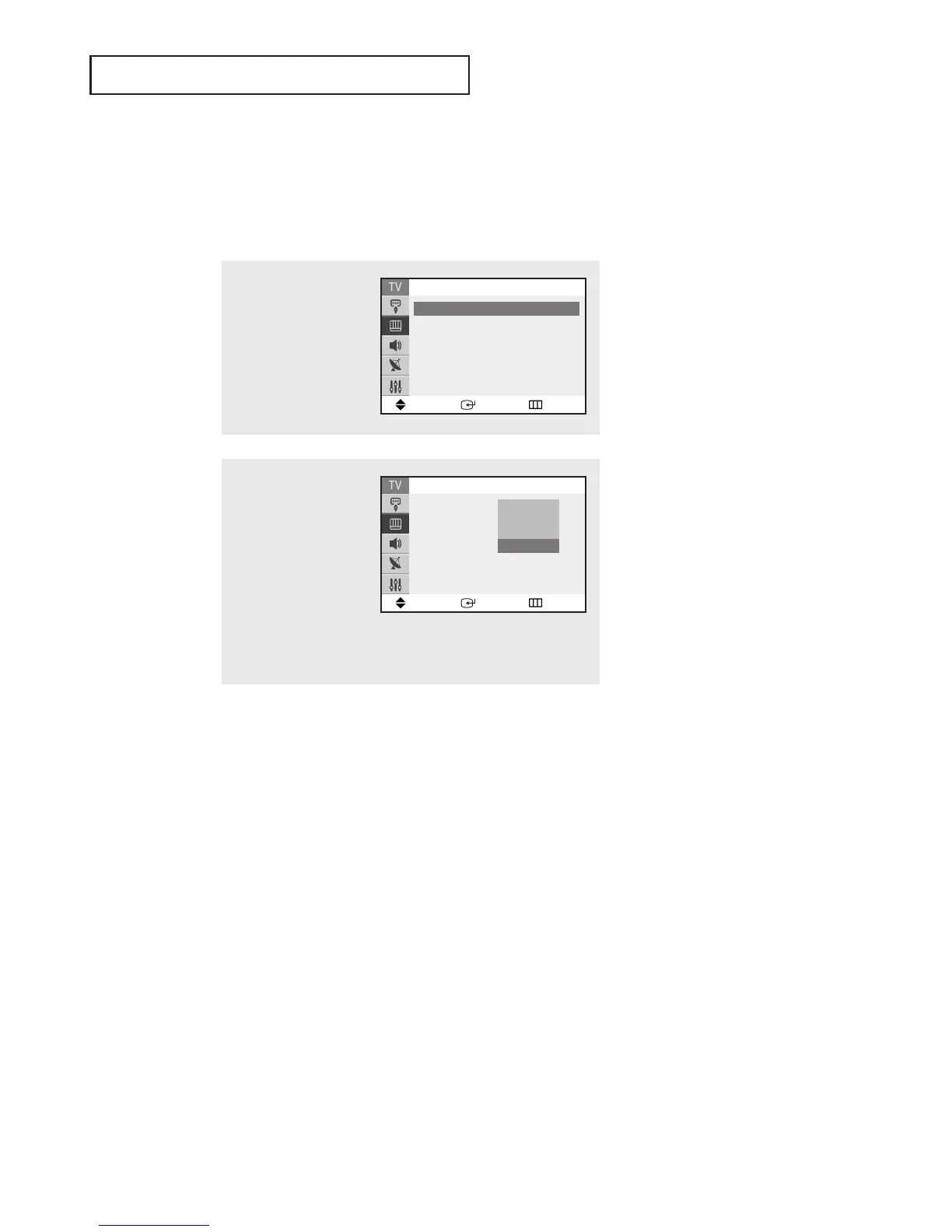
1
Press the MENU button to
display the menu.
Press the ▲ or ▼ button
to select “Picture”, then
press the ENTER button.
2
Press the ENTER button
again.
Press the ▲ or ▼ button
to select the “Dynamic”,
“Standard”“Movie” or
“Custom” picture setting,
then press the ENTER
button.
Press the EXIT button to
exit.
Move Enter Return
Mode : Dynamic
√√
Custom
√√
Color Tone : Normal
√√
Size : Normal
√√
▼
More
Picture
Move Enter Return
Mode : Custom
Custom
Color Tone : Normal
Size : Normal
▼
More
Picture
Dynamic
Standard
Movie
Custom




 To Next Page