SPECIAL FEATURES
53
Note: The V-Chip will automati-
cally block any category that is “more
restrictive.” For example, if you block
the “PG-13” category, then “R,” “NC-
17,” and “X” will automatically be
blocked also.
▼
4
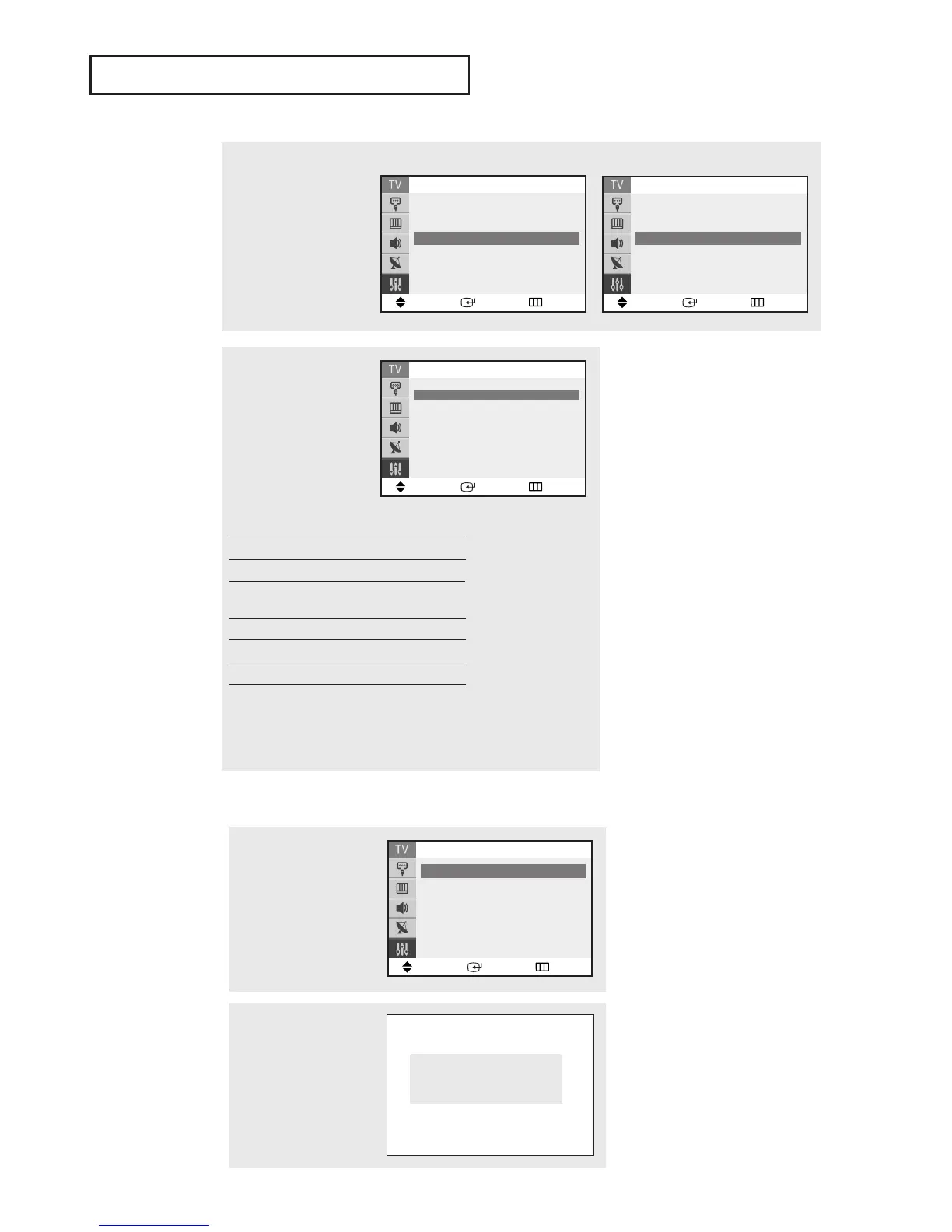
The “MPAA Rating” screen
will appear.
Repeatedly press the ▲ or
▼ button to select a par-
ticular MPAA category.
Pressing the ▲ or ▼ but-
ton will cycle through the
MPAA categories:
Move Enter Return
MPAA Rating
B/U
G
√√
U
PG
√√
U
PG-13
√√
U
R
√√
U
NC-17
√√
U
X
√√
U
NR
√√
U
B: Blocked U: Unblocked
G General audience (no restrictions).
PG Parental guidance suggested.
PG-13 PG-13 (Parents strongly cautioned).
R R (Restricted. Children under 17 should
be accompanied by an adult).
NC-17 No children under age 17.
X X (Adults only).
NR Not rated.
While a particular category is selected, press ENTER to activate it.
Aletter (“U” or “B”) will be selected. Press the ▲ or ▼ button to
select “U” or ”B”.
Press the
EXIT button to save the settings and to clear all screens.
3
Press the ▲ or ▼ button
to select the “MPAA
Rating”, then press the
ENTER button.
Move Enter Return
V-Chip
V-Chip Lock : Yes
TV Parental Guidelines
√√
MPAA Rating
√√
Change PIN
√√
<USA>
Move Enter Return
V-Chip
V-Chip Lock : Yes
TV Parental Guidelines
√√
MPAA Rating
√√
Canadian English
√√
▼
More
<Canada>
How to Set up Restrictions Using the Canadian English
2
Press the ▲ or ▼ button
to select the “V-Chip”, then
press the ENTER button.
The “Enter PIN” screen will
appear. Enter your 4-digit
PIN number,
Enter PIN
Enter PIN : - - - -
1
Press the MENU button to
display the menu.
Press the ▲ or ▼ button
to select the “Setup”, then
press the ENTER button.
Move Enter Return
Setup
Time
√√
Plug & Play
√√
V-Chip
√√
Caption
√√
▼
More
continued...




 To Next Page