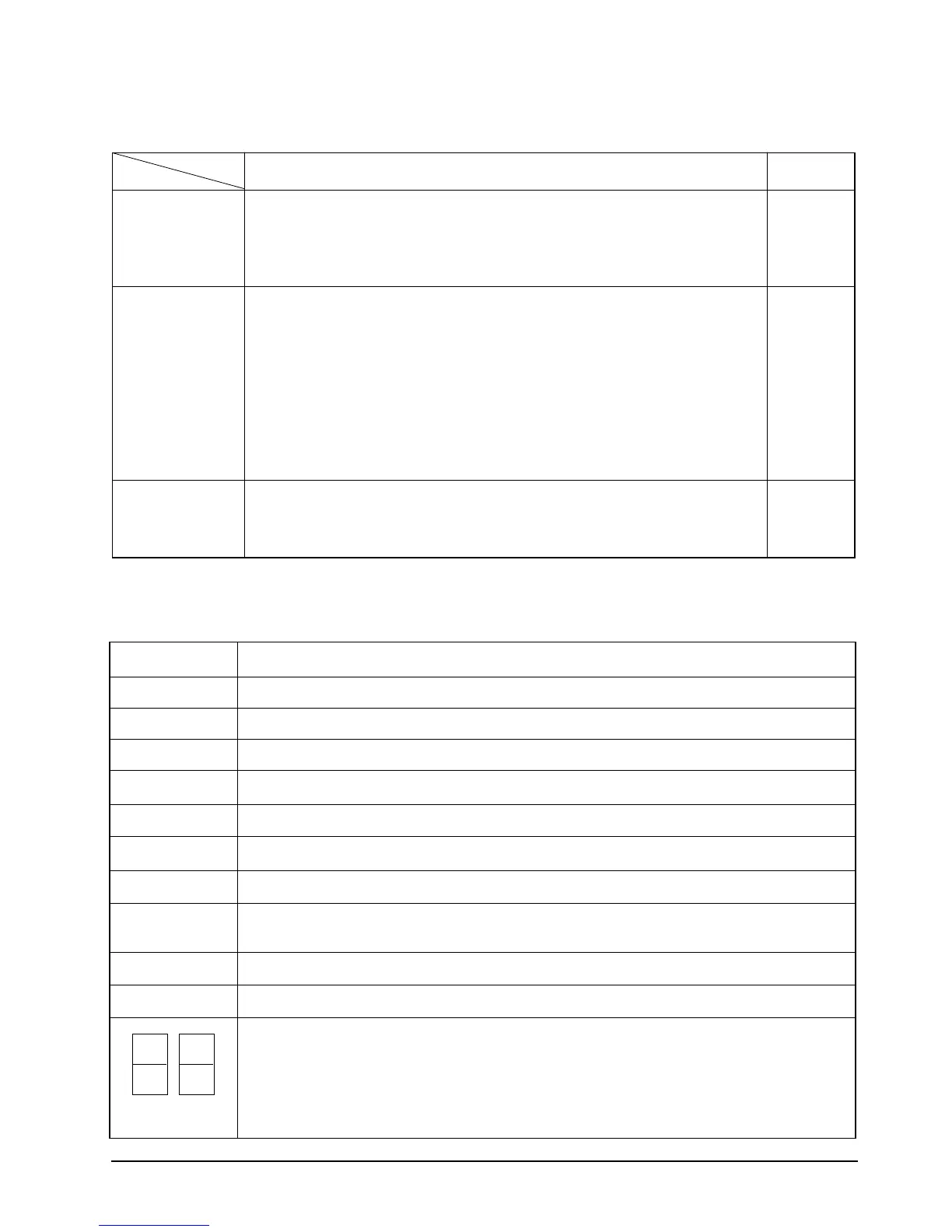
3-2-6 LED lamp operation specifications
LAMP name Operations specifications
COOL The mode is set to
"
COOL
" →
ON Others
→
OFF
FAN The mode is set to
"
FAN
" →
ON Others
→
OFF
˚C The set temperature is displayed Others
→
OFF
HIGH The mode is set to
"
HIGH
" →
ON Others
→
OFF
MID The mode is set to
"
MID
" →
ON Others
→
OFF
LOW The mode is set to
"
LOW
" →
ON Others
→
OFF
AIR SWING During setting of the
"
SWING MODE
" is set to "
SWING
" →
ON Others
→
OFF
Hr During setting of the convenient reserve (OFFTIMER) time
→
blinking
After setting of the convenient reserve (OFF TIMER) time
→
ON Others
→
OFF
TIMER Stand for /during / After setting of Convenient reserve (OFFTIMER) time
→
ON Others
→
OFF
ENERGY SAVER Energy Saving operation
→
ON Others
→
ON
In case of (set) temperature display
→
NO. (1) 7 seg. LED display indicates temperature of the tens digit
→
NO. (2) 7 seg. LED display indicates temperature of the units digit
In case of time (OFF TIMER) display
→
NO. (1) 7 seg. LED display indicates time of the tens digit
→
NO. (2) 7 seg. LED display indicates time of the units digit
3-4 Samsung Electronics
(1) (2)
Key operational function Key Type
Left/right swing Operation and stop of the left/right swing
- Once key on=left/right swing on, key on=left/right swing off again
- No operation continuously. TACT
- In case that the fan motor off(saving energy operation), left/right swing motor is not
operated(It is cleared in fan motor on.)
Off timer Setting the OFF Timer.
- In status of non-reservation, stand by the reservation set for once when key on. : "--" display
In status of the reservation setting stand by, it is not turn on the key within 10 second,
the reservation is cleared.
- In status of the reservation setting stand by within 10 second, the reservation setting time
TACT
is increased when key on.( -- → 1Hr → 2Hr → .. → 23Hr → 24Hr)
After setting the reservation time, if it is not turn on the key within 10 second,
it is reserved the Off timer with setting reservation time.
- For 24Hr, stand by the reservation set for once when key on. : "--" display
- It is possible a single shot and continue operation.
- In case of the operation off, it is treated invalidity.
Energy Save Operation and stop of the saving energy operation
- Once key on=saving operation on, key on=saving energy off again
- No operation continuously
TACT
- In case of the operation off, it is treated invalidity.
Key description
Key name
Installation and Operating Instructions
AW0690-00162A-1 5/16/00 11:33 AM Page 3-4




 To Next Page