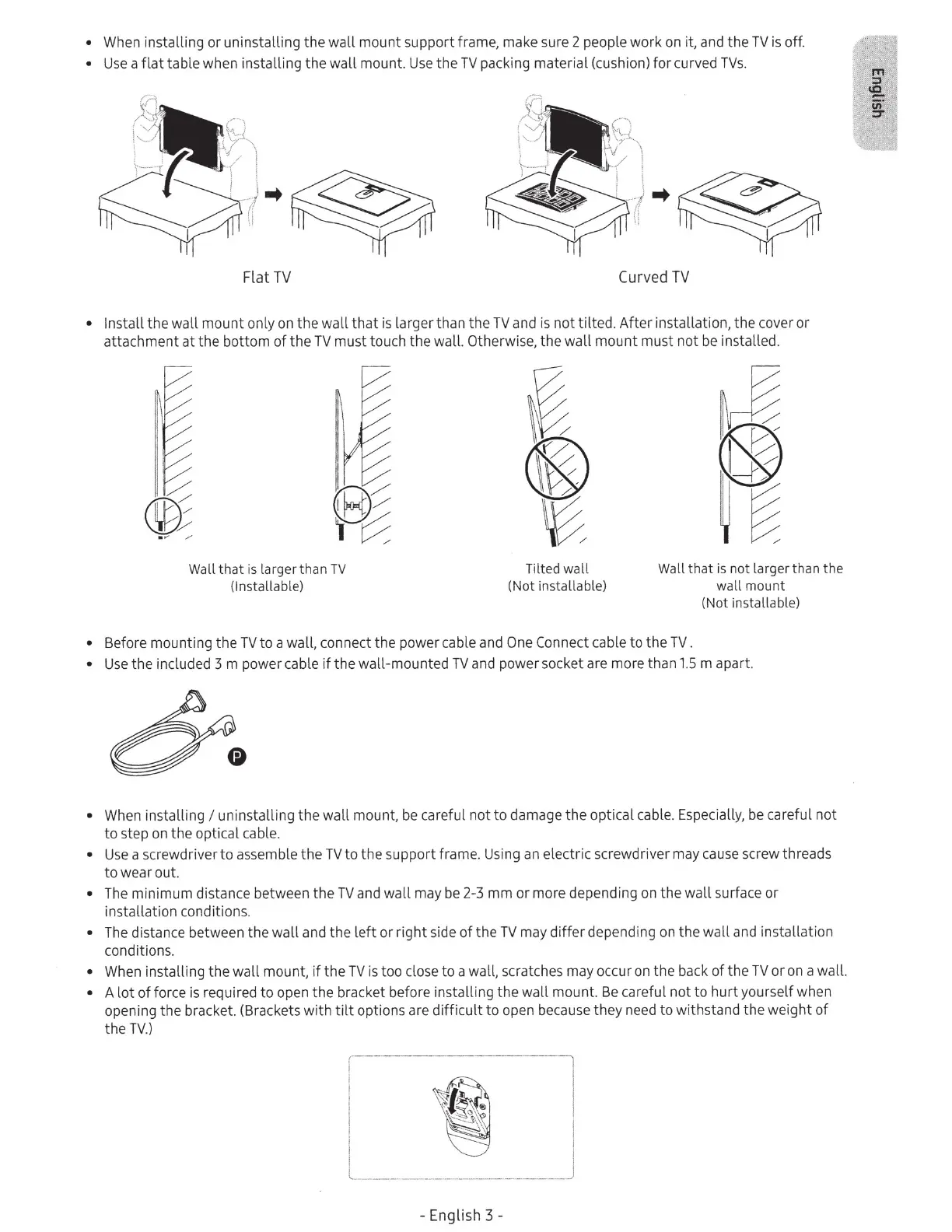
• When installing
or
uninstalling
the
wall
mount
support frame, make sure 2 people
work
on it, and the
TV
is off.
•
Use
a
flat
table when
installing
the
wall
mount.
Use
the
TV
packing material (cushion)
for
curved
TVs.
Flat
TV
Curved
TV
• Install
the
wall
mount
only on
the
wall
that
is larger
than
the
TV
and
is
not
tilted.
After
installation,
the
cover
or
attachment
at
the
bottom
of
the
TV
must
touch
the
wall. Otherwise,
the
wall
mount
must
not
be installed.
Wall
that
is
larger than
TV
(lnstallable)
T
il
ted wall
(Not installable)
Wall that
is
not larger than the
wall mount
(Not installable)
• Before mounting
the
TV
to
a wall, connect
the
power cable and One Connect cable
to
the
TV.
•
Use
the
included 3 m power cable
if
the
wall-mounted
TV
and pow
er
socket are more than
1.5
m apart.
• When installing
I uninstalling
the
wall
mount, be careful not
to
damage
the
optical cable. Especially,
be
careful
not
to
step on
the
optical cable.
•
Use
a screwdriver
to
assemble
the
TV
to
the
support frame. Using an electric screwdriver may cause screw threads
to
wear out.
• The minimum distance between
the
TV
and
wall
may
be
2-3
mm
or
more depending on
the
wall
surface
or
installation conditions.
• The distance between
the
wall
and
the
left
or
right
side
of
the
TV
may
differ
depending on
the
wall
and installation
conditions.
• When installing the
wall
mount,
if
the
TV
is
too close
to
a wall, scratches may occur on the back
of
the
TV
or
on a wall.
• A
lot
of
force is required
to
open
the
bracket before installing
the
wall
mount.
Be
careful
not
to
hurt
yourself when
opening
the
bracket. (Brackets
with
tilt
options are
difficult
to
open because they need
to
withstand
the
weight
of
the
TV.)
-
English
3 -







 To Next Page