EasyManua.ls Logo

Samsung WMN-M12E - Page 4

Samsung WMN-M12E
26 pages
Print Icon
To Next Page IconTo Next Page
To Previous Page IconTo Previous Page
Loading...
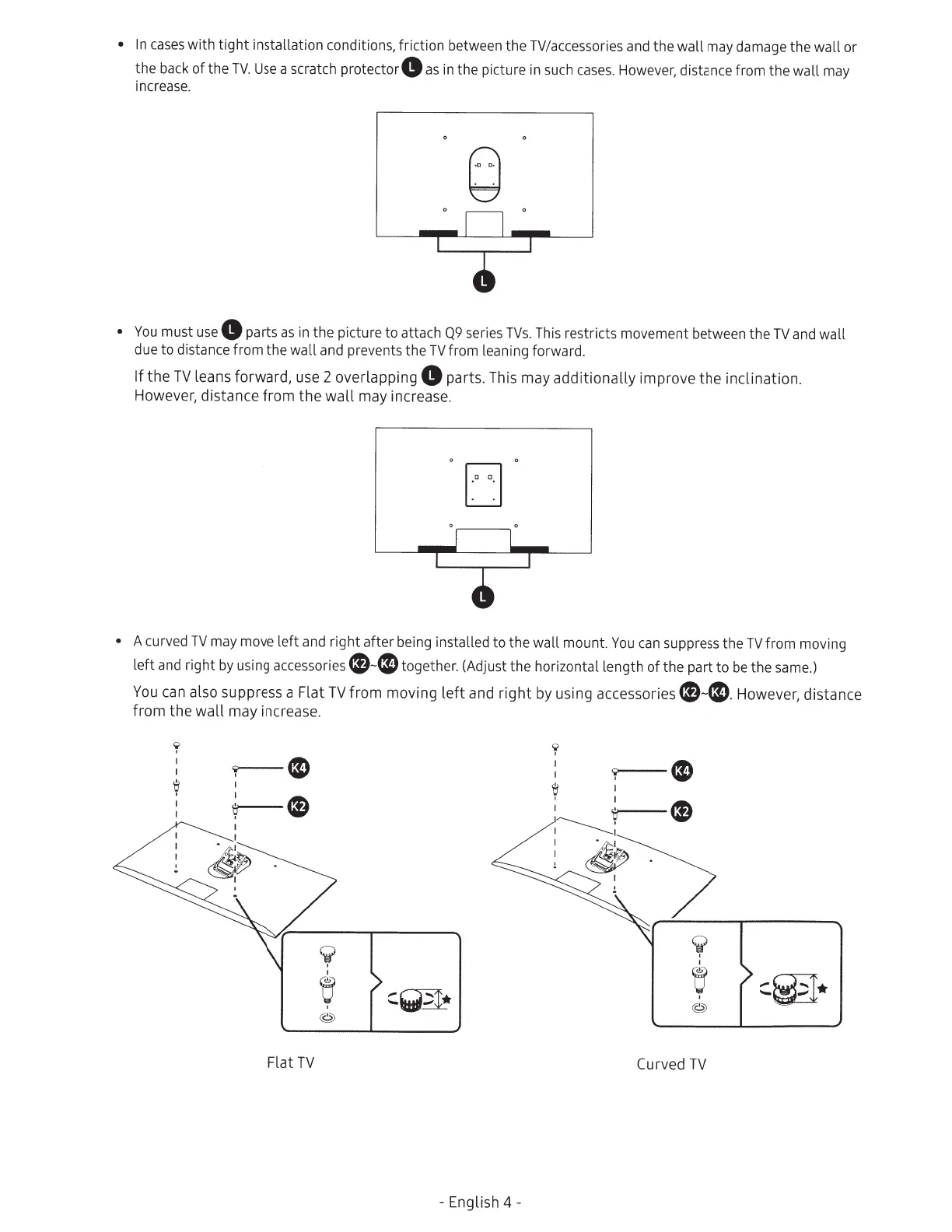
In
cases
with
tight
installation conditions, friction between
the
TV/accessories and the
wall
may damage the
wall
or
the
back
of
the
TV.
Use
a scratch
protector8
as
in
the picture in such
cases.
However, distance from
the
wall
may
increase.
(,:)
~
You
must
use
8
parts
as
in
the
picture
to
attach
Q9
series
TVs.
This restricts movement between the
TV
and
wall
due
to
distance from the
wall
and prevents the
TV
from leaning forward.
If
the
TV
leans forward, use 2 overlapping
8
parts. This may
additionally
improve
the
inclination.
However, distance
from
the
wall
may increase.
[J
.
A
curved
TV
may move
left
and
right
after being installed to the
wall
mount.
You
can
suppress the
TV
from moving
left
and right
by
using accessories
e-CO
together. (Adjust the horizontal length
of
the part
to
be
the
same.)
You
can
also suppress a Flat
TV
from
moving
left
and
right
by using accessories
e-e.
However, distance
from
the
wall
may increase.
9
I
e
I
~
~
~
Flat
TV
- English
4-
I
I
'0
9--e
;
~
~
~~.
'-P
!1?
--------~--------~
¥
I
y
Curved
TV

Related product manuals