EasyManua.ls Logo

Samsung YP-F3AL - User Manual

Samsung YP-F3AL
44 pages
Print Icon
To Next Page IconTo Next Page
Loading...
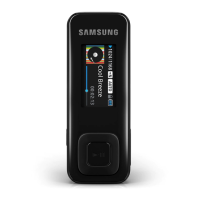
YP-F3
Thank you for purchasing this Samsung
product. To receive a more complete
service, please register your product at
www.samsung.com/register
Digital Audio Player
user manual
imagine the possibilities

Questions and Answers

  • L
    Lisa MillerAug 15, 2025
    Why Samsung YP-F3AL MP3 Player will not turn on?
    • A
      Annette ProctorAug 16, 2025
      Your Samsung MP3 Player might not turn on if the battery is completely drained. In this case, recharge the battery and try turning the player on again. Alternatively, you can press and hold the Power button for about 8-10 seconds to reset your player.
  • P
    Peggy NovakAug 18, 2025
    What to do if my Samsung YP-F3AL buttons do not work?
    • H
      hudsondanielAug 19, 2025
      If the buttons on your Samsung MP3 Player are not working, first check if the buttons are locked. Also, check if the buttons correspond to the functions you want to activate. If the issue persists, try pressing and holding the Power button for about 8-10 seconds to reset your player.
  • G
    Gary KnightAug 21, 2025
    Why Samsung YP-F3AL MP3 Player turns off automatically?
    • K
      kiaramccormickAug 21, 2025
      Your Samsung MP3 Player may turn off automatically if it is not used for 5 minutes after playback is paused. To resolve this, simply turn your player back on.
  • R
    Russell BarkerAug 25, 2025
    What to do if I cannot download files to my Samsung MP3 Player?
    • J
      Jason GonzalezAug 25, 2025
      If you cannot download files to your Samsung MP3 Player, verify that the USB cable is correctly connected and reconnect it if necessary. Also, check if the memory is full. If problems persist, try resetting your player by pressing and holding the Power button for about 8-10 seconds.
  • C
    Christopher CastilloAug 27, 2025
    Why my Samsung MP3 Player will not connect to a PC?
    • B
      bowmannatashaAug 28, 2025
      If your Samsung MP3 Player will not connect to a PC, run Windows Update on the PC. Select key updates and service packs and update all. When the update is completed, reboot the PC and reconnect.
  • M
    matthewgreeneAug 30, 2025
    What to do if the file transfer is too slow on Samsung YP-F3AL?
    • S
      samuelowensAug 30, 2025
      If the file transfer to your Samsung MP3 Player is too slow, format your player in ? ? and try again. Also, end all programs you are not using, because running multiple programs simultaneously can slow down the file transfer rate.
  • E
    emily44Sep 2, 2025
    What to do if my Samsung YP-F3AL will not play any files?
    • J
      Jose TaylorSep 2, 2025
      If your Samsung MP3 Player will not play any files, check if any playable files are stored on your player. Also, check if the files are damaged and ensure that the battery is charged.
  • W
    William CarterSep 6, 2025
    Why is my Samsung YP-F3AL MP3 Player getting hot to the touch?
    • D
      douglaswoodSep 6, 2025
      Charging the battery can cause your Samsung MP3 Player to heat up. This does not affect the player's life or capabilities.
  • A
    Austin BrooksSep 9, 2025
    Why the playing time does not display correctly during playback on Samsung YP-F3AL?
    • T
      Tina PerezSep 9, 2025
      The playing time may not display correctly during playback on your Samsung MP3 Player if the currently playing file is in the VBR (Variable Bit Rate) format; this is normal.
  • D
    David JohnsonSep 12, 2025
    How to fix if the file name does not display correctly on Samsung YP-F3AL?
    • P
      Pamela FischerSep 12, 2025
      To fix the issue where the file name does not display correctly on your Samsung MP3 Player, change the language setting in ? ? .

Samsung YP-F3AL Specifications

General IconGeneral
Storage Capacity2 GB
Audio Formats SupportedMP3, WMA, OGG
ConnectivityUSB 2.0
FM RadioYes
Voice RecordingYes
Display1 inch OLED

Related product manuals