EasyManua.ls Logo

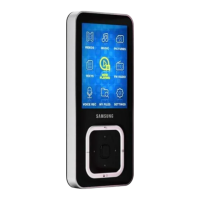
Samsung YP-S2ZB - User Manual

Samsung YP-S2ZB
33 pages
Print Icon
To Next Page IconTo Next Page
Loading...
MP3 Player
user manual
imagine the possibilities
Thank you for purchasing this Samsung product.
To receive a more complete service, please
register your product at
www.samsung.com/global/register
YP-S2

Questions and Answers

  • J
    Joel SalazarAug 14, 2025
    How to fix Samsung YP-S2ZB MP3 Player if power will not turn on?
    • H
      hickmandanielAug 14, 2025
      If your Samsung MP3 Player won't turn on, try recharging the battery and then attempt to power it on again. If that doesn't work, press the Reset hole.
  • S
    Samantha BarkerAug 18, 2025
    Why does my Samsung YP-S2ZB keep turning off?
    • M
      Mr. Patrick DeleonAug 18, 2025
      If your Samsung MP3 Player is turning off, it might be due to a completely drained battery, in which case you should recharge the battery. You can also try turning the player on again.
  • K
    Kaitlin HunterAug 21, 2025
    What to do if Samsung YP-S2ZB MP3 Player connection to PC is disabled?
    • E
      Eric DaltonAug 21, 2025
      If your Samsung MP3 Player isn't connecting to your PC, first ensure the direct connect USB adapter is correctly connected. If the connection is unstable, try using the USB port on the rear of your PC. Also, update your PC: run Windows Update from the Start menu, select Key Updates and Service Packs, install all updates, reboot, and reconnect the device.
  • D
    Dr. Charlotte LewisAug 25, 2025
    What to do if Samsung MP3 Player isn’t playing music?
    • M
      Michael HallAug 25, 2025
      If your Samsung MP3 Player isn’t playing, first ensure the file is saved in the player's memory and that the music file isn't damaged. Also, check if there is enough battery power. Note that secure WMA files from online stores are not supported.
  • J
    Jason ParrishAug 28, 2025
    How to fix slow file transfer rate on Samsung YP-S2ZB?
    • T
      turnercrystalAug 28, 2025
      If the file transfer rate to your Samsung MP3 Player is too slow, especially after formatting on Windows 2000, format the player on Windows XP or Vista. Also, close any unnecessary programs before transferring files again.
  • G
    Gary RodgersAug 31, 2025
    What to do if Samsung MP3 Player buttons do not work?
    • M
      Michele SextonAug 31, 2025
      If the buttons on your Samsung MP3 Player aren't working, first double-check that you're pressing the correct button and try pressing it again. If the problem persists, press the Reset hole.
  • E
    elizabethwalkerSep 3, 2025
    What to do if files are missing from Samsung MP3 Player?
    • S
      Sheila RileySep 4, 2025
      If files or data are missing from your Samsung MP3 Player, check if the direct connect USB adapter was disconnected during file or data transmission.
  • D
    Dennis ReynoldsSep 6, 2025
    What to do if Samsung MP3 Player EmoDio program malfunction?
    • J
      Justin LeeSep 7, 2025
      If the EmoDio Program is malfunctioning with your Samsung MP3 Player, verify that your PC meets the basic system requirements.
  • J
    John MoodySep 10, 2025
    Why is my Samsung MP3 Player so hot?
    • S
      Sean CarterSep 12, 2025
      Heat may be generated during recharging of your Samsung MP3 Player. This has no effect on the product life or functions.

Samsung YP-S2ZB Specifications

General IconGeneral
BrandSamsung
ModelYP-S2ZB
CategoryMP3 Player
LanguageEnglish

Related product manuals