Settings Basic Operation
Preparations Introduction and
Product Overview
Troubleshooting
and Specication
GB-5
Safety Warnings
LCD Display
Product Overview
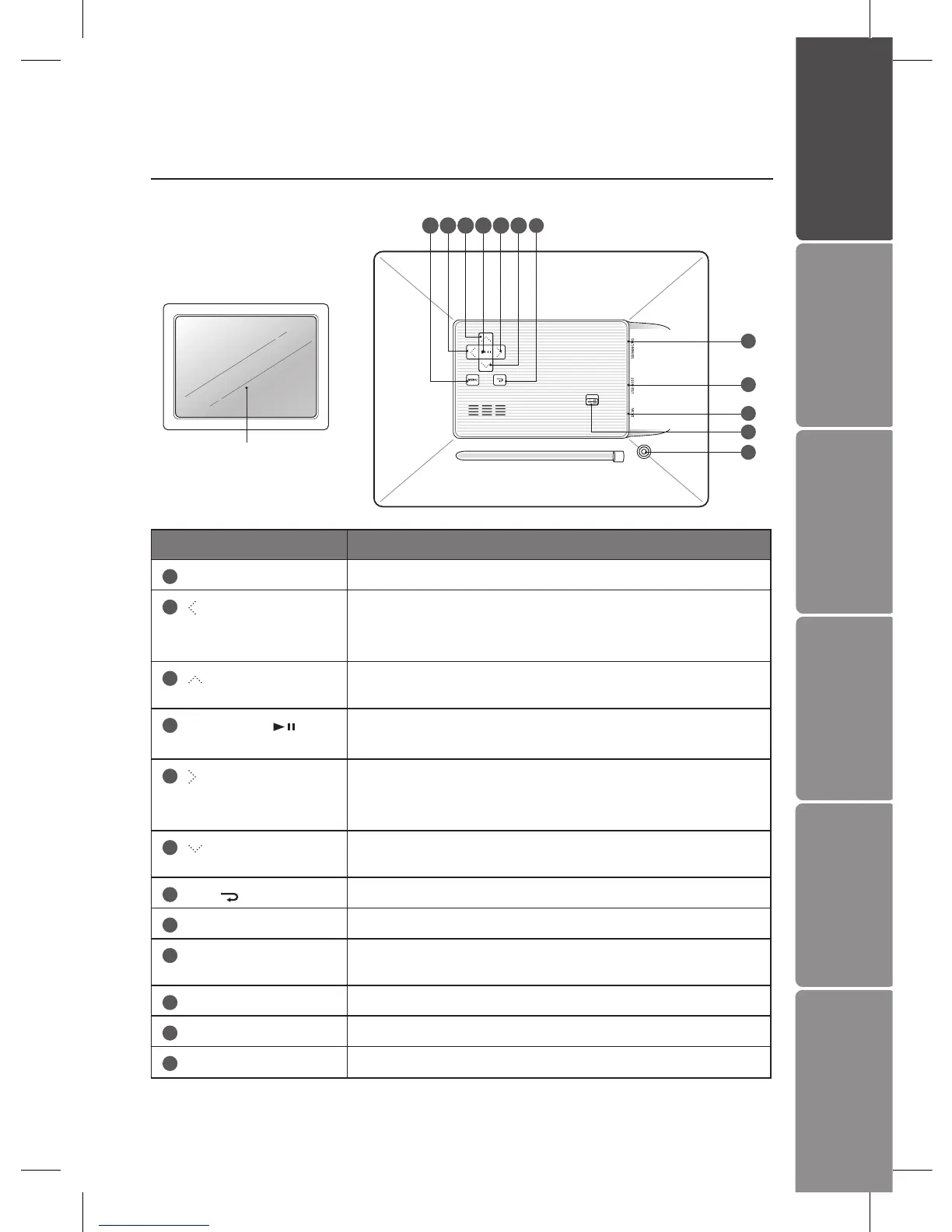
Main Unit
1 7
8
9
10
11
12
2 3
Name Description
1
MENU
• To access the menu mode.
2
button
• Press to move right in the menu / thumbnail mode /
option settings
• To display the next photo
3
button
• To move up in the menu / thumbnail mode / option
settings
4
Play / Pause
• To start / pause the slideshow
• To conrm a setting or function
5
button
• To move left in the menu / thumbnail mode / option
settings
• To display the previous photo
6
button
• To move down in the menu / thumbnail mode / option
settings
7
Esc / button
• To return to the main menu
8
SD/MMC/MS slot
• To accommodate SD, MMC, MS cards
9
USB host
• To accommodate USB devices such as portable USB
ash drives or ash memory card readers
10
DC-IN socket
• To connect to the mains
11
ON / OFF button
• To turn the photo frame on and o
12
Stand receptacle
• To attach the supplied stand
4 5 6


 To Next Page