EasyManua.ls Logo

Sandstrom S32HED13 - User Manual

Sandstrom S32HED13
68 pages
Print Icon
To Next Page IconTo Next Page
Loading...
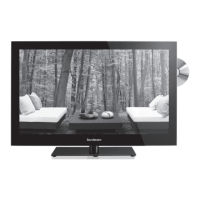
Instruction Manual
32 HD Ready LED TV
with DVD Player
S32HED13
S32HED13_IB_RC130906_Annie.indd 1 6/9/13 3:58 PM

Table of Contents

Question and Answer IconNeed help?

Do you have a question about the Sandstrom S32HED13 and is the answer not in the manual?

Summary

Safety Warnings

Physical & Environmental Safety

Covers placement, temperature, moisture, ventilation, and naked flames.

Electrical & Operational Safety

Includes damage, mains cable, interference, optimum viewing, and screen care.

Safety Precautions

Audio, Battery & Product Safety

Covers earphones, batteries, supervision, laser product, service, and maintenance.

Unpacking and Setup

Unpacking the TV & Included Items

Lists components and guides unpacking.

TV Installation

Base Stand & Wall Mounting

Instructions for installing the base stand and mounting to a wall.

TV Controls and Connections

Front;Side Controls & Rear Sockets

Details of all controls and rear connection ports.

Remote Control

Setup & Operation

Battery installation, handling, and operational range.

Functions & Navigation

Basic operations, menu navigation, and feature selection.

Connecting External Devices

HDMI, VGA, Component Connections

Guides for connecting devices via HDMI, VGA, and Component.

SCART, Composite, Audio & Headphone Connections

Guides for SCART, Composite, audio receiver, and headphone connections.

Initial Setup Procedure

First Time Installation & Configuration

Steps for initial power-on, language, mode, country, and channel tuning.

Input Source & Channel Management

Switching sources, selecting channels, and radio tuning.

Channel Settings

Auto & Manual Tuning

Finding and adjusting TV channels.

Channel Editing & Signal Info

Editing the channel list and viewing signal strength.

Common Interface & Software Update

CAM Module & Software Update

Using Common Interface and updating TV software.

Picture Settings

Picture Modes & Adjustments

Selecting modes and adjusting contrast, brightness, colour, sharpness, tint.

Colour Temp, Aspect Ratio & Noise Reduction

Fine-tuning picture display properties.

PC Mode & Backlight Settings

Adjusting PC input and backlight for brightness/power.

Sound Settings

Sound Modes & Features

Selecting sound modes, balance, SRS, and analogue sound options.

Stereo;Dual Sound & Language Selection

Managing analogue sound reception and audio languages.

Time Settings

Clock, Timers & Standby

Setting time, auto power off, sleep timer, and auto standby.

Option Settings (Language, Country, PVR)

Configuring OSD language, country, and PVR file system.

System Settings

Restore Defaults, HDMI CEC & ARC

Resetting to defaults, controlling HDMI CEC and ARC.

Lock Settings

Lock System, Password & Blocking

Enabling channel lock, setting password, and blocking channels.

Parental Guidance

Setting age ratings to block programmes.

EPG & Teletext

Electronic Programme Guide (EPG)

Navigating and using the EPG.

Teletext Functions (ATV & DTV)

Operating teletext in analogue and digital modes.

Entertainment Features

USB Device Operations

Connecting USB, viewing photos, music, movies, and text.

PVR Functions

Time Shift & Recording

Pausing live TV, recording programs, and timer programming.

Playing Recorded Programs

Accessing and playing back recorded content.

DVD Player Functions

Disc Compatibility & Playback

Supported discs, formats, region codes, and basic playback.

Advanced DVD Features & Multimedia

Repeat, goto, audio, program playback, and multimedia file playback.

DVD Setup Menus

Language, Video & Rating Settings

Configuring DVD display and control settings.

Maintenance & Disc Care

Cleaning and Storing Discs

Proper procedures for cleaning and storing discs.

Troubleshooting & Hints

TV, Video, Audio & Password Issues

Resolving common operational and function problems.

DVD, PC Issues & FAQs

Troubleshooting DVD/PC problems and common questions.

Display Modes

Resolution & Aspect Ratio Options

Supported display modes for various inputs.

Specifications

Technical Details & Ports

Model, power, dimensions, and input/output specifications.

Legal Information & Trademarks

Service, Notices & Trademarks

Contact info, notices, and trademark acknowledgements.

Summary

Safety Warnings

Physical & Environmental Safety

Covers placement, temperature, moisture, ventilation, and naked flames.

Electrical & Operational Safety

Includes damage, mains cable, interference, optimum viewing, and screen care.

Safety Precautions

Audio, Battery & Product Safety

Covers earphones, batteries, supervision, laser product, service, and maintenance.

Unpacking and Setup

Unpacking the TV & Included Items

Lists components and guides unpacking.

TV Installation

Base Stand & Wall Mounting

Instructions for installing the base stand and mounting to a wall.

TV Controls and Connections

Front;Side Controls & Rear Sockets

Details of all controls and rear connection ports.

Remote Control

Setup & Operation

Battery installation, handling, and operational range.

Functions & Navigation

Basic operations, menu navigation, and feature selection.

Connecting External Devices

HDMI, VGA, Component Connections

Guides for connecting devices via HDMI, VGA, and Component.

SCART, Composite, Audio & Headphone Connections

Guides for SCART, Composite, audio receiver, and headphone connections.

Initial Setup Procedure

First Time Installation & Configuration

Steps for initial power-on, language, mode, country, and channel tuning.

Input Source & Channel Management

Switching sources, selecting channels, and radio tuning.

Channel Settings

Auto & Manual Tuning

Finding and adjusting TV channels.

Channel Editing & Signal Info

Editing the channel list and viewing signal strength.

Common Interface & Software Update

CAM Module & Software Update

Using Common Interface and updating TV software.

Picture Settings

Picture Modes & Adjustments

Selecting modes and adjusting contrast, brightness, colour, sharpness, tint.

Colour Temp, Aspect Ratio & Noise Reduction

Fine-tuning picture display properties.

PC Mode & Backlight Settings

Adjusting PC input and backlight for brightness/power.

Sound Settings

Sound Modes & Features

Selecting sound modes, balance, SRS, and analogue sound options.

Stereo;Dual Sound & Language Selection

Managing analogue sound reception and audio languages.

Time Settings

Clock, Timers & Standby

Setting time, auto power off, sleep timer, and auto standby.

Option Settings (Language, Country, PVR)

Configuring OSD language, country, and PVR file system.

System Settings

Restore Defaults, HDMI CEC & ARC

Resetting to defaults, controlling HDMI CEC and ARC.

Lock Settings

Lock System, Password & Blocking

Enabling channel lock, setting password, and blocking channels.

Parental Guidance

Setting age ratings to block programmes.

EPG & Teletext

Electronic Programme Guide (EPG)

Navigating and using the EPG.

Teletext Functions (ATV & DTV)

Operating teletext in analogue and digital modes.

Entertainment Features

USB Device Operations

Connecting USB, viewing photos, music, movies, and text.

PVR Functions

Time Shift & Recording

Pausing live TV, recording programs, and timer programming.

Playing Recorded Programs

Accessing and playing back recorded content.

DVD Player Functions

Disc Compatibility & Playback

Supported discs, formats, region codes, and basic playback.

Advanced DVD Features & Multimedia

Repeat, goto, audio, program playback, and multimedia file playback.

DVD Setup Menus

Language, Video & Rating Settings

Configuring DVD display and control settings.

Maintenance & Disc Care

Cleaning and Storing Discs

Proper procedures for cleaning and storing discs.

Troubleshooting & Hints

TV, Video, Audio & Password Issues

Resolving common operational and function problems.

DVD, PC Issues & FAQs

Troubleshooting DVD/PC problems and common questions.

Display Modes

Resolution & Aspect Ratio Options

Supported display modes for various inputs.

Specifications

Technical Details & Ports

Model, power, dimensions, and input/output specifications.

Legal Information & Trademarks

Service, Notices & Trademarks

Contact info, notices, and trademark acknowledgements.

Sandstrom S32HED13 Specifications

General IconGeneral
Screen Size32 inches
Resolution1366 x 768
Display TechnologyLED
HDMI Ports2
USB Ports1
Smart TVNo
Refresh Rate60 Hz
Energy RatingA

Related product manuals