16
GB
LINE IN
USB FOR CHARGING ONLY 5V 1A
POWER INPUT 13.5V 3.5A
LINE IN
USB FOR CHARGING ONLY 5V 1A
POWER INPUT 13.5V 3.5A
Connections
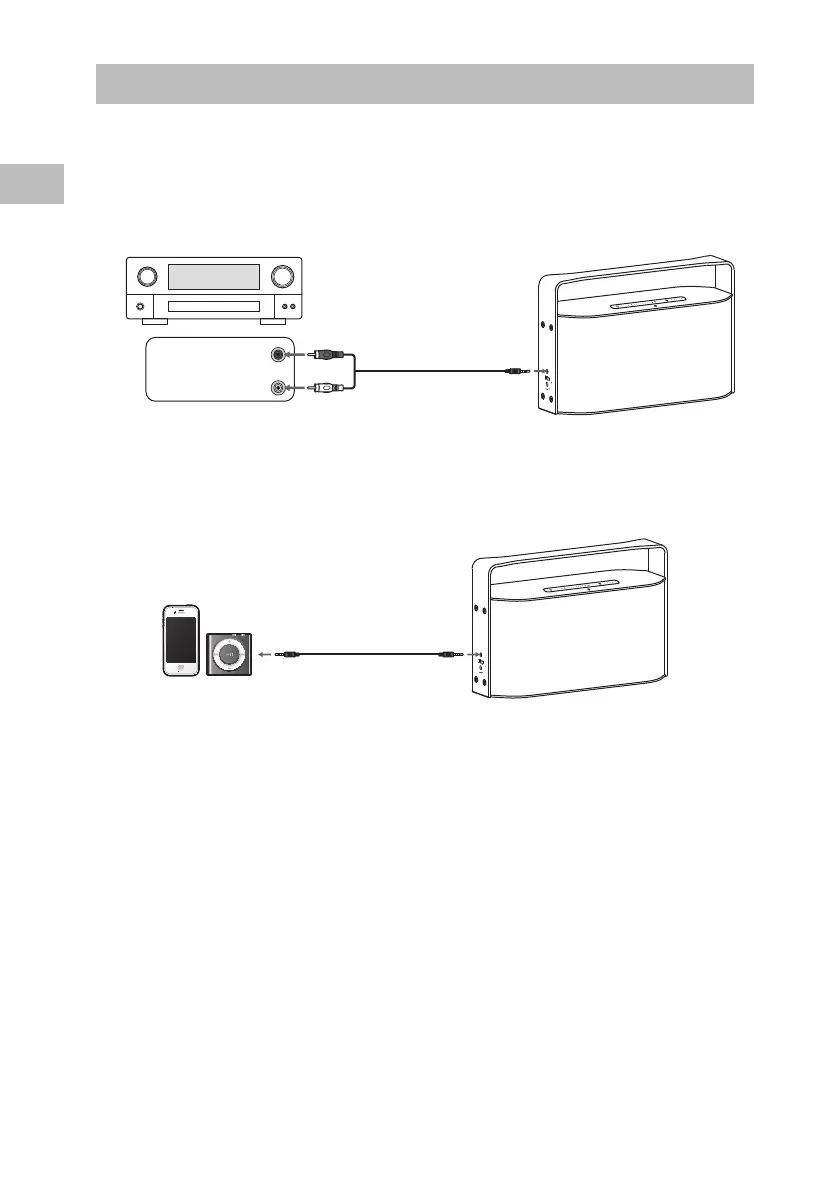
Using the AUX Connection
Use a 3.5mm to RCA stereo audio cable to connect the audio device’s audio output sockets
to the unit’s AUX LINE IN Socket.
3.5mm to RCA
stereo audio cable
(not included)
To the AUX LINE IN
Socket
AUDIO OUT
R
Red
White
L
Audio device
Use a 3.5mm to 3.5mm stereo audio cable to connect the mobile device’s headphone
socket to the unit’s AUX LINE IN socket.
3.5mm to 3.5mm
stereo audio cable
(included)
Mobile Device


 To Next Page