PAGE | 2 GETTING STARTED
Getting Started
Meet the
P-Series
Sangoma IP phones are designed for the greatest interoperability with
Sangoma Unied Communication platforms, including Asterisk, Business
Voice, Business Voice Plus, Switchvox, PBXact, and CommUnity phone
systems. This guide provides information about the setup and use of
Sangoma P310, P315, P320, P325, P330, P370 IP phones (herein referred
to as the P-Series) and the PM200 Attendant Console when a Sangoma
Conguration Server is not being used. See the Sangoma website for in-
formation about using Sangoma phones with Switchvox or the Digium
Phone Module for Asterisk (DPMA).
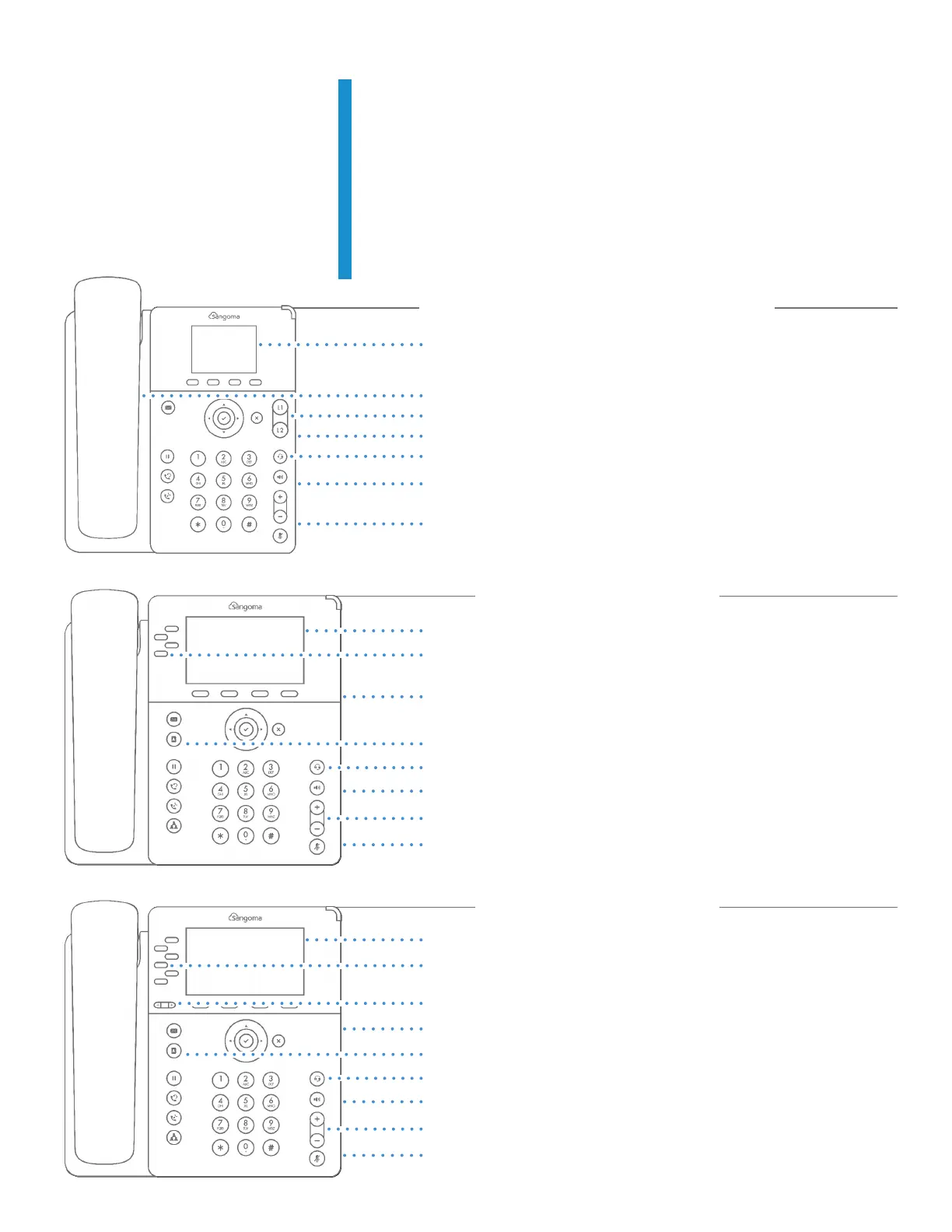
2.4” 320X240 BACKLIT COLOR DISPLAY
LOUD, HIGH-QUALITY SPEAKERPHONE
TWO SIP ACCOUNTS
ETHERNET (P310 FAST, P315 GIGABIT)
HEADSET & EHS SUPPORT
2 X LOCK PORTS (KENSINGTON) (BACK)
MODERN DESIGN SOLID ROBUST BASE
Value-Based P310 & P315
Mid-Ranged P320
4.3” 480X272 IPS GLASS BACKLIT COLOR DISPLAY, ALL-AROUND VIEW
FOUR SIP ACCOUNTS
GIGABIT ETHERNET
SIX DEDICATED PHONE FUNCTION KEYS
HEADSET & EHS SUPPORT
2 X LOCK PORTS (KENSINGTON) (BACK)
BACKLIT AUDIO FUNCTION KEYS
USB PORT FOR HEADSET SUPPORT (BACK)
Mid-Ranged P325
4.3” 480X272 BACKLIT COLOR DISPLAY IPS GLASS, ALL-AROUND VIEW
SIX SIP ACCOUNTS
PAGE KEY FOR VIRTUAL BLF KEYS
GIGABIT ETHERNET
SIX DEDICATED PHONE FUNCTION KEYS
HEADSET & EHS SUPPORT
USB PORT FOR HEADSET SUPPORT (BACK)
BACKLIT AUDIO FUNCTION KEYS
2 X LOCK PORTS (KENSINGTON) (BACK)


 To Next Page