Need help?
Do you have a question about the Sangoma P320 and is the answer not in the manual?
Introduces Sangoma P-Series IP phones, covering models P310, P315, P320, P325.
Details features of P310 and P315 models, including display, audio, accounts, and ports.
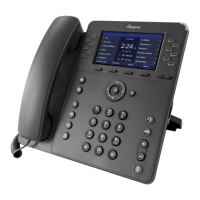
Lists features of the P320 model, such as display, SIP accounts, Ethernet, and function keys.
Outlines P325 features like display, SIP accounts, BLF keys, Ethernet, and ports.
Describes P330 features: display, SIP accounts, connectivity, expansion support.
Details P370 features: large touch display, connectivity, SIP accounts, expansion support.
Illustrates back view connection points and stand slots for P-Series phones.
Describes the PM200 module with display, dial keys, and daisy-chaining capability.
Explains automatic and manual methods for connecting Sangoma P-series phones to a network.
Outlines preferred XML configuration and WebUI tool methods for phone setup.
Details recommended UC software and manual firmware upgrade methods for P-series phones.
Guides on setting IP, Netmask, Gateway, DNS, VLAN, and Quality of Service settings.
Covers VLAN discovery mode, ID, priority, and Quality of Service (DSCP) settings.
Details Ethernet port modes, PC port VLAN ID, and Wi-Fi connectivity setup.
Explains creating custom XML files and provides link and format details.
Explains how to reset to factory defaults, reconfigure, or restart the phone.
Introduces the WebUI for manual phone configuration and how to access it.
Explains how to define line keys (SIP accounts) and their settings.
Details general line settings like User ID, Authorization Name, Line Label, Caller ID, and Password.
Covers primary/alternate SIP server, proxy settings, and connection parameters.
Guides on setting general options like password protection, time, and SIP behavior.
Covers localization, idle screen, call answering, display, and sound preferences.
Guides on setting up Rapid Dial Keys and enabling contacts on main line keys.
Covers configuring network settings like IPv4, VLAN, QoS, and Ethernet port modes.
Explains the logging tab for technical support, including log levels and syslog settings.
Guides on uploading custom ringtones and lists pre-loaded ringtones.
Introduces applications like Call Log, Forward Calls, Bluetooth, Contacts, Parked Calls.
Explains how to view call history, dial from logs, and save contacts.
Guides on setting up call forwarding and pairing/using Bluetooth headsets.
Explains how to access the voicemail system on the phone.
Covers dialing, receiving, redialing, hold, transfer, conference, and voicemail.
Details assisted and unassisted call transfer procedures.
 General
| Type | IP Phone |
|---|---|
| Lines | 6 |
| SIP Accounts | 6 |
| Power Supply | PoE or optional power adapter |
| Headset Port | Yes |
| Supported Protocols | SIP |
| Weight | 1.2 kg |
| Display Size | 3.5 inches |
| Display | LCD |
| Ethernet Ports | 2 (10/100/1000 Mbps) |
| Audio Codec Support | G.711, G.722, G.729 |
| Features | Bluetooth, USB |
| Codecs | G.711, G.722, G.729 |

 To Next Page