Remote Control Profile
- 07 -
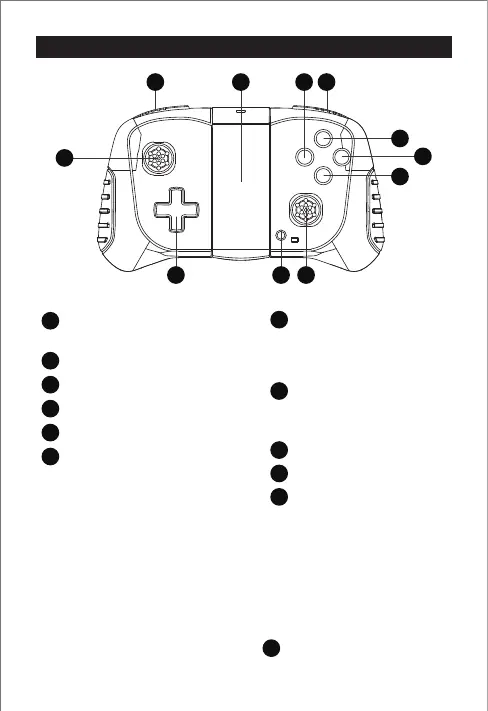
1. The drone supports two control modes, mode 1 and mode 2.
Mode1: Left joystick controls the drone’s ascending / descending, turn left / right;
Right joystick controls forward / backward, left / right side flight.
Mode2: Left stick controls forward / backward, turn left / right; Right joystick controls
drone’s ascending / descending, left / right side flight.
Mode 1 is the default setting when the remote control is turned on.
To switch the mode 2: Press and hold the key , and then turn on the remote control.
Prompt:
2. The following describes the control methods, taking mode 1 as an example.
2
1
2
3
3
4
4
5
6
6
7
7
8
8
9
9
5
10
1011
11
1
1
Slow / Normal / Fast
(Short press to switch the flying speed)
Left control stick
Trimming
Power button
Right control stick
Emergency stop
(Long press for 1 second to trigger
emergency stop)
Photo / Video
(Short press to take a photo. Long
press for 1 second to start/stop
recording)
Take off / Land
(Long press for 1 second to take
off / land)
Headless mode
3D Roll
Phone clip
EN


 To Next Page