Remote control
DISPLAY TV/DVD®OO
VOL
©@@0*
®®®o L
MUTE
®®®O
SLEEP
SETUP/®ODvD
_MENU MENU
CHA O
EXIT_
CANC P MENU
O c.v %
PLAY
SKIP SUBTITLE STOP SKIP
SLOW PAUSE/STILLPLAYMODE SLOW
AUDIO RETURN REPEATA-B ANGLE
0000
QUICKVIEW/
SCREENSIZE MARKER JUMP ZOOM
0000
INPUT
SELECT
0
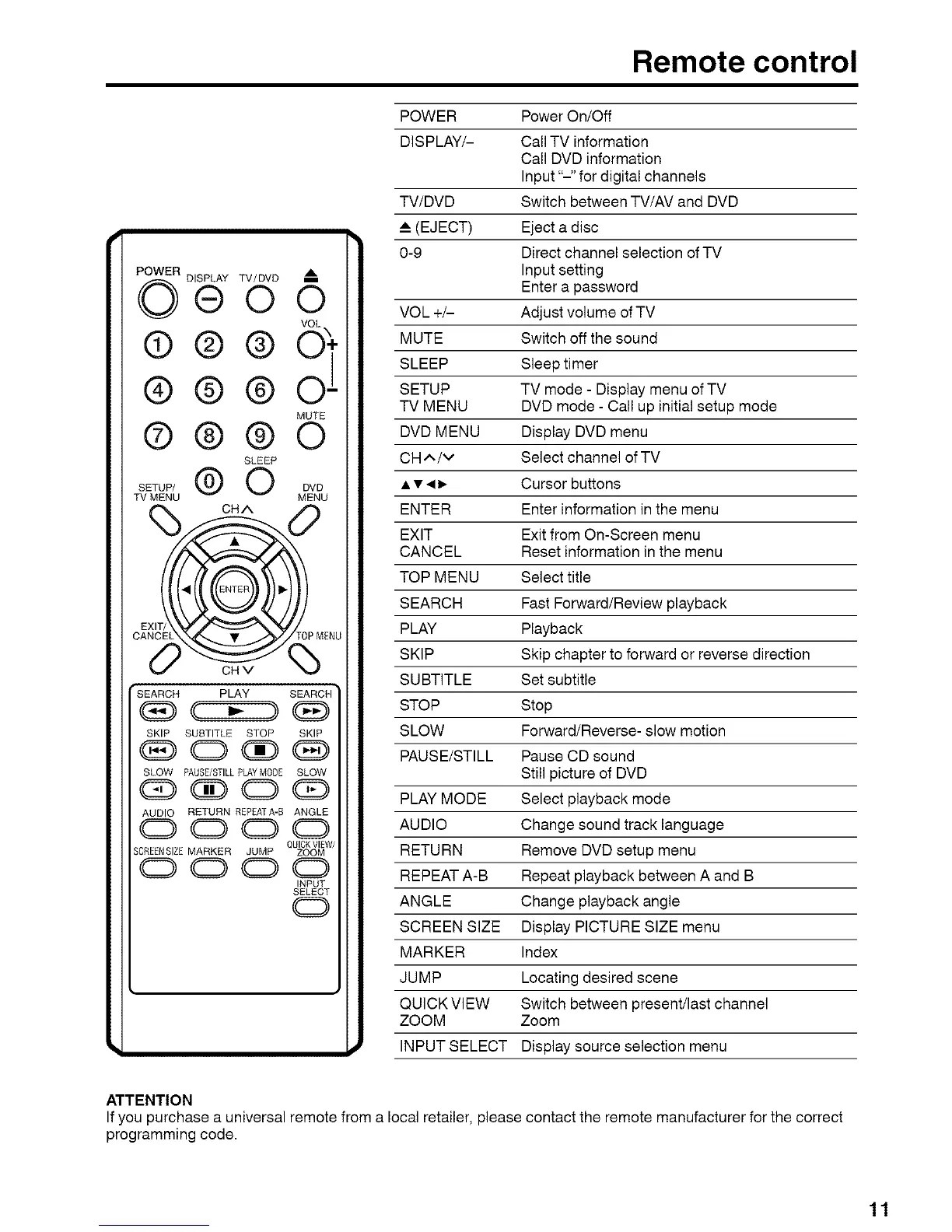
POWER Power On/Off
DISPLAY/- Call TV information
Call DVD information
Input "-" for digital channels
TV/DVD Switch between TV/AV and DVD
__ (EJECT) Eject a disc
0-9 Direct channel selection of TV
Input setting
Enter a password
VOL +/- Adjust volume of TV
MUTE Switch off the sound
SLEEP Sleep timer
SETUP TV mode - Display menu of TV
TV MENU DVD mode - Call up initial setup mode
DVD MENU Display DVD menu
CH ,,N/V Select channel of TV
• • • D. Cursor buttons
ENTER Enter information in the menu
EXIT Exit from On-Screen menu
CANCEL Reset information in the menu
TOP MENU Select title
SEARCH Fast Forward/Review playback
PLAY Playback
SKIP Skip chapter to forward or reverse direction
SUBTITLE Set subtitle
STOP Stop
SLOW Forward/Reverse- slow motion
PAUSE/STILL Pause CD sound
Still picture of DVD
PLAY MODE Select playback mode
AUDIO Change sound track language
RETURN Remove DVD setup menu
REPEAT A-B Repeat playback between A and B
ANGLE Change playback angle
SCREEN SIZE Display PICTURE SIZE menu
MARKER Index
JUMP Locating desired scene
QUICK VIEW Switch between present/last channel
ZOOM Zoom
INPUT SELECT Display source selection menu
ATTENTION
If you purchase a universal remote from a local retailer, please contact the remote manufacturer for the correct
programming code.
11



 To Next Page