EasyManua.ls Logo

Sansui P-L50 - Page 10

Sansui P-L50
24 pages
Print Icon
To Next Page IconTo Next Page
To Previous Page IconTo Previous Page
Loading...
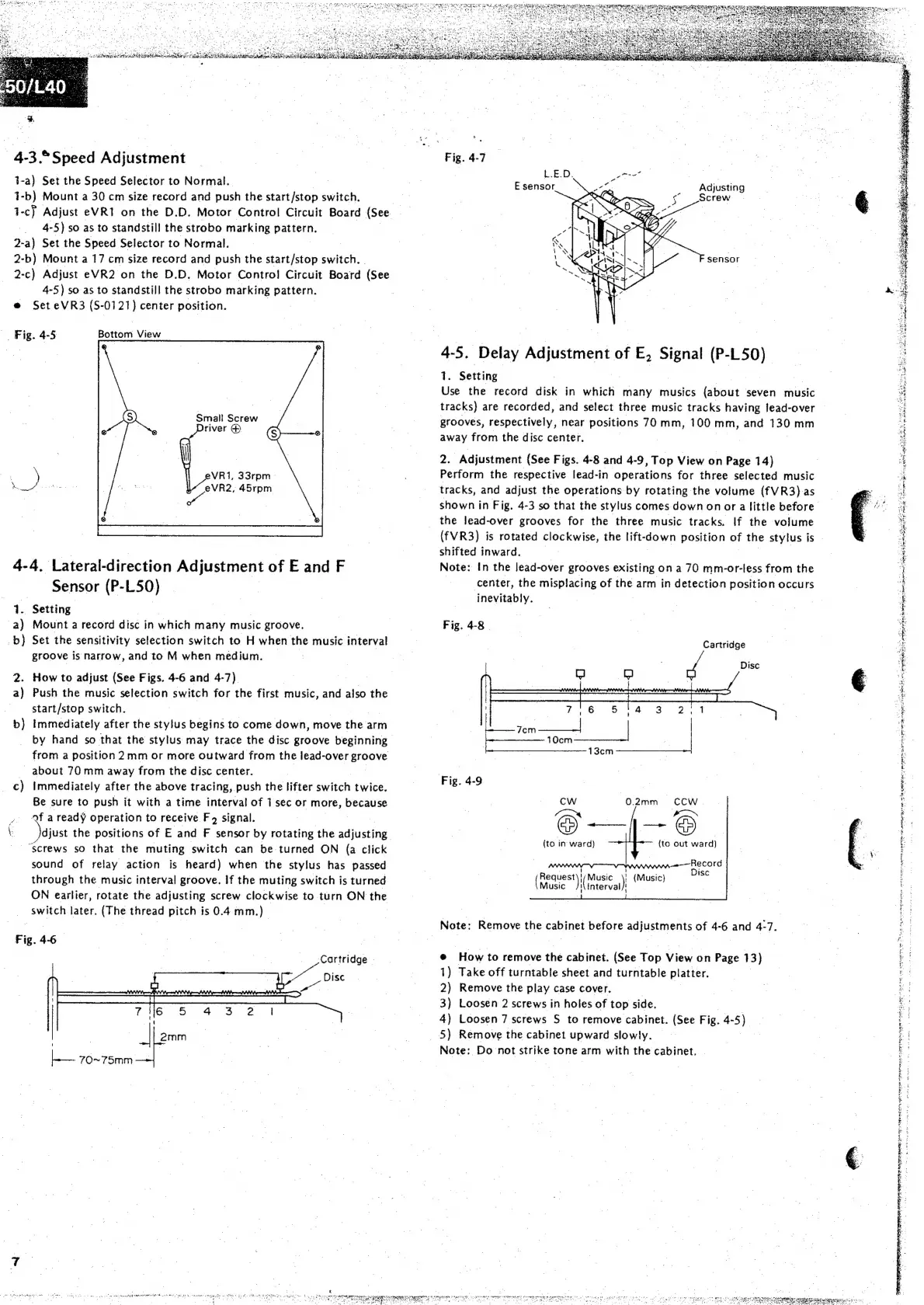
—4-3.°Speed
Adjustment
t-a)
Set
the
Speed
Selector
to
Normal.
1-
b)
Mount
a
30
cm
size
record
and
push
the
start/stop
switch.
1-c}
Adjust
eVRI
on
the
D.D.
Motor
Control
Circuit
Board
(See,
4-
5)
so
as
to
standstill
the
strobo
marking
Bariein,
2-a)
Set
the
Speed
Selector
to
Normal.
2-b)
Mount
a
17
cm
size
record
and
push
the
start/stop
switch.
2-c)
Adjust
eVR2
on
the
D.D.
Motor
Control
Circuit
Board
(See
4-5)
so
as
to
standstill
the
strobo
marking
pattern.
Set
eVR3
(S-
0121
}
center
position.
__
Fig.
4-5
Bottom
View
Small
Screw
\
VR1,
33rpm_—
eer
Ne
eVR2,
45rpm
4-4.
Lateral-direction
Adj
justment
of
E
and
F
Sensor
(P-
L50)
1.
Setting
a)
Mount
a
record
disc
in
which
many
music
groove.
b)
Set
the
sensitivity
selection
switch
to
H
when
the
music
interval
groove
is
narrow,
and
to
'M
when
medium.
2.
How
to
adjust
(See
Figs.
4-6
and
4-7)
| |
a)
Push
the
music
selection
switch
for
the
first
music,
and
also
the
start/stop
switch.
b)
Immediately
after
the
stylus
begins
to
come
down,
move
the
arm
by
hand
so
that
the
stylus
may
trace
the
disc
groove
beginning
from
a
position
2mm
or
more
outward
from
the
lead-over
Ercone
about
70
mm
away
from
the
disc
center.
c)
Immediately
after
the
above
tracing,
push
the
lifter
switch
twice.
Be
sure
to
push
it
with
a
time
interval
of
1
sec
or
more,
because
Qf
a
ready
operation
to
receive
F4
signal.
|
\
djust
the
positions
of
E
and
F
sensor
by
rotating
the
adjusting
“screws
so
that
the
muting
switch
can
be
turned
ON
(a
click
sound
of
relay
action
is
heard)
when
the
stylus
has
passed
through
the
music
interval
groove.
If
the
muting
switch
is
turned
ON
earlier,
rotate
the
adjusting
screw
clockwise
to
turn
ON
the
switch
later.
(The
thread
pitch
is
0.4
mm.)
Fig.
4-6—
Peer
70~75mm
Feelin
et
ane
cy
een
ctbeec
maalgeh
MAPA
oth
GE
ded
canes
eeatg
Se
we
ER
Bea
SAR
eae
Getig
ie
|
tracks,
and
adjust
the
operations
by
rotating
the
volume
(fVR3)
as
Fig.
4-7
L.ED,
gen
P
E-sensor
Adjusting
Screw
sensor
4-5,
Delay
Adjustment
of
E,
i
(P-
ae
si
Setting
Use
the
record
disk
in
which
many
musics
(about
seven
music
tracks)
are
recorded,
and
select
three
music
tracks
having
fead-over
grooves,
respectively,
near
positions
70mm,
100
mm,
and
130
mm
away
from
the
disc
center.
2.
Adjustment
(See
Figs.
4-8
and
4-9
,
Top
View
on
n
Page
14)
Perform
the
respective
lead-in
operations
for
three
selected
music
shown
in
Fig.
4-3
so
that
the
stylus
comes
down
on
or
a
little
before
the
lead-over
grooves
for
the
three
music
tracks.
If
the
volume
(fVR3)
is
rotated
clockwise,
the
lift-
ade
position
oF
the
stylus
is
shifted
inward.
Note:
In
the
lead-over
grooves
existing
on
a
70
mm-or-less
from
the
|
center,
the
misplacing
of
the
arm
in
detection
position
occurs
‘inevitably.
Fig.
4-8
|
Cartridge
4
Disc
Fig.
4-9
(to
in
ward)
Music
(Request)
Music
;
{Music}
interval
Note:
Remove
the
cabinet
before
adjustments
of
4-6
and
4-7.
6
‘How
to
remove
the
cabinet.
(See
Top
View
on
Page
13)
1)
Take
off
turntable
sheet
and
turntable
platter.
2)
Remove
the
play
case
cover.
3)
Loosen
2
screws
in
holes
of
top
side.
4)
Loosen
7
screws
S
to
remove
cabinet.
(See
Fig.
4-
5)
5)
Remove
the
cabinet
upward
slowly.
Note:
Do
not
strike
tone
arm
with
the
cabinet.
eee
et
She
Moet
eu
<4
Bs
an
cag
HAS
aie
Somreeca
iT
aoa
DS
cas esr
TREND
TOS
er
ete
ee
pt
oa
AN
Sa
wen
fsee
amie
nen
ee
rte
s
Fist
cea
6
"az.
Ses
ee
ee
oes
ae
Sh
ewe
aan
ES
ath
ie
ON
ne
egret
itinres
dane
tend
et
SS
ae
Teo
ener
RUE
Et
sesene
4:
PeP
re
ete?
ee
aan
oe
ata
rayemna
Serer
Hh
hal
Den
ee
~
IANPRNE
50!
3!
a
i
MEET
CAME
omer
tm
eo
RSPR
NAG
TIP
RMU
Jee
nt
npn
acy
eT
REZ
ER
CUR
i
a
ke
re
oe.
re
=
be
hee

Related product manuals