EasyManua.ls Logo

Sansui RA-700 - Switches and Controls Overview; Reverberation Indicator; Reverberation Time Control; Power Switch and Indicator

Sansui RA-700
11 pages
Print Icon
To Next Page IconTo Next Page
To Previous Page IconTo Previous Page
Loading...
SWITCHES
AND
CONTROLS
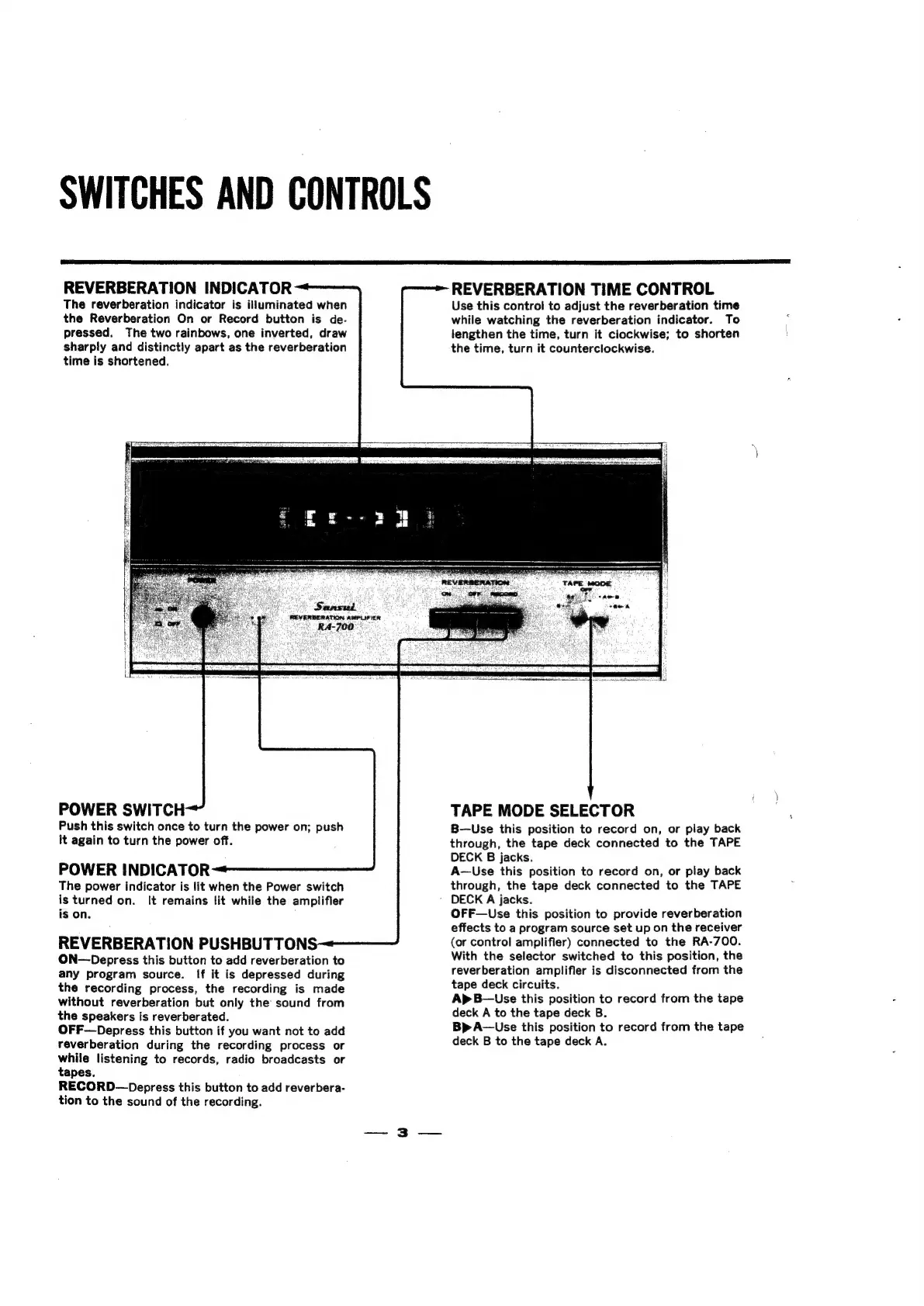
REVERBERATION
INDICATOR
The
reverberation
indicator
is
illuminated
when
the
Reverberation
On
or
Record
button
is
de.
pressed.
The
two
rainbows,
one
inverted,
draw
sharply
and
distinctly
apart
as
the
reverberation
time
is
shortened.
REVERBERATION
TIME
CONTROL
Use
this
control
to
adjust
the
reverberation
time
while
watching
the
reverberation
indicator.
To
lengthen
the
time,
turn
it
clockwise;
to
shorten
the
time,
turn
it
counterclockwise.
ERBERATION
AMPLIFIER
A-700.
POWER
SWITCH
Push
this
switch
once
to
turn
the
power
on;
push
it
again
to
turn
the
power
off.
POWER
INDICATOR
The
power
indicator
is
lit
when
the
Power
switch
is
turned
on.
It
remains
lit
while
the
amplifier
is
on.
REVERBERATION
PUSHBUTTONS
ON—Depress
this
button
to
add
reverberation
to
any
program
source.
If it
is
depressed
during
the
recording
process,
the
recording
is
made
without
reverberation
but
only
the
sound
from
the
speakers
is
reverberated.
OFF—Depress
this
button
if
you
want
not
to
add
reverberation
during
the
recording
process
or
while
listening
to
records,
radio
broadcasts
or
tapes.
RECORD—Depress
this
button
to
add
reverbera-
tion
to
the
sound
of
the
recording.
TAPE
MODE
SELECTOR
B—Use
this
position
to
record
on,
or
play
back
through,
the
tape
deck
connected
to
the
TAPE
DECK
B
jacks.
A—Use
this
position
to
record
on,
or
play
back
through,
the
tape
deck
connected
to
the
TAPE
DECK
A
jacks.
OFF—Use
this
position
to
provide
reverberation
effects
to
a
program
source
set
up
on
the
receiver
(or
control
amplifier)
connected
to
the
RA-700.
With
the
selector
switched
to
this
position,
the
reverberation
amplifier
is
disconnected
from
the
tape
deck
circuits.
Ap
B—Use
this
position
to
record
from
the
tape
deck
A
to
the
tape
deck
B.
Bp
A—Use
this
position
to
record
from
the
tape
deck
B
to
the
tape
deck
A.

Related product manuals