EasyManua.ls Logo

Sansui RG-710 - Panel Information

Sansui RG-710
10 pages
Print Icon
To Next Page IconTo Next Page
To Previous Page IconTo Previous Page
Loading...
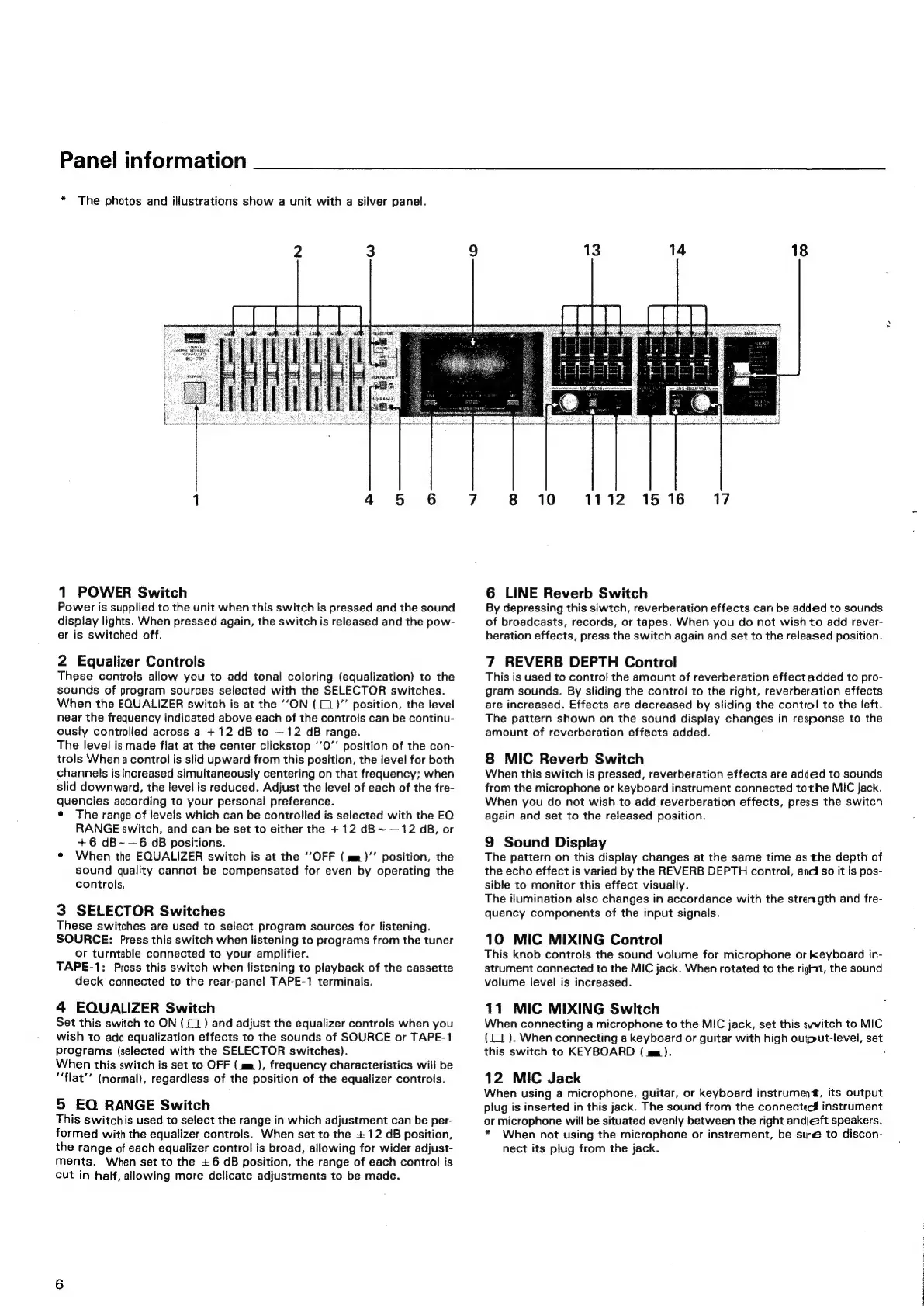
Panel
information
*
The
photos
and
illustrations
show
a
unit
with
a
silver
panel.
1
POWER
Switch
Power
is
supplied
to
the
unit
when
this
switch
is
pressed
and
the
sound
display
lights.
When
pressed
again,
the
switch
is
released
and
the
pow-
er
is
switched
off.
2
Equalizer
Controls
These
controls
allow
you
to
add
tonal
coloring
(equalization)
to
the
sounds
of
program
sources
selected
with
the
SELECTOR
switches.
When
the
EQUALIZER
switch
is
at
the
‘‘ON
(1
)’’
position,
the
level
near
the
frequency
indicated
above
each
of
the
controls
can
be
continu-
ously
controlled
across
a
+
12
dB
to
—12
dB
range.
The
level
is
made
flat
at
the
center
clickstop
‘’0’’
position
of
the
con-
trols
When
a
control
is
slid
upward
from
this
position,
the
level
for
both
channels
is
increased
simultaneously
centering
on
that
frequency;
when
slid
downward,
the
level
is
reduced.
Adjust
the
level
of
each
of
the
fre-
quencies
according
to
your
personal
preference.
¢
The
range
of
levels
which
can
be
controlled
is
selected
with
the
EQ
RANGE
switch,
and
can
be
set
to
either
the
+12 dB~
—12
dB,
or
+6
dB~—6
GB
positions.
©
When
the
EQUALIZER
switch
is
at
the
‘OFF
(mm)’’
position,
the
sound
quality
cannot
be
compensated
for
even
by
operating
the
controls.
3
SELECTOR
Switches
These
switches
are
used
to
select
program
sources
for
listening.
SOURCE:
Press
this
switch
when
listening
to
programs
from
the
tuner
or
turntable
connected
to
your
amplifier.
TAPE-1:
Press
this
switch
when
listening
to
playback
of
the
cassette
deck
connected
to
the
rear-panel
TAPE-1
terminals.
4
EQUALIZER
Switch
Set
this
switch
to
ON
(1
)
and
adjust
the
equalizer
controls
when
you
wish
to
add
equalization
effects
to
the
sounds
of
SOURCE
or
TAPE-1
programs
(selected
with
the
SELECTOR
switches).
When
this
switch
is
set
to
OFF
(mm
),
frequency
characteristics
will
be
““flat’’
(normal),
regardless
of
the
position
of
the
equalizer
controls.
5
EQ
RANGE
Switch
This
switchis
used
to
select
the
range
in
which
adjustment
can
be
per-
formed
with
the
equalizer
controls.
When
set
to
the
+12
dB
position,
the
range
of
each
equalizer
control
is
broad,
allowing
for
wider
adjust-
ments.
When
set
to
the
+6
dB
position,
the
range
of
each
control
is
cut
in
half,
allowing
more
delicate
adjustments
to
be
made.
1516
17
8
10
1112
6
LINE
Reverb Switch
By
depressing
this
siwtch,
reverberation
effects
cari
be
added
to
sounds
of
broadcasts,
records,
or
tapes.
When
you
do
not
wish
to
add
rever-
beration
effects,
press
the
switch
again
and
set
to
the
released
position.
7
REVERB
DEPTH
Control
This
is
used
to
control
the
amount
of
reverberation
effect
added
to
pro-
gram
sounds.
By
sliding
the
control
to
the
right,
reverberation
effects
are
increased.
Effects
are
decreased
by
sliding
the
contiol
to
the
left.
The
pattern
shown
on
the
sound
display
changes
in
response
to
the
amount
of
reverberation
effects
added.
8
MIC
Reverb Switch
When
this
switch
is
pressed,
reverberation
effects
are
added
to
sounds
from
the
microphone
or
keyboard
instrument
connected
tothe
MIC
jack.
When
you
do
not
wish
to
add
reverberation
effects,
press
the
switch
again
and
set
to
the
released
position.
9
Sound
Display
The
pattern
on
this
display
changes
at
the
same
time
as
the
depth
of
the
echo
effect
is
varied
by
the
REVERB
DEPTH
control,
andi
so
it
is
pos-
sible
to
monitor
this
effect
visually.
The
ilumination
also
changes
in
accordance
with
the
strength
and
fre-
quency
components
of
the
input
signals.
10
MIC
MIXING
Control
This
knob
controls
the
sound
volume
for
microphone
or
keyboard
in-
strument
connected
to
the
MIC
jack.
When
rotated
to
the
right,
the
sound
volume
level
is
increased.
11
MIC
MIXING
Switch
When
connecting
a
microphone
to
the
MIC
jack,
set
this
switch
to
MIC
(1
).
When
connecting
a
keyboard
or
guitar
with
high
ouiput-level,
set
this
switch
to
KEYBOARD
(
mm).
12
MIC
Jack
When
using
a
microphone,
guitar,
or
keyboard
instrument,
its
output
plug
is
inserted
in
this
jack.
The
sound
from
the
connectec#
instrument
or
microphone
will
be
situated
evenly
between
the
right
andleft
speakers.
*
When
not
using
the
microphone
or
instrement,
be
sue
to
discon-
nect
its
plug
from
the
jack.

Related product manuals