EasyManua.ls Logo

Sansui RG-710 - Page 8

Sansui RG-710
10 pages
Print Icon
To Next Page IconTo Next Page
To Previous Page IconTo Previous Page
Loading...
VIDEO
SOUND
(TAPE-2)
[oes
5500]
Cassette
deck
3
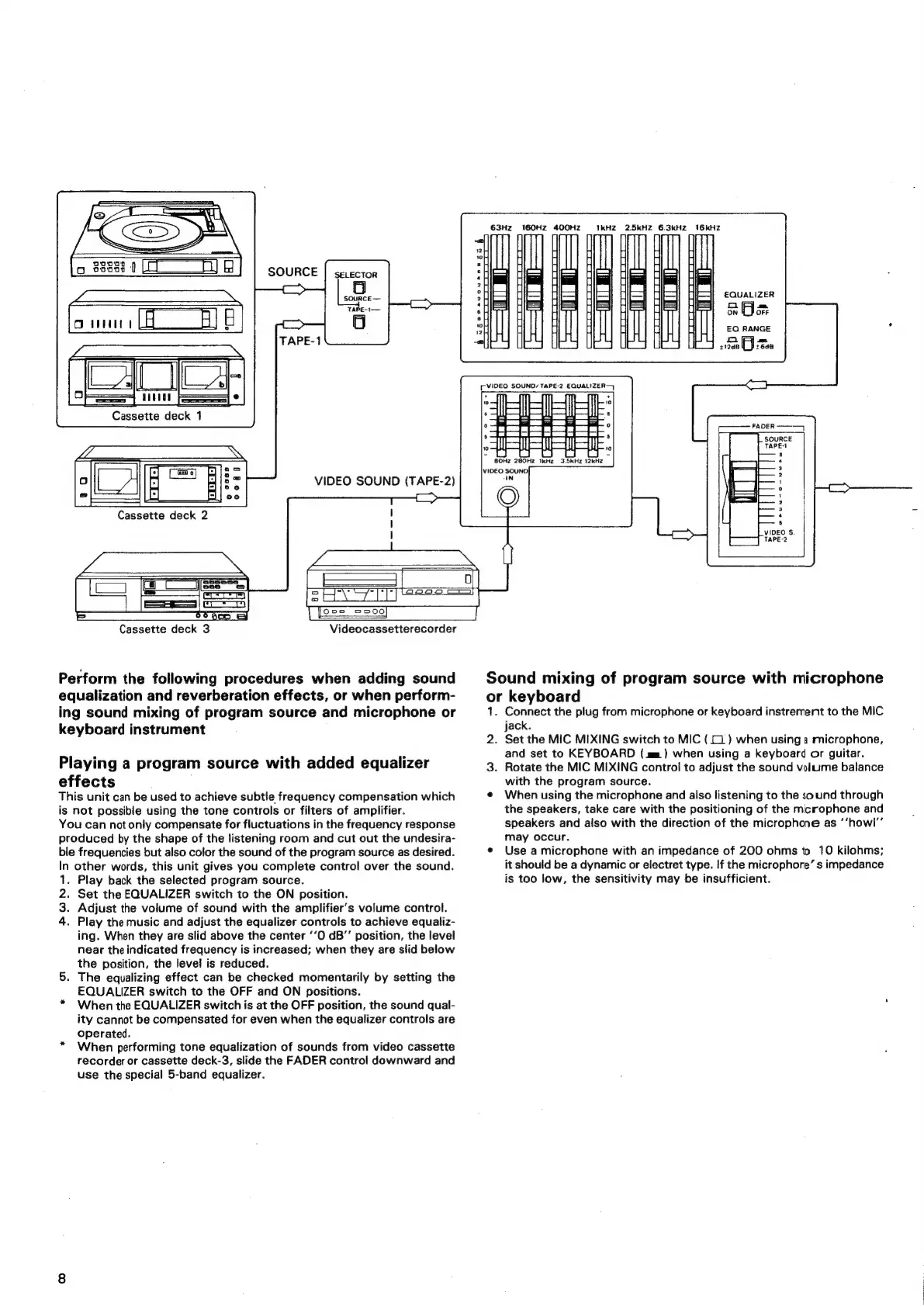
Perform
the
following
procedures
when
adding
sound
equalization
and
reverberation
effects,
or
when
perform-
ing
sound
mixing
of
program
source
and
microphone
or
keyboard
instrument
Playing
a
program
source
with
added
equalizer
effects
This
unit
can
be
used
to
achieve
subtle
frequency
compensation
which
is
not
possible
using
the
tone
controls
or
filters
of
amplifier.
You
can
not
only
compensate
for
fluctuations
in
the
frequency
response
produced
by
the
shape
of
the
listening
room
and
cut
out
the
undesira-
ble
frequencies
but
also
color
the
sound
of
the
program
source
as
desired.
In
other
words,
this
unit
gives
you
complete
control
over
the
sound.
.
Play
back
the
selected
program
source.
Set
the
EQUALIZER
switch
to
the
ON
position.
.
Adjust
the
volume
of
sound
with
the
amplifier’s
volume
control.
Play
the
music
and
adjust
the
equalizer
controls
to
achieve
equaliz-
ing.
When
they
are
slid
above
the
center
‘‘O
dB’’
position,
the
level
near
the
indicated
frequency
is
increased;
when
they
are
slid
below
the
position,
the
level
is
reduced.
5.
The
equalizing
effect
can
be
checked
momentarily
by
setting
the
EQUALIZER
switch
to
the
OFF
and
ON
positions.
*
When
the
EQUALIZER
switch
is
at
the
OFF
position,
the
sound
qual-
ity
cannot
be
compensated
for
even
when
the
equalizer
controls
are
Operated.
When
performing
tone
equalization
of
sounds
from
video
cassette
recorder
or
cassette
deck-3,
slide
the
FADER
control
downward
and
use
the
special
5-band
equalizer.
PONS
Videocassetterecorder
63Hz
160HZ
400HZ
TkHZ
2.5kHZ
6.3kHZ2
16kHZ
EQUALIZER
aye
EQ
RANGE
BEM
AVON
AOOSZS
ons
$12dB
Alt.
((VIDEO
SOUND
TAPE-2
EQUALIZER
———_r_
sid
Sound
mixing
of
program
source
with
microphone
or
keyboard
1.
Connect
the
plug
from
microphone
or
keyboard
instrement
to
the
MIC
jack.
2.
Set
the
MIC
MIXING
switch
to
MIC
(
[1
)
when
using
a
microphone,
and
set
to
KEYBOARD
(mm)
when
using
a
keyboard
or
guitar.
3.
Rotate
the
MIC
MIXING
control
to
adjust
the
sound
volume
balance
with
the
program
source.
¢
When
using
the
microphone
and
also
listening
to
the
sound
through
the
speakers,
take
care
with
the
positioning
of
the
microphone
and
speakers
and
also
with
the
direction
of
the
microphone
as
‘‘howl’’
may
occur.
e
Use
a
microphone
with
an
impedance
of
200
ohms
to
10
kilohms;
it
should
be
a
dynamic
or
electret
type.
If
the
microphore’
s
impedance
is
too
low,
the
sensitivity
may
be
insufficient.

Related product manuals