EasyManua.ls Logo

Sansui RX-710 - AM CHANNEL Selector Switch; AM Channel Selector Operation; Synchronizing Time; Setting the Clock

Sansui RX-710
17 pages
Print Icon
To Next Page IconTo Next Page
To Previous Page IconTo Previous Page
Loading...
AM
CHANNEL
selector
switch
AM
programs
are
broadcast
under
channel
spacing
which,
depending
on
the
broadcasting
area
in
the
world,
are
characterized
by
different
chan-
nels
(frequency
intervals)
between
broadcasting
stations.
In
North,
Cen-
tral
and
South
America,
this
channel
is
10
kHz
whereas
in
the
rest
of
the
world,
it
is
9
kHz.
Your
unit
is
a
synthesizer
tuner
which
varies
the
reception
frequency
at
each
9
kHz
or
10
kHz
channel
(frequency
interval)
during
reception.
lf
you
use
your
unit
in
an
area
with
a
different
channel
plan,
you
may
not
be
able
to
receive
AM
stations.
The
unit
you
have
purchased
has
been
adjusted
to
the
channel
in
your
area.
It
is
therefore
necessary
to
change
over
the
channel
setting
if
you
move
to
an
area
with
a
different
channel
spacing.
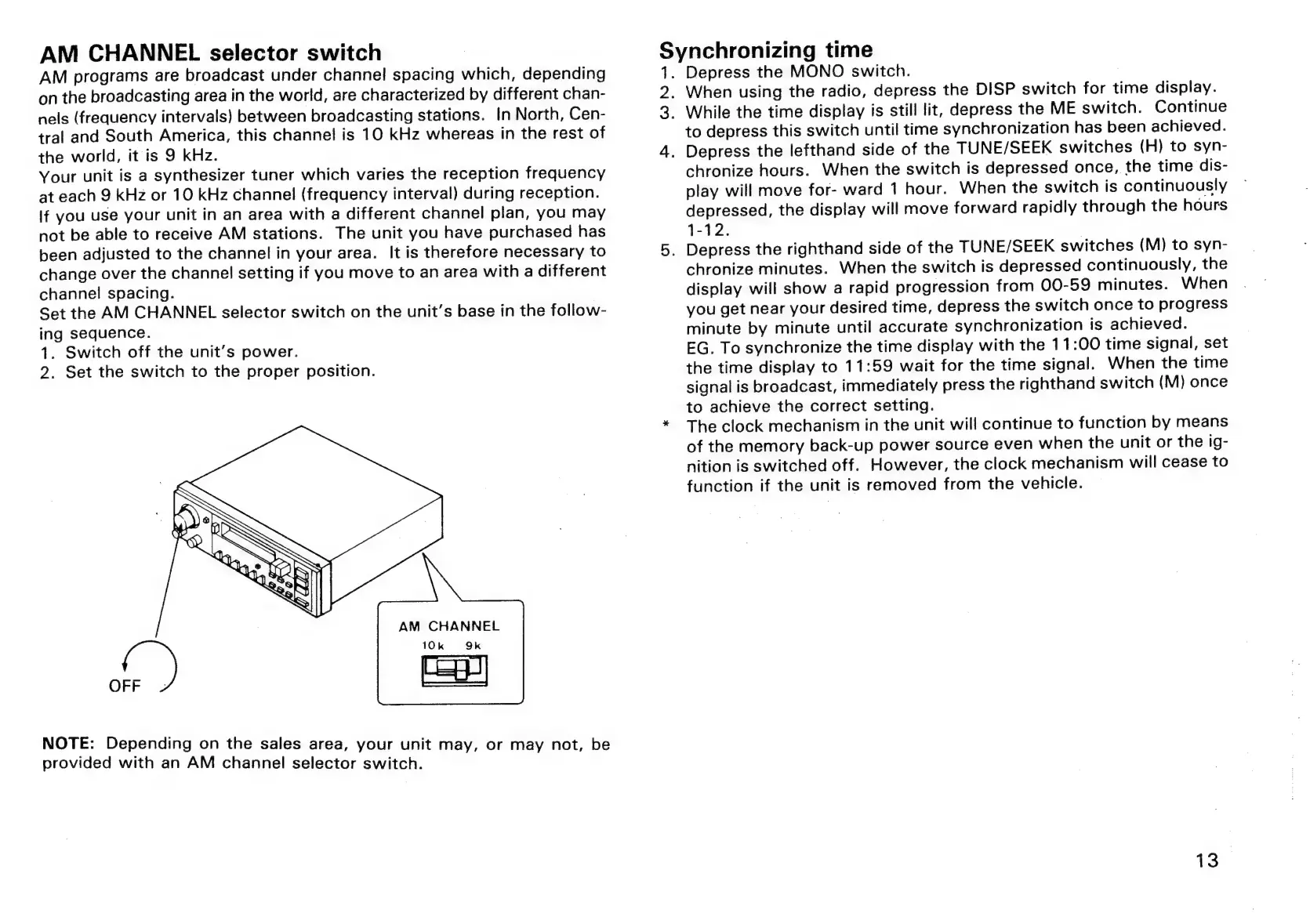
Set
the
AM
CHANNEL
selector
switch
on
the
unit's
base
in
the
follow-
ing
sequence.
1.
Switch
off
the
unit’s
power.
2.
Set
the
switch
to
the
proper
position.
AM
CHANNEL
10k
9k
NOTE:
Depending
on
the
sales
area,
your
unit
may,
or
may
not,
be
provided
with
an
AM
channel
selector
switch.
2
3.
4
ynchronizing
time
Depress
the
MONO
switch.
.
When
using
the
radio,
depress
the
DISP
switch
for
time
display.
While
the
time
display
is
still
lit,
depress
the
ME
switch.
Continue
to
depress
this
switch
until
time
synchronization
has
been
achieved.
.
Depress
the
lefthand
side
of
the
TUNE/SEEK
switches
(H)
to
syn-
chronize
hours.
When
the
switch
is
depressed
once,
the
time
dis-
play
will
move
for-
ward
1
hour.
When
the
switch
is
continuously
depressed,
the
display
will
move
forward
rapidly
through
the
hours
1-12.
.
Depress
the
righthand
side
of
the
TUNE/SEEK
switches
(M)
to
syn-
chronize
minutes.
When
the
switch
is
depressed
continuously,
the
display
will
show
a
rapid
progression
from
00-59
minutes.
When
you
get
near
your
desired
time,
depress
the
switch
once
to
progress
minute
by
minute
until
accurate
synchronization
is
achieved.
EG.
To
synchronize
the
time
display
with
the
11:00
time
signal,
set
the
time
display
to
11:59
wait
for
the
time
signal.
When
the
time
signal
is
broadcast,
immediately
press
the
righthand
switch
(M)
once
to
achieve
the
correct
setting.
The
clock
mechanism
in
the
unit
will
continue
to
function
by
means
of
the
memory
back-up
power
source
even
when
the
unit
or
the
ig-
nition
is
switched
off.
However,
the
clock
mechanism
will
cease
to
function
if
the
unit
is
removed
from
the
vehicle.
13

Related product manuals