EasyManua.ls Logo

Sansui RX-710 - Using a Holder; Using the Projection on the Vehicle; Illumination Switch; Illumination Switch Operation

Sansui RX-710
17 pages
Print Icon
To Next Page IconTo Next Page
To Previous Page IconTo Previous Page
Loading...
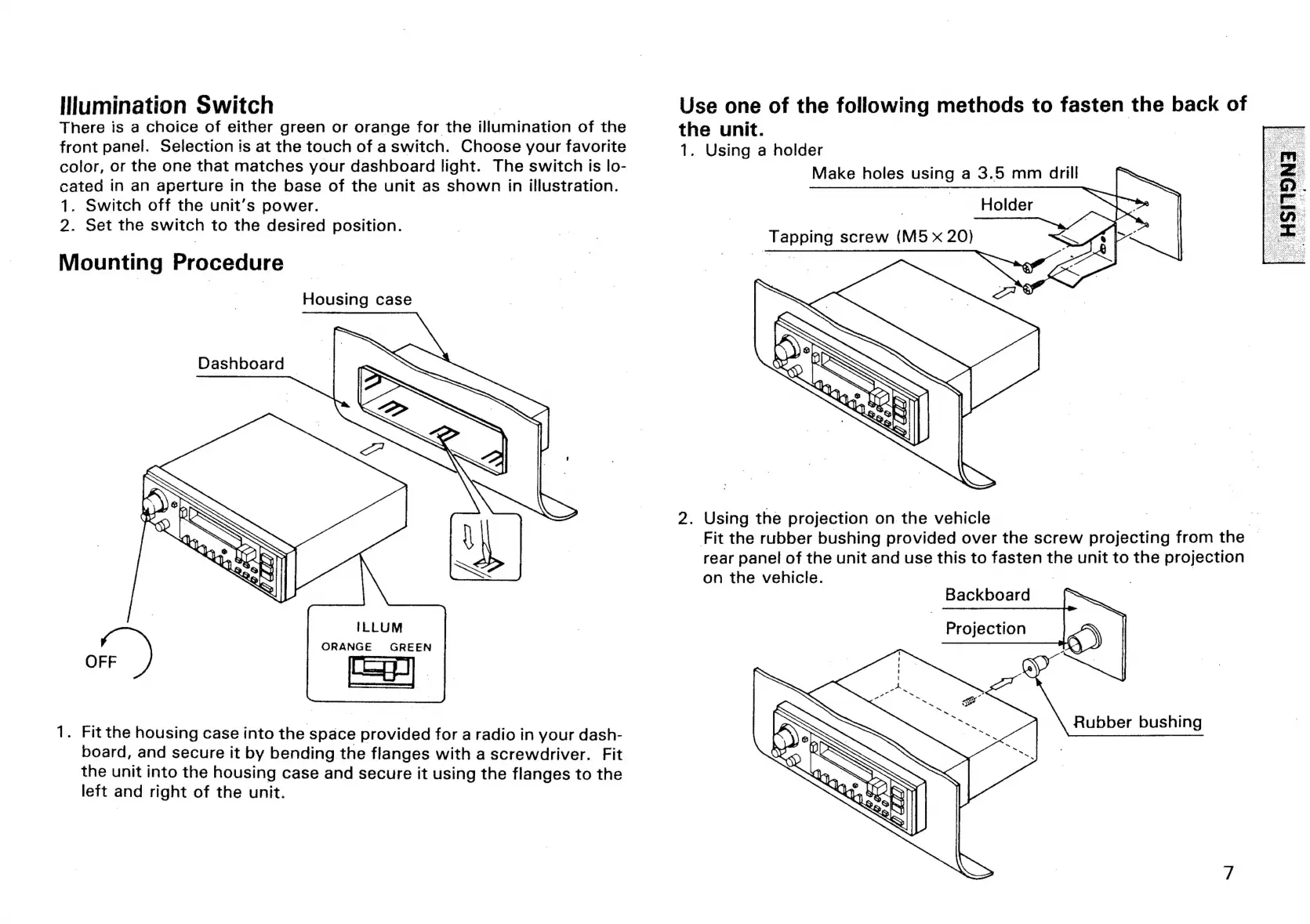
[lumination
Switch
Use
one
of
the
following
methods
to
fasten
the
back
of
There
is
a
choice
of
either
green
or
orange
for
the
illumination
of
the
the
unit.
front
panel.
Selection
is
at
the
touch
of
a
switch.
Choose
your
favorite
1.
Using
a
holder
color,
or
the
one
that
matches
your
dashboard
light.
The
switch
is
lo-
Make
holes
using
a
3.5
mm
drill
cated
in
an
aperture
in
the
base
of
the
unit
as
shown
in
illustration.
1
oh
Holder
1.
Switch
off
the
unit’s
power.
2.
Set
the
switch
to
the
desired
position.
Mounting
Procedure
Housing
case
Dashboard
©
2.
Using
the
projection
on
the
vehicle
|
Fit
the
rubber
bushing
provided
over
the
screw
projecting
from
the
|
rear
panel
of
the
unit
and
use
this
to
fasten
the
unit
to
the
projection
on
the
vehicle.
Backboard
Projection
ORANGE
GREEN
a)
1.
Fit
the
housing
case
into
the
space
provided
for
a
radio
in
your
dash-
eee
board,
and
secure
it
by
bending
the
flanges
with
a
screwdriver.
Fit
the
unit
into
the
housing
case
and
secure
it
using
the
flanges
to
the
left
and
right
of
the
unit.

Related product manuals